Publication date: June, 2015
Revision A1
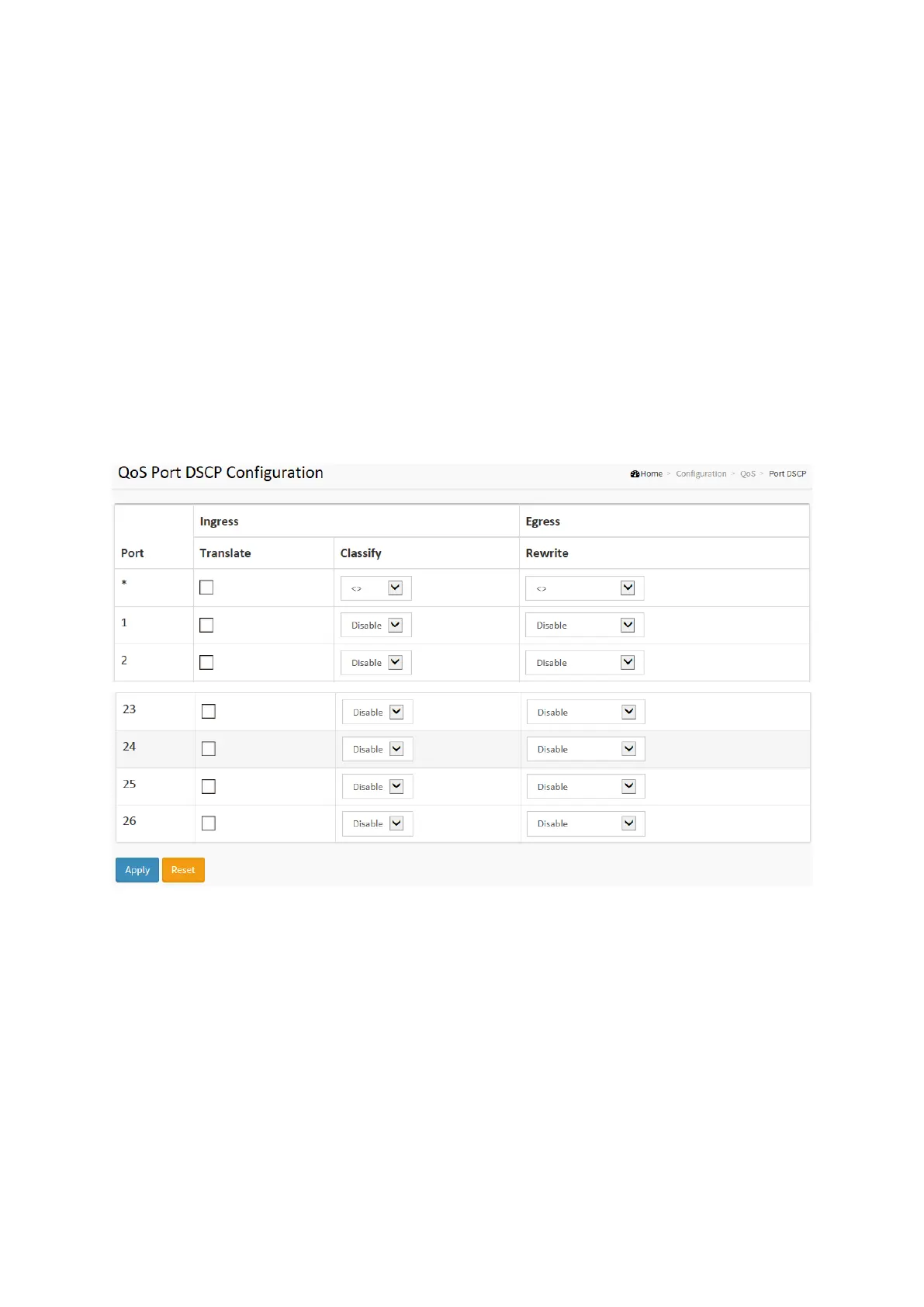
2-17.6 Port DSCP
The section will teach user to set the QoS Port DSCP configuration that was allowed you to
configure the basic QoS Port DSCP Configuration settings for all switch ports. Others the
settings relate to the currently selected stack unit, as reflected by the page header.
Web Interface
To configure the QoS Port DSCP parameters in the web interface:
1. Click Configuration, QoS, Port DSCP
2. Evoke to enable or disable the Ingress Translate and Scroll the Classify
Parameter configuration
3. Scroll to select Egress Rewrite parameters
4. Click the save to save the setting
5. If you want to cancel the setting then you need to click the Reset button.
It will revert to previously saved values
Figure 2-17.6: The QoS Port DSCP Configuration
Parameter description:
Port :
The Port coulmn shows the list of ports for which you can configure dscp ingress and egress
settings.
Ingress :
In Ingress settings you can change ingress translation and classification settings for
individual ports.
There are two configuration parameters available in Ingress:
1. Translate : To Enable the Ingress Translation click the checkbox
2. Classify: Classification for a port have 4 different values
Disable: No Ingress DSCP Classification.
DSCP=0: Classify if incoming (or translated if enabled) DSCP is 0.














 To Next Page