Publication date: June, 2015
Revision A1
2-5.2.5 ARP Inspection
The section describes to configure the ARP Inspection parameters of the switch. You could use
the ARP Inspection configure to manage the ARP table.
2-5.2.5.1 Configuration
This section describes how to configure ARP Inspection setting including:
Mode (Enabled and Disabled)
Port (Enabled and Disabled)
Web Interface
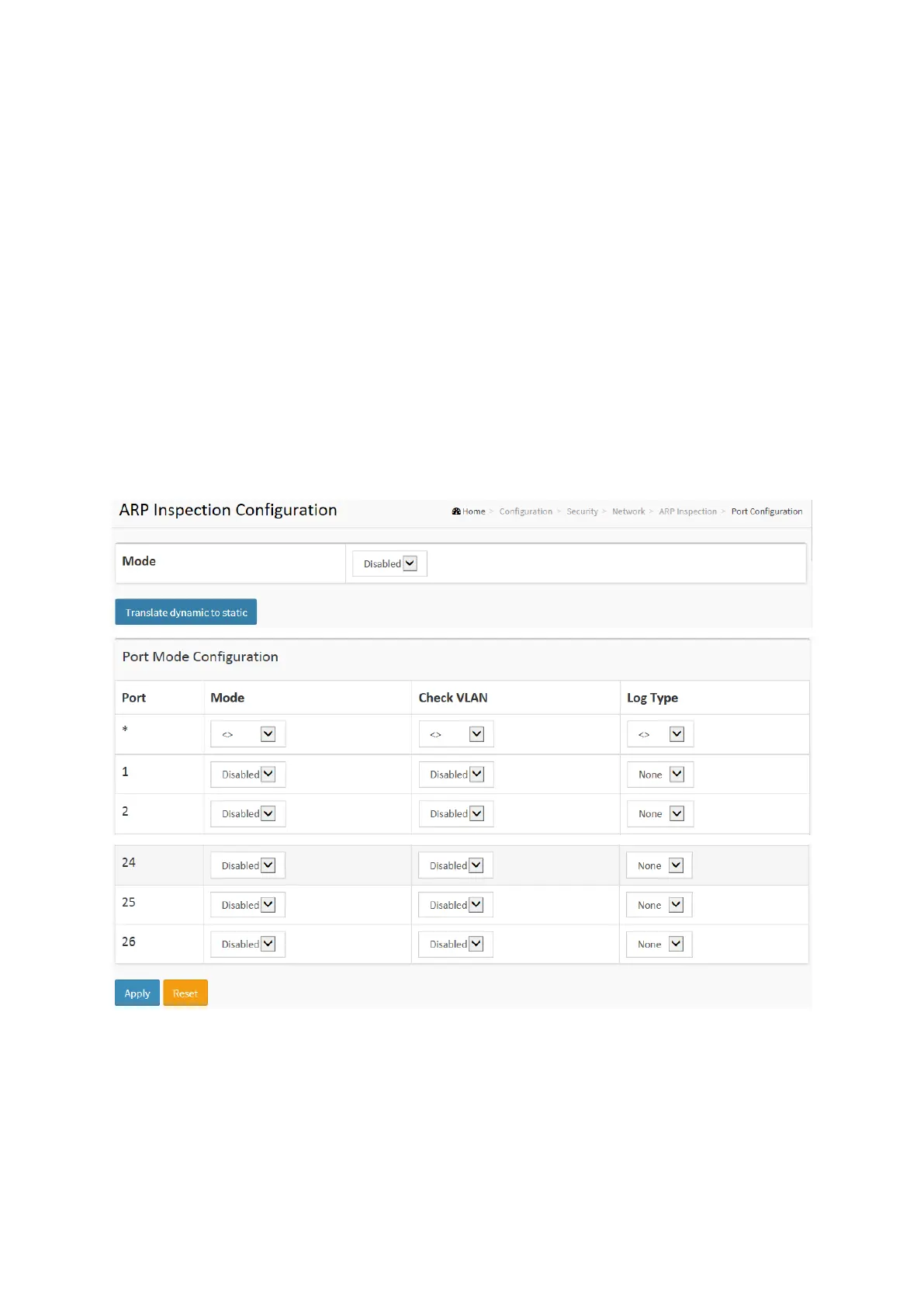
To configure an ARP Inspection Configuration in the web interface:
1. Select “Enabled” in the Mode of ARP Inspection Configuration.
2. Select “Enabled” of the specific port in the Mode of Port Mode Configuration.
3. Click Apply.
Figure 2-5.2.5.1: The ARP Inspection Configuration
Parameter description:
Mode of ARP Inspection Configuration :
Enable the Global ARP Inspection or disable the Global ARP Inspection.
Port Mode Configuration :
Specify ARP Inspection is enabled on which ports. Only when both Global Mode and Port
Mode on a given port are enabled, ARP Inspection is enabled on this given port. Possible
modes are:














 To Next Page