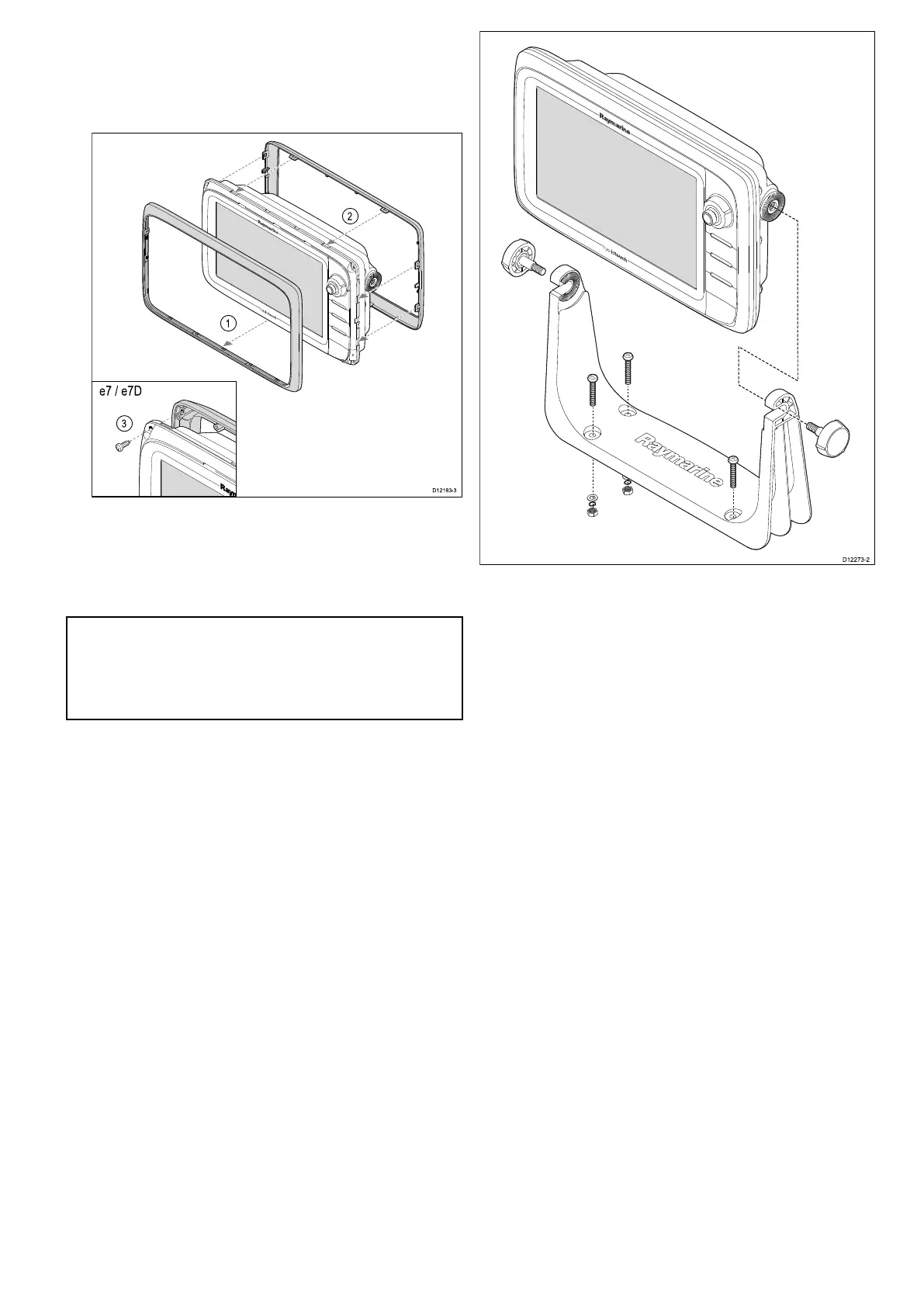
i.Outeredges-workfromthesidesupwards
andthenalongthetopedge,toensurethatit
clipssecurelyintoposition.
ii.Inneredges-ensurethatthebezelsitsat
againsttheunit.
3.Usethesuppliedscrewstosecurethebezelto
thedisplay(e7ande7Donly).
Bracket(trunnion)mounting
Thedisplaycanbemountedonatrunnionbracket.
Note:Themountingbracketissuppliedwiththe
e7ande7Ddisplayvariants,forallotherdisplay
variantsthemountingbracketisanoptional
accessorySeetheSparesandAccessories
sectionofthismanualfordetails.
Beforemountingtheunitensurethatyouhave:
•Selectedasuitablelocation.
•Identiedthecableconnectionsandroutethatthe
cableswilltake.
•Attachthefrontbezel.
1.Markthelocationofthemountingbracketscrew
holesonthechosenmountingsurface.
2.Drillholesforthexingsusingasuitabledrill,
ensuringthereisnothingbehindthesurfacethat
maybedamaged.
3.Usethexingssuppliedwiththemounting
brackettoattachsecurely.
4.Attachthedisplayunittothemountingbracket.
Frontbezel
Attachingthefrontbezel
Thefollowingprocedureassumesthattheunithas
alreadybeenmountedinposition.
1.Carefullyliftoneedgeofthescreenprotection
lm,sothatitisaccessibleforremovingwhen
unitinstallationiscomplete.
2.Ensurethememorycardslotdoorisintheopen
position.
3.Orientatethebottom-rightsideofthebezelunder
thelipofthechartcarddoorandplacethebezel
overthefrontofthedisplay,ensuringthatthe
clipsalongthebottomedgeofthebezellatch
intoposition.
Mounting
87



 To Next Page