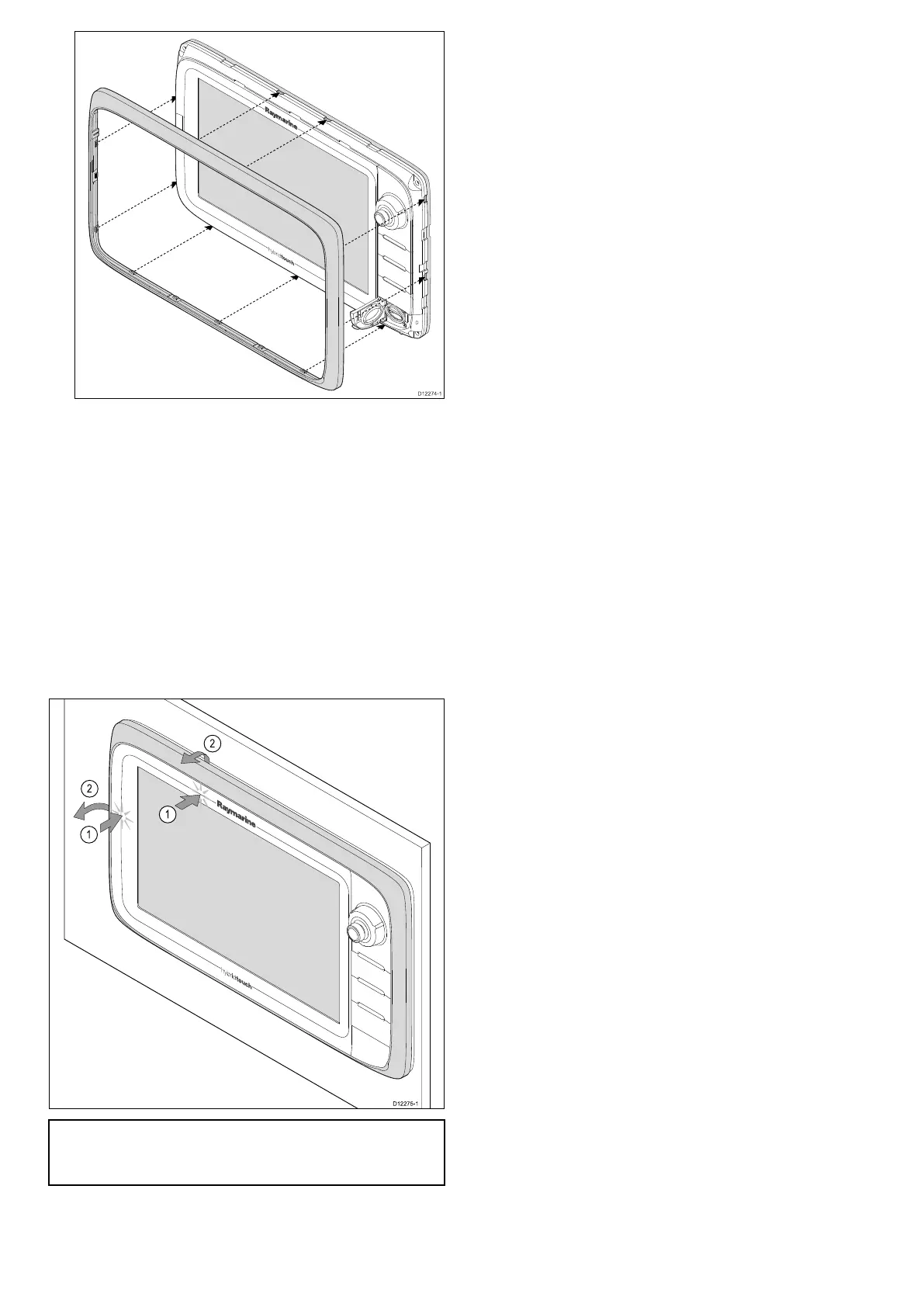
4.Ensurethebezeliscorrectlyalignedwiththe
display,asshown.
5.Applyrmbutevenpressuretothebezelalong
the:
i.Outeredges-workfromthesidesupwards
andthenalongthetopedge,toensurethatit
clipssecurelyintoposition.
ii.Inneredges-particularlyalongthechartcard
dooredge,toensurethatthebezelsitsat.
6.Checkthatallcontrolbuttonsarefreetooperate.
Removingthefrontbezel
Beforeproceedingensurethememorycardslotdoor
isopen.
Important:Usecarewhenremovingthebezel.
Donotuseanytoolstoleverthebezel;doingso
maycausedamage.
1.Placebothyourthumbsontheupperleftedge
ofthedisplay,atthepositionsindicatedinthe
diagramabove.
2.Placeyourngersunderneaththebezel,atthe
positionsindicatedinthediagramabove.
3.Inasinglermmotion,applypressuretothe
outeredgeofthedisplaywithyourthumbsand
pullthebezeltowardsyouusingyourngers.
Thebezelshouldnowcomeawayfromthedisplay
easily.
88aSeries/cSeries/eSeries



 To Next Page