6.21 ERROR CODES AND WARNINGS M A E D A Crawler Crane
6-112 5/2020 CC1908S-1
ERROR CODES AND WARNINGS
CAUTION
If a warning or error code is displayed, immediately stop operations, stop the engine or set it to
low idle, inspect the applicable part, and take appropriate action. Continuing to use the machine
in this state may result in damage to the machine and serious personal injury.
WARNING DISPLAY
Monitor
display
Explanation
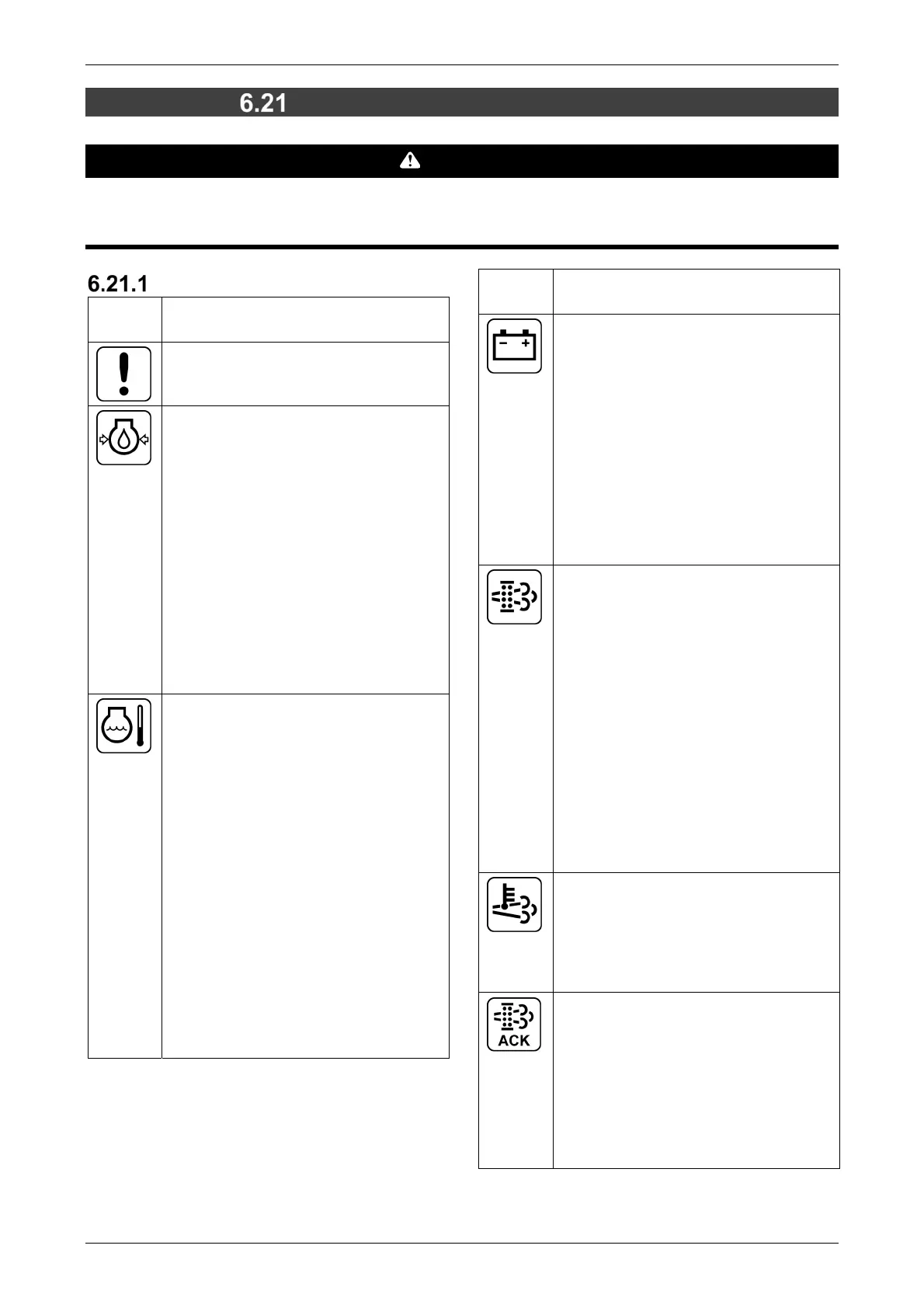
[Error]
Indicates that an error has occurred.
Check the error code.
[Abnormal drop in engine oil
pressure]
Indicates a drop in engine oil
pressure.
The icon lights up when the starter
switch is turned to the "ON" position
and goes out as the engine speed
increases after starting, indicating
that the oil pressure is normal.
If the icon lights up during operation,
this indicates low engine oil pressure.
Stop the machine immediately,
inspect the engine oil filter for
clogging, and inspect the engine oil
level.
[Engine coolant temperature
abnormality]
Indicates an abnormal engine coolant
temperature.
It is normal if the icon remains off
during operation.
If the icon lights up during operation,
this indicates the engine coolant
temperature has exceeded the
normal value.
Set the engine speed to low idle
immediately, and wait until the icon
clears (engine coolant temperature
drops).
Then stop the machine and check the
radiator for water leakage, the
radiator core for clogging, and the
alternator belt for damage and
incorrect tensioning.
Monitor
display
Explanation
[Charge abnormality]
Indicates an abnormality with the
charging system.
The icon lights up when the starter
switch is turned to the "ON" position
and goes out as the engine speed
increases after starting, indicating
that charging is normal.
The charging system is faulty if the
icon lights up during operation.
Stop the machine immediately, and
check the alternator belt tension and
harness.
[DPF regeneration request]
While the DPF is normally
regenerated automatically, it may not
be properly regenerated if the
machine is idling with no load or when
repeated operations are made with
low loads.
In such cases, the DPF regeneration
request lamp lights up on the monitor.
If the DPF regeneration request lamp
lights up, perform stationary
regeneration manually.
For details on stationary
regeneration, refer to "6.19.7 DPF
(DIESEL PARTICULATE FILTER)
REGENERATION" on P. 6-99.
[Exhaust temperature alarm]
This indicates that the exhaust gas
temperature is high due to resetting or
stationary regeneration.
This lights up when during resetting or
stationary regeneration.
[DPF regeneration
acknowledgement]
This flashes or lights up to indicate
the DPF regeneration status.
Flashing: Stationary regeneration can
be performed.
Illuminated: Stationary regeneration
is in progress. It clears once
regeneration is complete.



 To Next Page