4-5
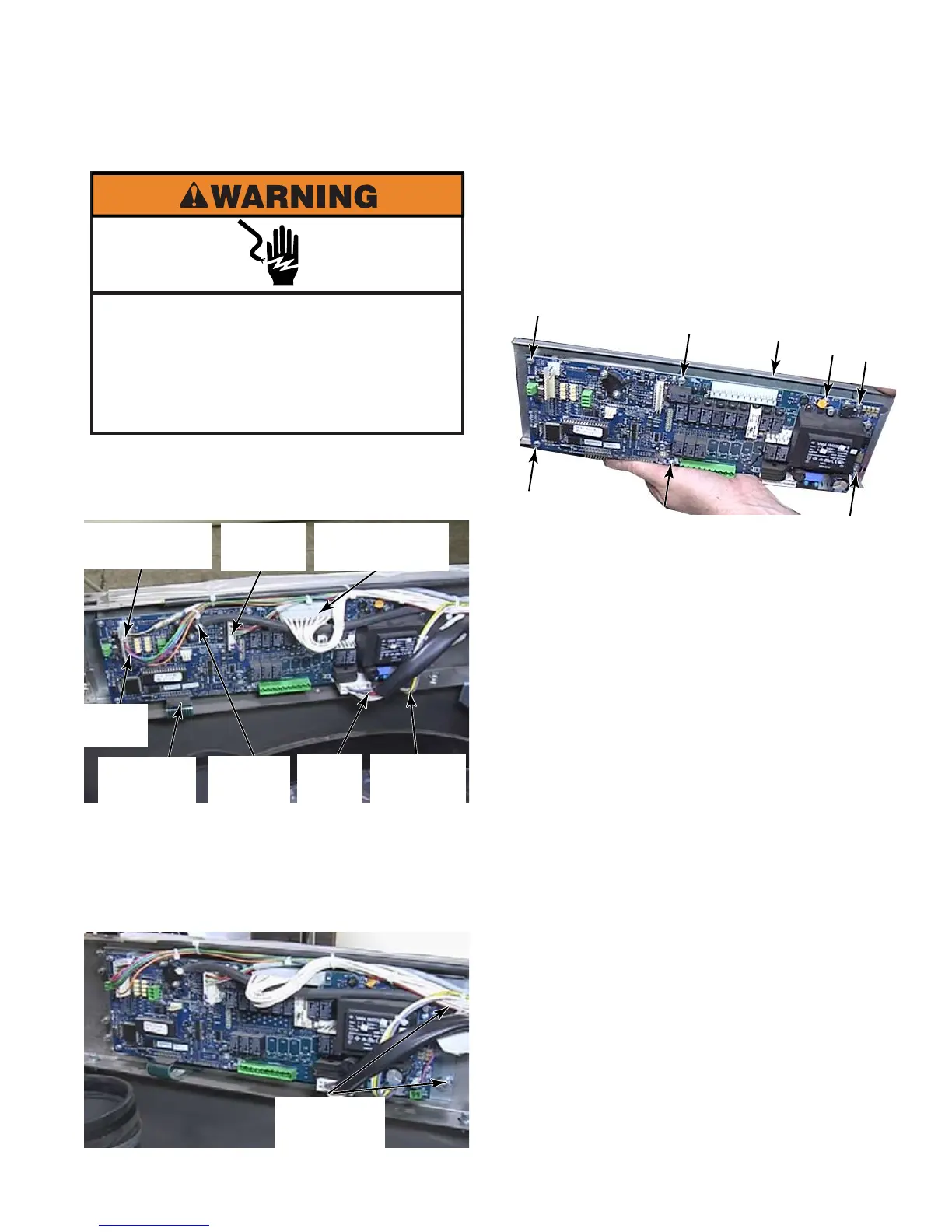
Raise the top of the washer (See page 4-2).
Disconnect all the wire connectors.
Snip the wire tie and disconnect the water
level sensor hose.
Remove two 8mm hex nuts at the left end of
the control board.
1.
2.
3.
4.
REMOVE CONTROL BOARD - PD
Pull the board out and to the right. The
control board and mounting bracket come
out as a unit.
To replace the control board, remove the
7 star head screws that secure the control
board to the mounting bracket.
TECH TIP: The EPROM chip must match
the board for the model. A new control board
does not come with an EPROM. If just the
board is to be replaced, remove the EPROM
from the old board and place it on the new
board (See page 4-7). A new EPROM can
be ordered and installed at the same time
the board is ordered if necessary.
5.
6.
Electrical Shock Hazard
Disconnect power before servicing.
Failure to do so can result in death or
electrical shock.
Replace all parts and panels before
operating.
Incoming
Power
Door
Lock
Output Wiring
Harness
Motor
Control
Temperature
Sensor
Input
Circuit
Water
Level
Key Pad
Ribbon
Two 8mm
Hex Nuts
Mounting Panel



 To Next Page