4-19
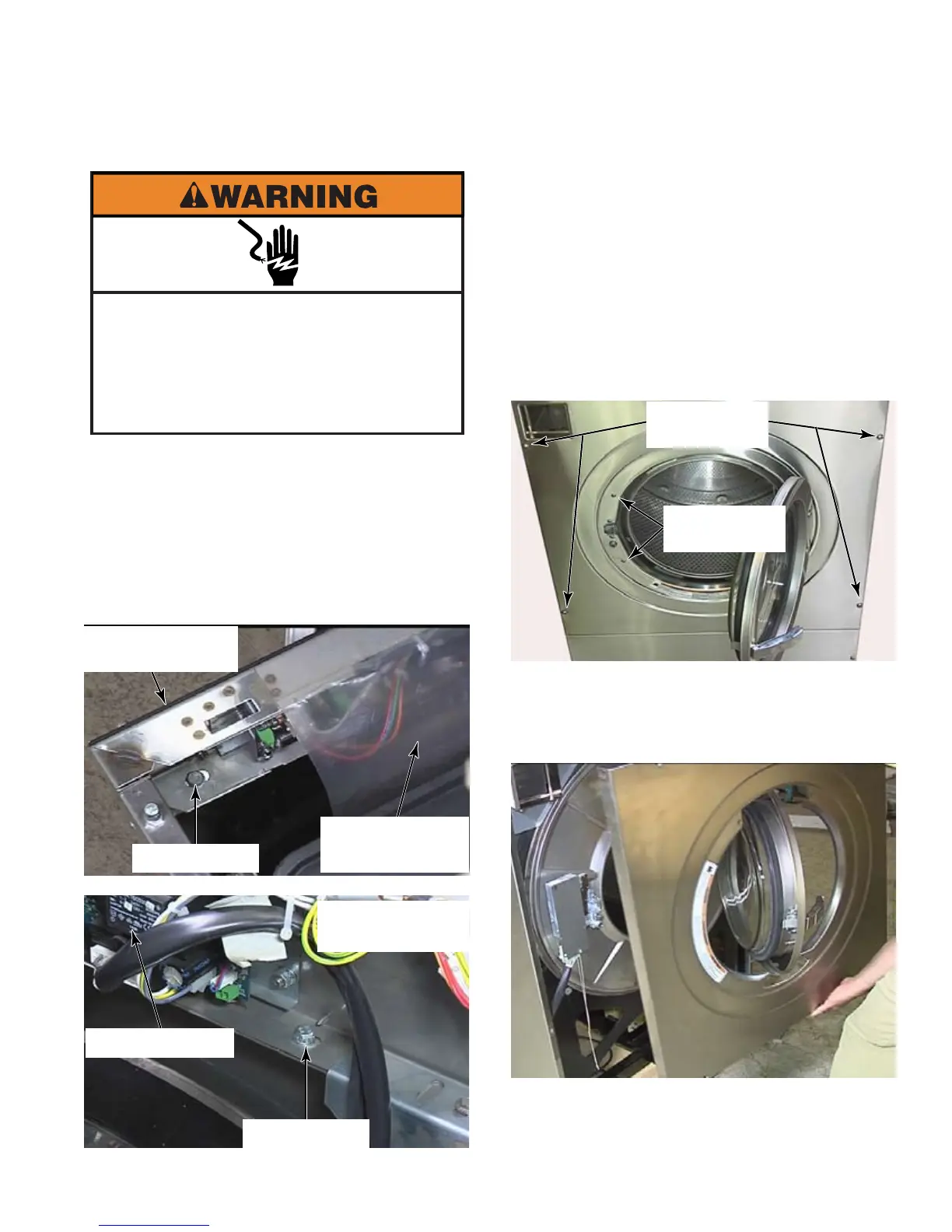
Loosen completely, but not remove, the
four star head screws on the front panel.
There are spacers inside to keep the panel
from being crushed when the screws are
tightened.
Open the washer door.
Remove two star head screws at the left of
the door opening to remove the door lock
assembly cover (if present).
Pull the front panel away from the washer,
rotate it 90 degrees so the door is aligned
with the cut outs. Pull the front panel over
the door and off the washer.
4.
5.
6.
7.
Raise the top of the washer (See page 4-2).
Remove the lower service panel
(See page 4-12).
Remove two 10mm bolts behind the control
panel. The bolts have a flat washer and a
star lock washer.
1.
2.
3.
REMOVE FRONT PANEL WITH 90° ROTATION - MFR30 - 80
Electrical Shock Hazard
Disconnect power before servicing.
Failure to do so can result in death or
electrical shock.
Replace all parts and panels before
operating.
10mm Bolt
Control Board
Splash Guard
Control Panel
Front Right Side
Control Board
10mm Bolt
Behind Control
Panel Left Side
Two Star
Head Screws
Four Star
Head Screws



 To Next Page