4-33
Remove the belt(s) (See page 4-30).
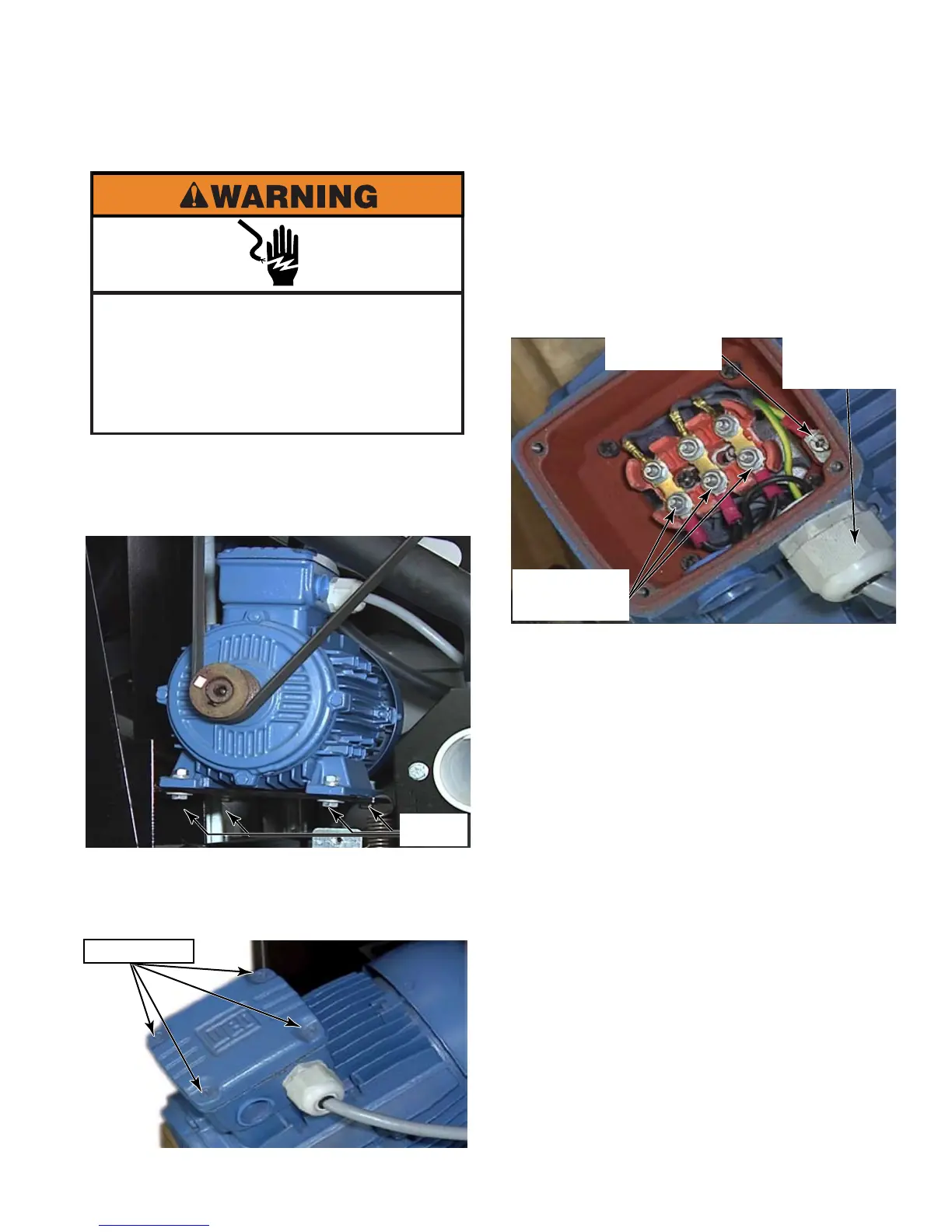
Remove the four mounting bolts that secure
the motor to the motor mounting plate.
Slide the motor out far enough to access
and remove four screws that secure the
cover plate of the terminal box to the top of
the motor.
1.
2.
3.
REMOVE MOTOR - MFR30 - 80
Mark the wire position on the wires to be
removed, reversing any 2 of the wires
will result in a motor turning in the wrong
direction.
Remove the cover plate and remove 3 nuts
that secure the power supply wires to the
motor.
Loosen the star head screw that secures the
ground wire and remove the wire from the
terminal.
Unscrew the strain relief and pull the wires
out of the motor terminal box (See photo
above).
Remove the motor from the washer.
NOTE: During reassembly, make sure the
power supply wire connections are tight and
that there is no corrosion on the terminals to
avoid problems with the motor operation or
possibility of error codes from the inverter.
4.
5.
6.
7.
8.
Electrical Shock Hazard
Disconnect power before servicing.
Failure to do so can result in death or
electrical shock.
Replace all parts and panels before
operating.
4 Bolts
4 Screws
Power Supply
Wire Strain
Relief
Ground Wire



 To Next Page