4-7
Remove the control board (See page 4-5).
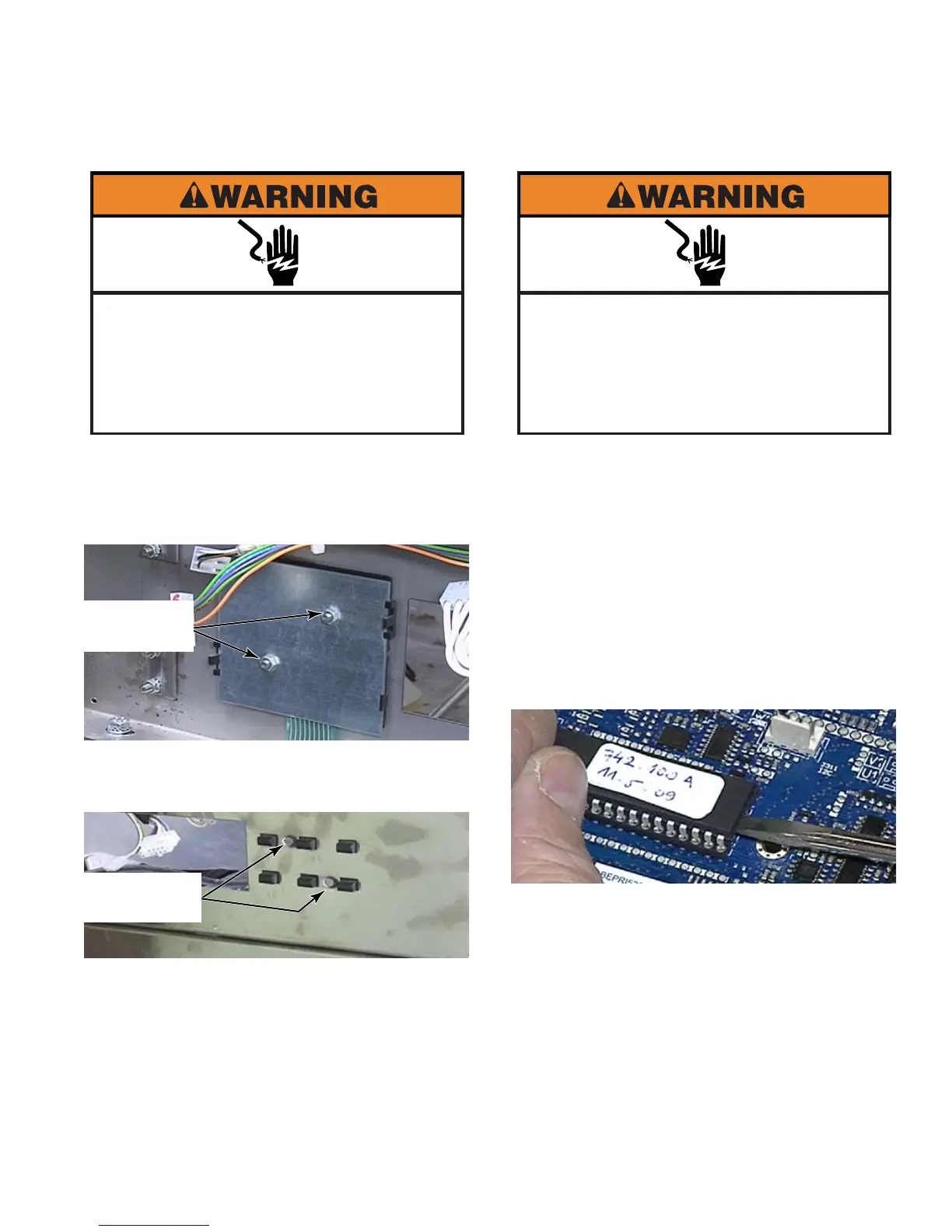
Remove two 7mm nuts from the rear of the
key pad.
Remove the two flat blade screws from the
front of the key pad.
Pull the key pad assembly out through the
back.
To remove the buttons, release the tab from
one edge and remove each row of buttons.
The buttons can be replaced separately.
1.
2.
3.
4.
5.
REMOVE KEY PAD - PD
Electrical Shock Hazard
Disconnect power before servicing.
Failure to do so can result in death or
electrical shock.
Replace all parts and panels before
operating.
Two 7mm
Nuts
2 Flat Blade
Screws
Write down all custom settings before
replacing the EPROM.
Raise the top of the washer (See page 4-2).
The EPROM chip is the only removable
integrated circuit on the control board.
Use a small flat blade screwdriver and slide
it between the EPROM and the socket.
Alternating back and forth, gently pry until
the chip comes off the board.
NOTE: If the chip is installed backwards
and the washer is powered up, the chip will
be damaged and will need to be replaced.
Install the EPROM making sure that the
notch at the edge of the EPROM is at the
same position as the notch on the socket.
1.
2.
3.
4.
5.
REMOVE AND REPLACE
EPROM CHIP
Electrical Shock Hazard
Disconnect power before servicing.
Failure to do so can result in death or
electrical shock.
Replace all parts and panels before
operating.



 To Next Page