4-9
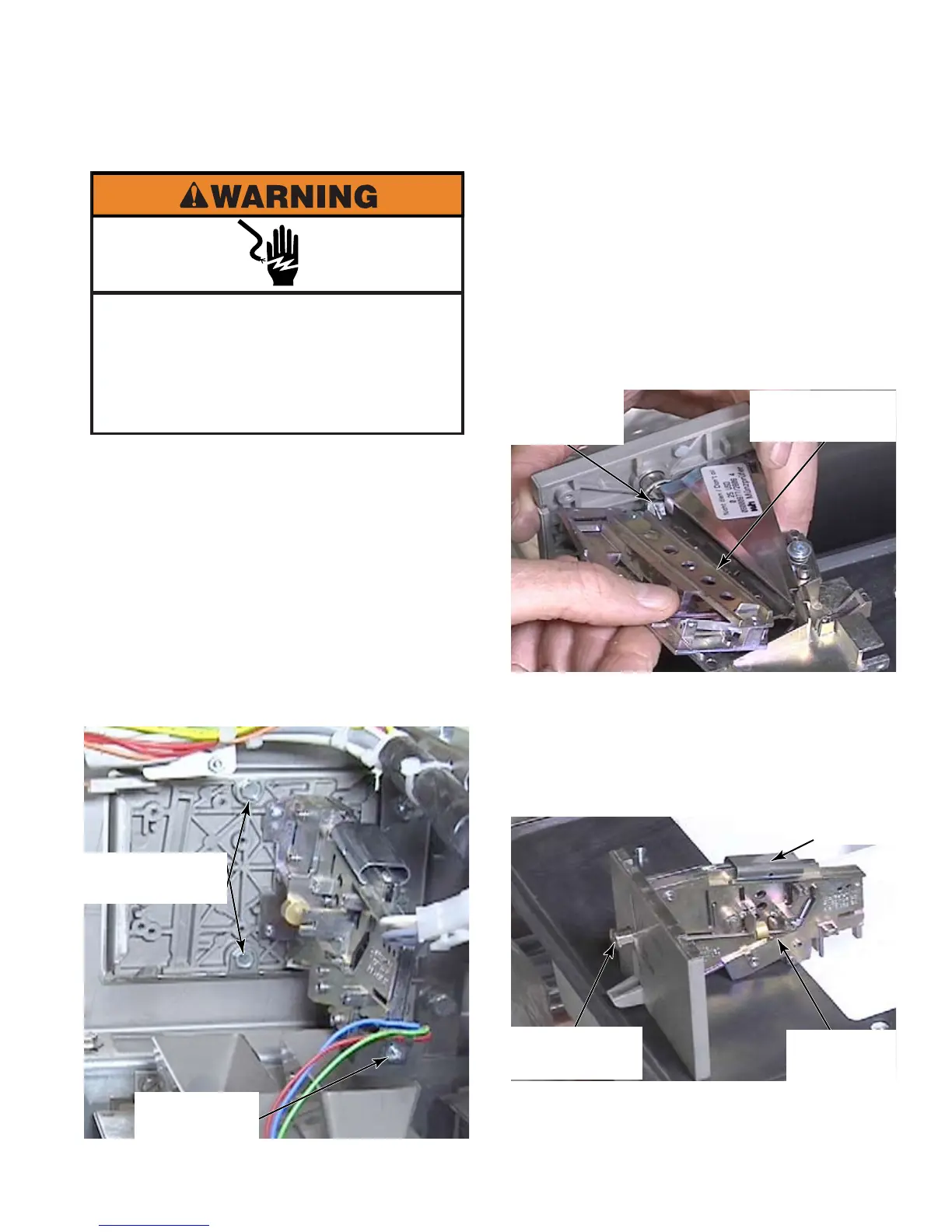
Raise the top of the washer (See page 4-2).
Remove two 5/16” hex head screws from
the rear of the coin drop mechanism inside
the cabinet.
It may be necessary to tap the mechanism
to get it to come loose.
Remove the optical switch by pushing the
coin drop mechanism out a bit through the
front to access and remove the number one
star head screw securing the optical switch.
1.
2.
3.
4.
REMOVE COIN DROP MECHANISM
To clean the coin drop mechanism, remove
the top clip. Open and remove the left side.
Remove any dirt or sediment inside halves.
Lubricate just the coin return plunger with
white lube or grease.
Reassemble the left side piece. Insert the
bottom edge and it drops into place.
Put the clip in approximately the center of
the groove.
Adjust the top clip if necessary to make
sure there is good smooth action of the coin
return button.
5.
6.
7.
8.
9.
10.
Electrical Shock Hazard
Disconnect power before servicing.
Failure to do so can result in death or
electrical shock.
Replace all parts and panels before
operating.
Two 5/16” Hex
Head Screws
1 Star Head
Screw
Top Clip
Coin Return
Plunger
View Of
Right Side
Lubrication
Point
Bottom Edge
Of Left Side



 To Next Page