4-28
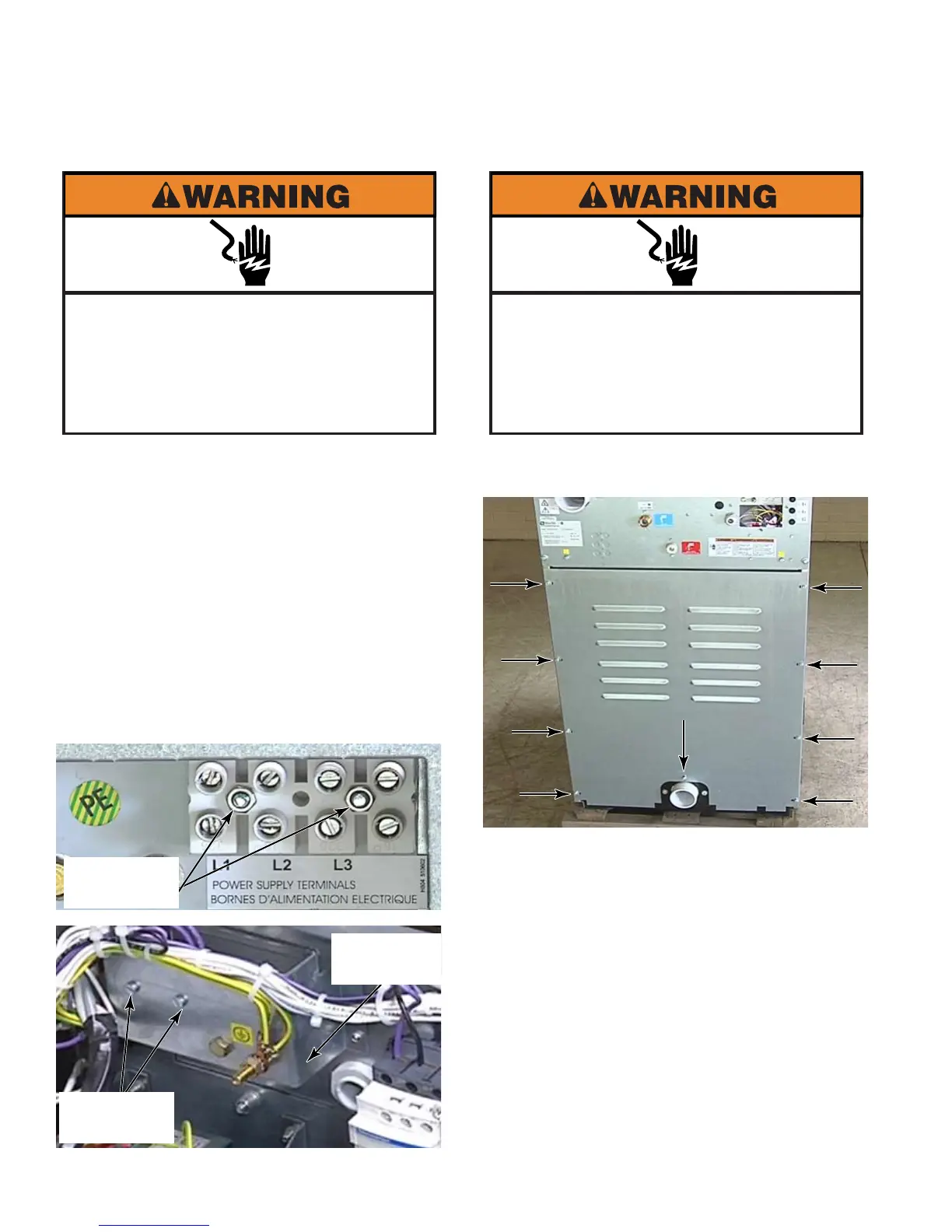
Remove the hex head screws from the back
panel.
Remove the back panel from the washer.
1.
2.
REMOVE BACK PANEL
Electrical Shock Hazard
Disconnect power before servicing.
Failure to do so can result in death or
electrical shock.
Replace all parts and panels before
operating.
Raise the top of the washer (See page 4-2).
Disconnect the wires from the terminal
block.
Remove the 8mm bolt that secures the
terminal block cover on the rear of the
washer.
Remove the two 12mm hex nuts that
secure the terminal block to the retaining
bracket. Reach under the top of the washer
to secure the screws with a flat blade
screwdriver while removing the hex nuts.
1.
2.
3.
4.
REMOVE TERMINAL BLOCK
Electrical Shock Hazard
Disconnect power before servicing.
Failure to do so can result in death or
electrical shock.
Replace all parts and panels before
operating.
2 Hex Nuts
2 Flat Blade
Screws
Retaining
Bracket



 To Next Page