3-CONTROLSANDINSTRUMENTS
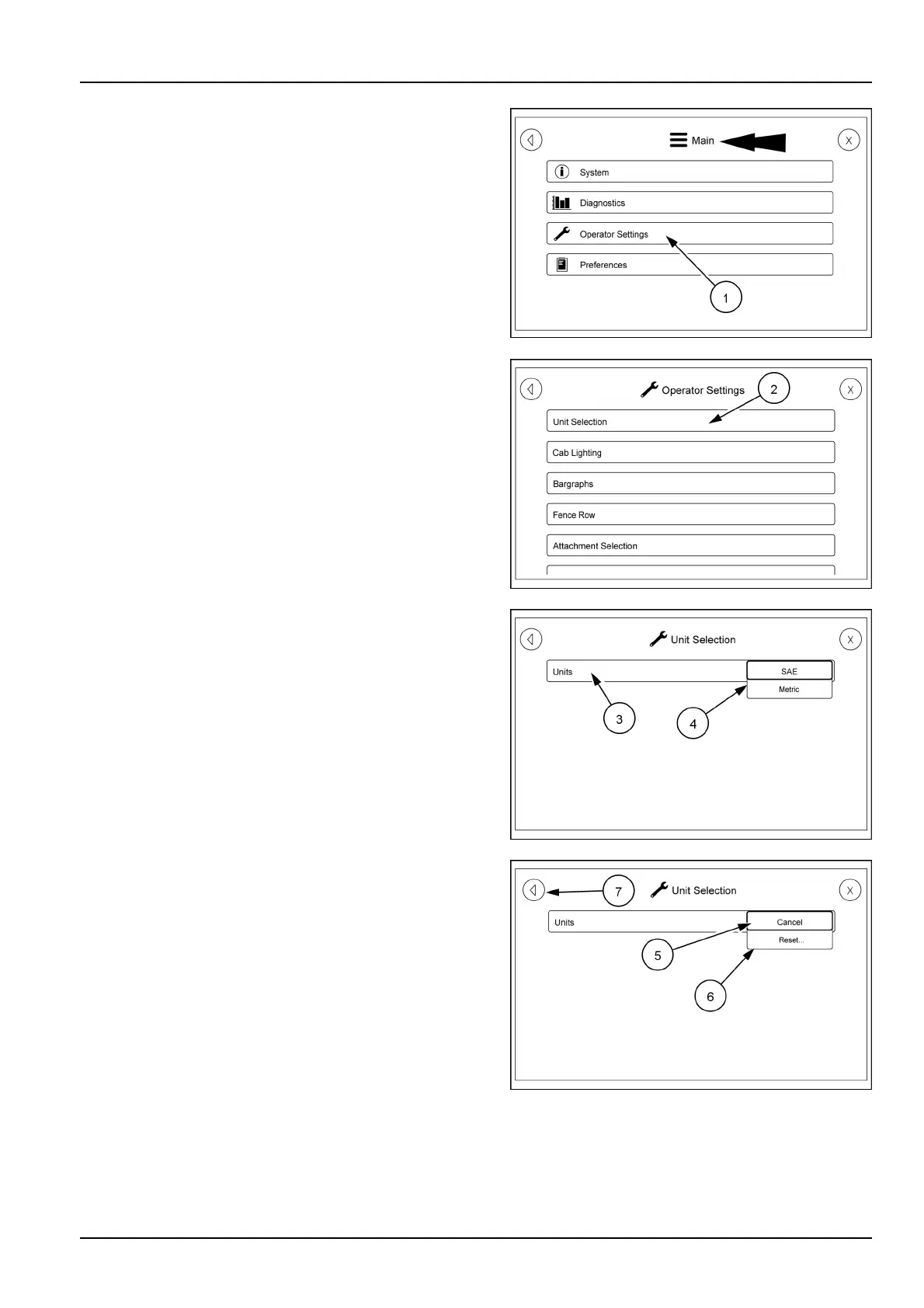
Usethebackarrowonthescreensuntilyougetbackto
themainpage.
OnthemainpagetouchtheOperatorSettingsicon(1).
Touchingthisiconwillbringupascreenthathasmultiple
categories.Thisscreenisaswipescreentoseeallthe
categories.
TouchcategoryUnitSelection(2).Thiswillbringupa
screenwhereyoucanselectSAEormetricforthedisplay.
TouchtheUnitsicon(3)andapulldownmenuwillappear.
Selectthevalueyouwanttodisplay.TouchtheMetric
icon(4)andthedisplaywillbemetric.
FromthisscreenyoucanCancel(5)yourselectionor
Reset(6)thedisplaybacktothepresetvalue.
Usethebackarrow(7)togobackonepage.
RAIL17SP00118AA2
RAIL17SP00144AA3
RAIL17SP00146AA4
RAIL17SP00147AA5
3-91



 To Next Page