101/128
Setting Up Computers as T25 Remote Stations
© MOBOTIX AG • Security-Vision-Systems • Made in Germany
www.mobotix.com • sales@mobotix.com
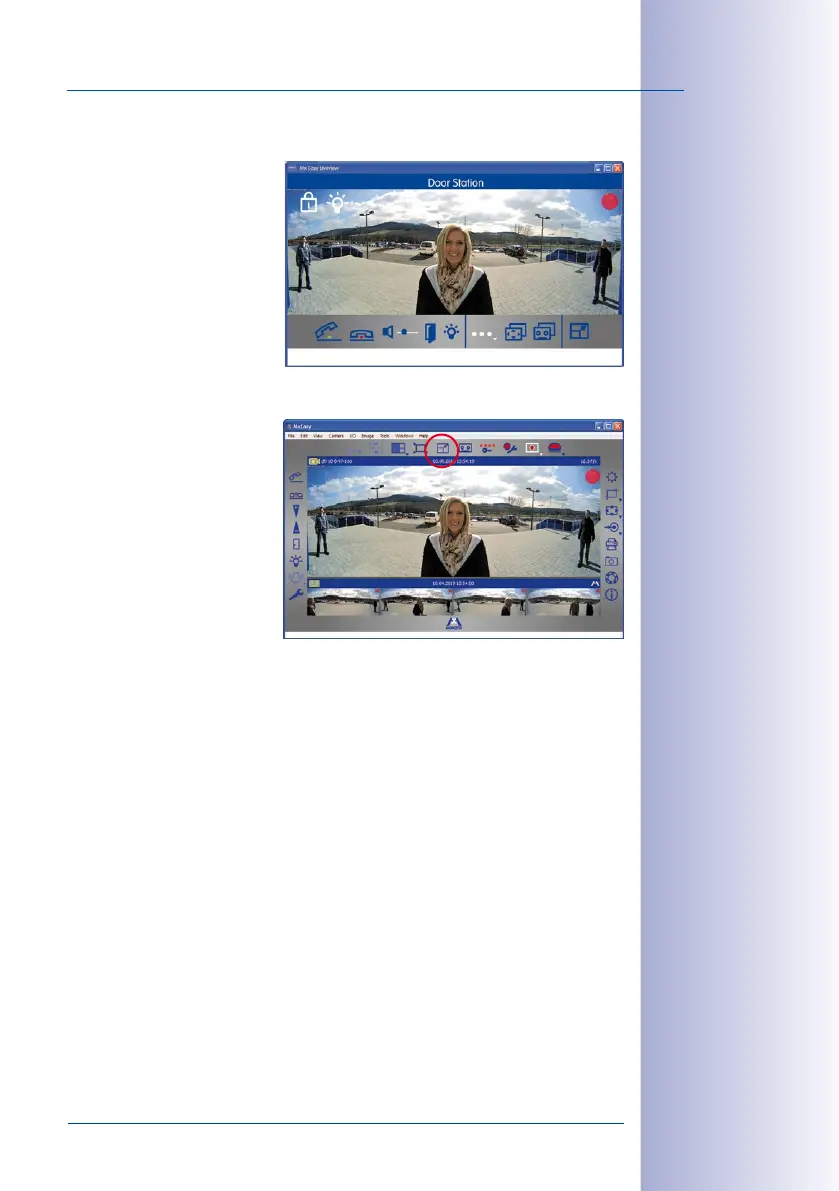
User Tip: The MxEasy Mini Viewer
If you use your computer primar-
ily for other applications (such as
Oce programs, Internet, etc.) yet
always want to remain informed
about door activity without having
to switch back and forth between
program windows, then just open
the Mini Viewer in MxEasy. The Mini
Viewer is a smaller preview window
with live camera images, important
Door Station features and status
display for doors and lights.
You can easily switch to the Mini
Viewer by clicking on the appro
-
priate button in the center of the
toolbar above the live image.
If someone rings the doorbell, a
large doorbell icon is shown and the
pre-configured sound generated
through the computer's speakers.
The two-way communication inter-
com function can be activated or
deactivated using the telephone
handset icons. The volume of the visitor (or the Door Station microphone) can be changed
using the slider. An electronic door opener connected to the Door Station and/or a light
can be activated by clicking on the corresponding icons.



 To Next Page