97/128
Setting Up Computers as T25 Remote Stations
© MOBOTIX AG • Security-Vision-Systems • Made in Germany
www.mobotix.com • sales@mobotix.com
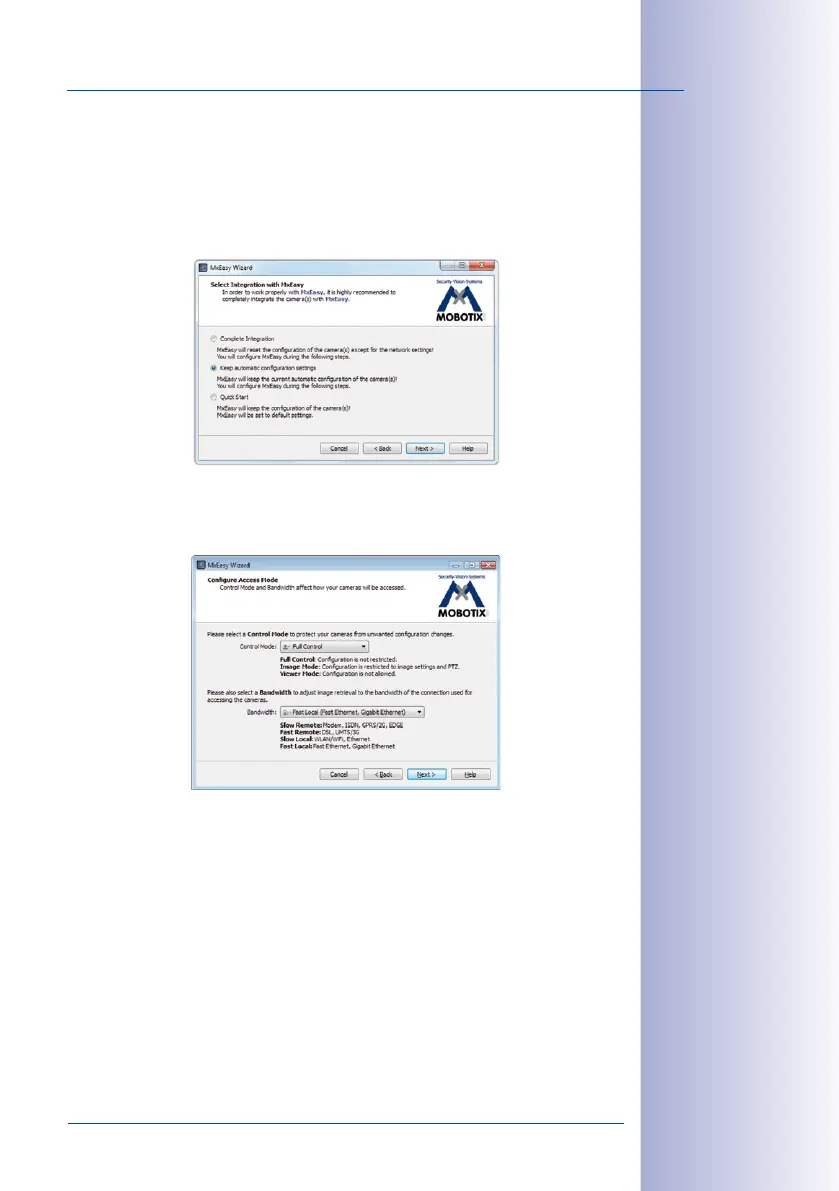
Step3: Select Integration With MxEasy
Because the T25 was already auto-configured successfully (by pressing the lower button
on the camera module during startup), you should keep the settings made automatically
by the system during this process. Click on the center option field Keep automatic con
-
figuration settings and then Continue. The Configure Access Mode window opens.
Step4: Configure Access Mode
The Control Mode can be used to prevent (accidental) configuration changes.
Setting the Control Mode to Image Mode for example, means that the type of recording
cannot be changed.
Bandwidth determines how, in environments with connections of dierent speeds, frames
are retrieved by the cameras and shown as live images or provided for searching. Choosing
a Bandwidth enables you to determine the display quality of the camera image in MxEasy.
Click Continue. The Change Camera Access window opens.
More information on
this can be found in
the MxEasy manual at
www.mobotix.com



 To Next Page