IN
4
Innovation. Quality. Performance. Best in Industry. Worldwide.
Power Lockout Instructions
MultiCam machines are equipped with a built-in main power lockout device. If any kind of repair work or
maintenance is being performed on the machine or control cabinet, the Operator should disconnect power from
the machine before starting work. Lasers should be de-energized prior to maintenance. This may take between a
few minutes and an hour depending on the power of the laser.
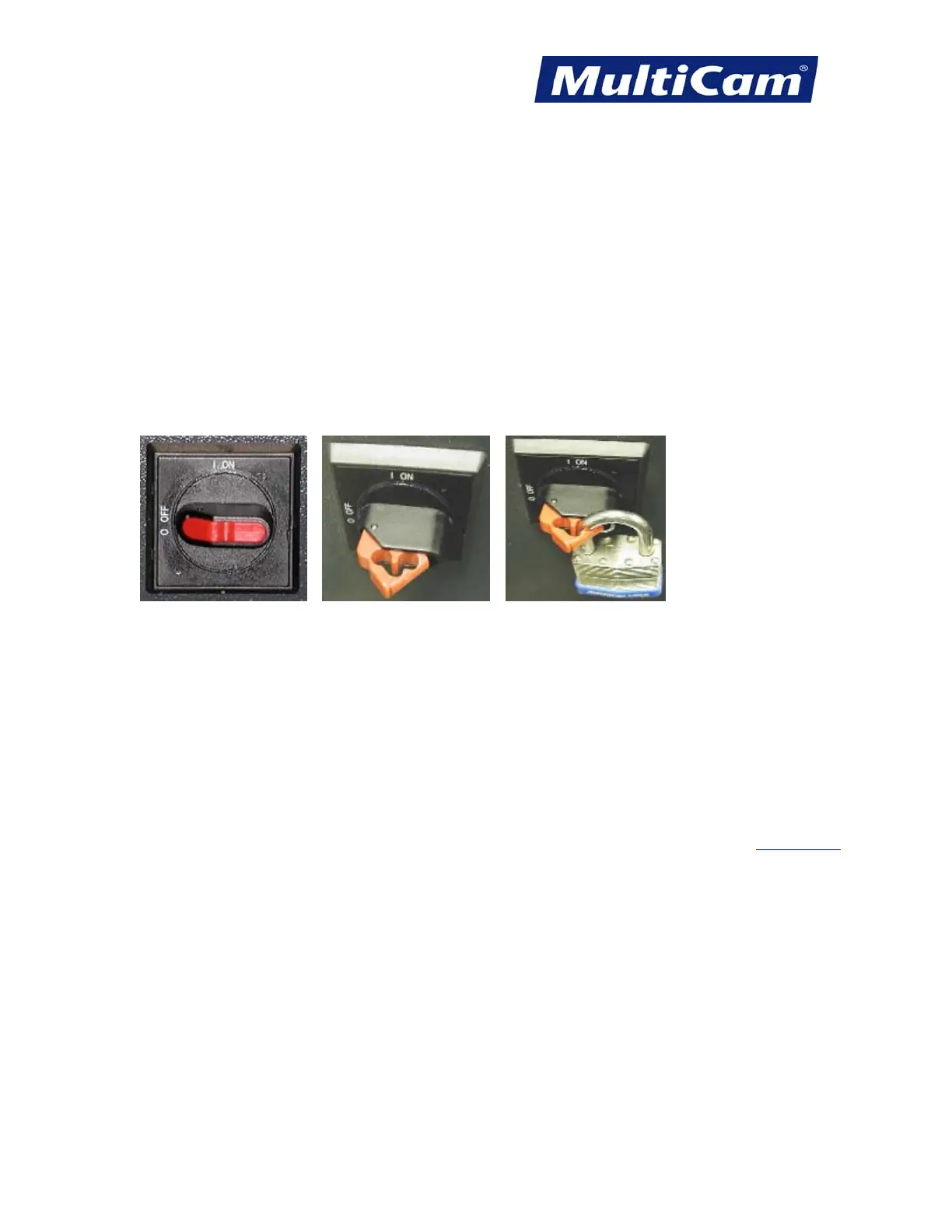
1. Turn the main disconnect switch to the OFF position.
2. Flip out the plastic lockout latch.
3. Insert any padlock into one of the holes of the lockout latch. With the plastic lockout latch in this position,
the switch cannot be moved to the ON position.
1 2 3
4. Throw the bulkhead switch to the OFF position.
5. Open the control cabinet.
6. Make sure the LEDs on the drives and inverters are not lit. It may take a few minutes for the light from the
LEDs to fade away.
7. Make sure the incoming voltage for L1, L2, and L3 is 0v.
8. Follow the standard Tag Out procedure in tagging the disconnect switch. Introduction
Routers * Lasers * Plasma * WaterJets * Knife Cutters
www.MultiCam.com v. 11 10



 To Next Page