KF
26
Innovation. Quality. Performance. Best in Industry. Worldwide.
Advanced
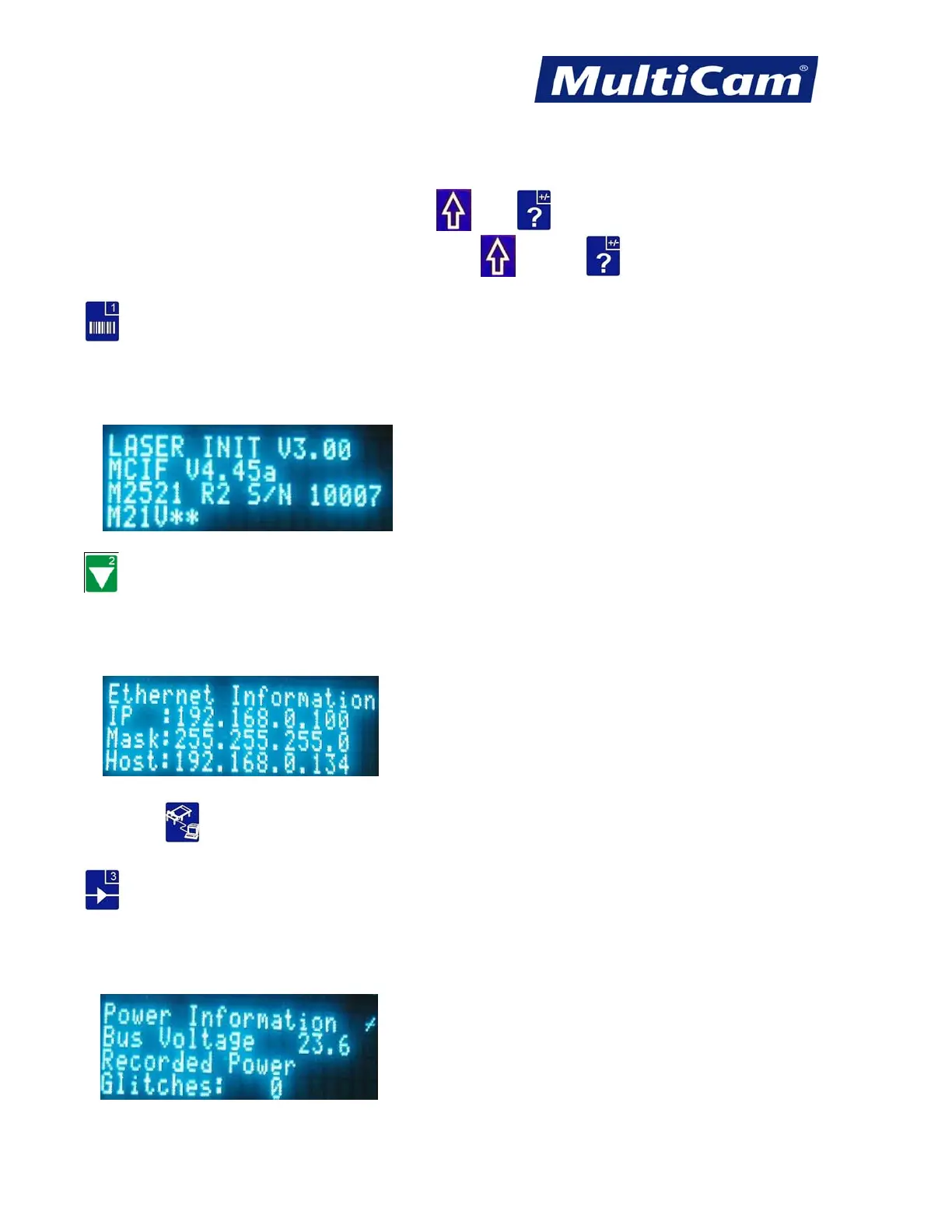
Advanced Hot Keys are accessed by pressing Shift , Help , and keypad numbers 1-9. The operator will
be in the main information screen upon pressing the Shift
and Help sequence the first time.
Main Information Screen
Line 1: Init File Versions
Line 2: Firmware Version
Line 3: Controller and Interface Board rev and ID
Line 4: Keypad version
Ethernet Information Screen
Line 1: “Ethernet Information”
Line 2: IP Address
Line 3: Net Mask
Line 4: DHCP Server Address (Only shows up if DHCP enabled)
Press DNC from this screen to be prompted to enable DHCP or specify an IP address.
Power Information Screen
Line 1: “Power Information”
Line 2: Incoming 24V Power to the Board
Line 3: “Recorded Power”
Line 4: “Glitches:” <number of glitches> If this number exceeds 6, a job will stop with a power failure.
Routers * Lasers * Plasma * WaterJets * Knife Cutters
www.MultiCam.com v. 11 10



 To Next Page