MI
75
Innovation. Quality. Performance. Best in Industry. Worldwide.
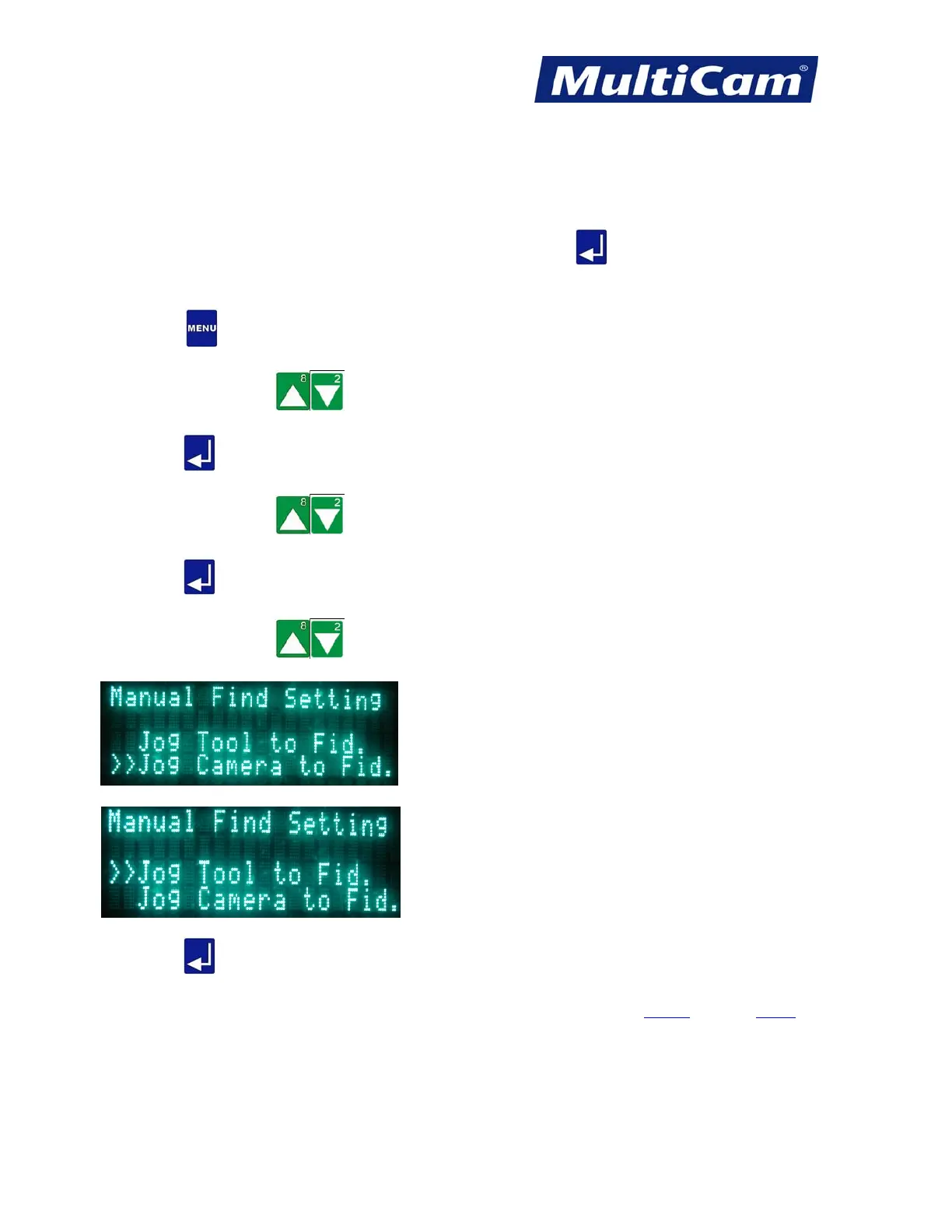
Manual Find Setting
The Manual Find Setting function can be utilized once the Auto Find Setting has been disabled. Operators can
enter “0” under Auto Find Setting before selecting Manual Find Setting and then select to either Jog the tool to
the fiducial or Jog the camera to the fiducial. Operators can press Enter
once the laser or camera, whichever
has been selected in the keypad, is directly above the fiducial.
1. Press Menu
to access the menu system.
2. Press X-axis Jog Arrows
until Vision is highlighted in blue.
3. Press Enter
to access the Vision sub-menu.
4. Press X-axis Jog Arrows
until Manual Find Setting is highlighted in blue.
5. Press Enter
to access the Manual Find Setting function.
6. Press X-axis Jog Arrows
to move between “Jog Tool to Fid.” and “Jog Camera to Fid.” The double
arrows show which setting is active.
7. Press Enter
to return to the Vision sub-menu.
Vision
Menu
Routers * Lasers * Plasma * WaterJets * Knife Cutters
www.MultiCam.com v. 11 10



 To Next Page