SW
2
Innovation. Quality. Performance. Best in Industry. Worldwide.
Software
The MultiCam Laser can use files created from many popular software packages in the industry, such as
AlphaCam and EnRoute, as well as files created in G Code and HPGL. The productivity suite enhances
communication between the
MultiCam Laser and the host computer. Software
AlphaCam Post Processor Installation
MultiCam offers 2 AlphaCam post processor systems for use depending on the type of post system in the
machine. The
MultiCam ATC-ARP post processor interfaces with both ATC and multiple head systems while
the
MultiCam ARP post processor interfaces with single head systems and outputs a manual tool change
command so that multiple tool change files can be run on single head systems.
Multiple Post Systems
1. Copy the appropriate post processor located in Software Drivers/AlphaCam from the MultiCam Installation
CD into the LICOMDAT/RPOSTS.ALP directory using Windows Explorer.
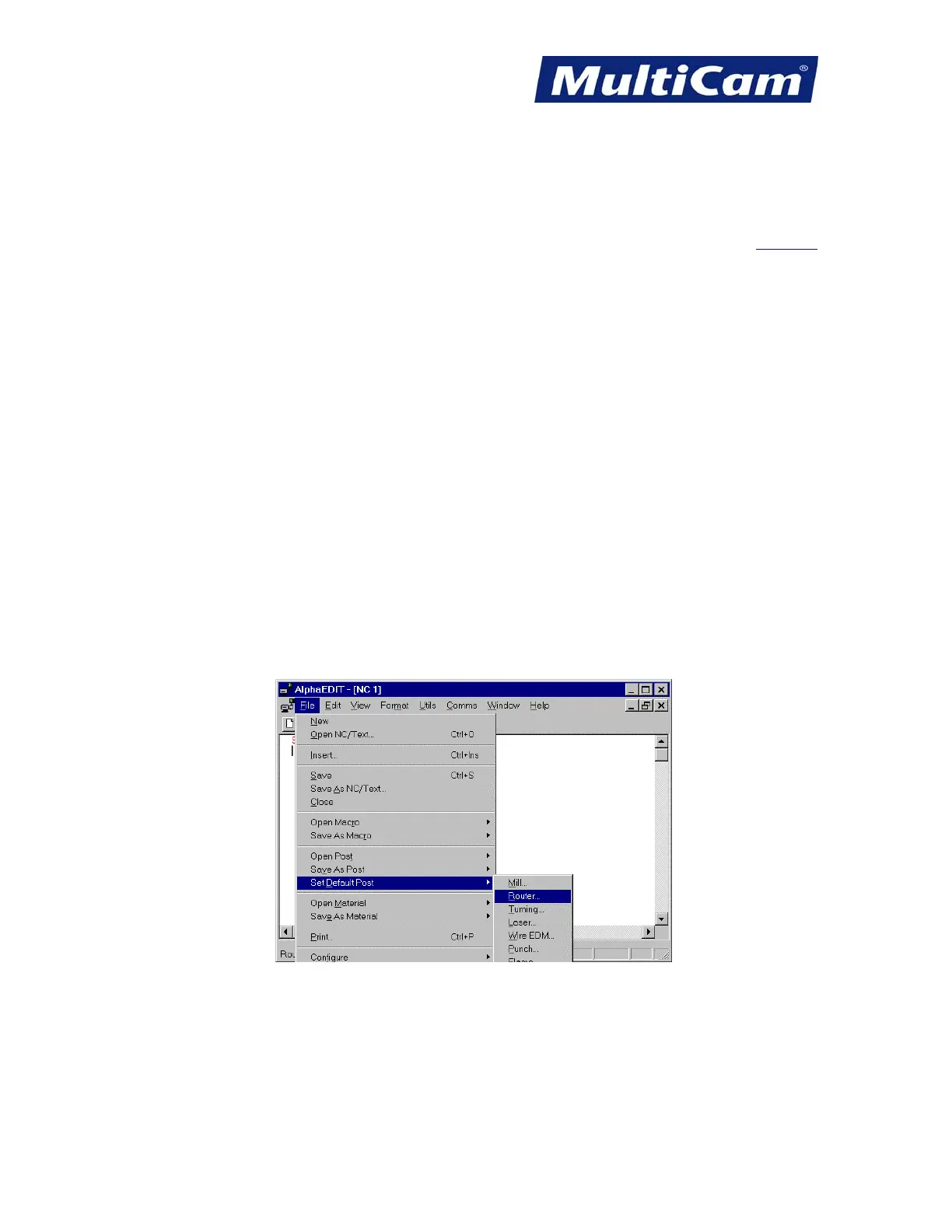
2. Start the Alpha Edit program from the AlphaCam folder in the Windows Start menu once the post processor
is copied.
3. Select Set Default Post/Laser from the file menu in Alpha Edit
Routers * Lasers * Plasma * WaterJets * Knife Cutters
www.MultiCam.com v. 11 10


 To Next Page
 Loading...
