RX1575 SERIES TRENCH ROLLER • OPERATION MANUAL — REV. #0 (04/28/15) — PAGE 27
14stnemele yalpsid dna gnitarepO
1230047 | 21.06.2013
Display
Shutdown bar
Tab. 5-3 Shutdown bar display
NOTE Bear in mind the priority of the displays: First the bar switch, then the close
proximity shutdown and last, the close proximity area.
5.2 Infrared transmitter
5.2.1 Design
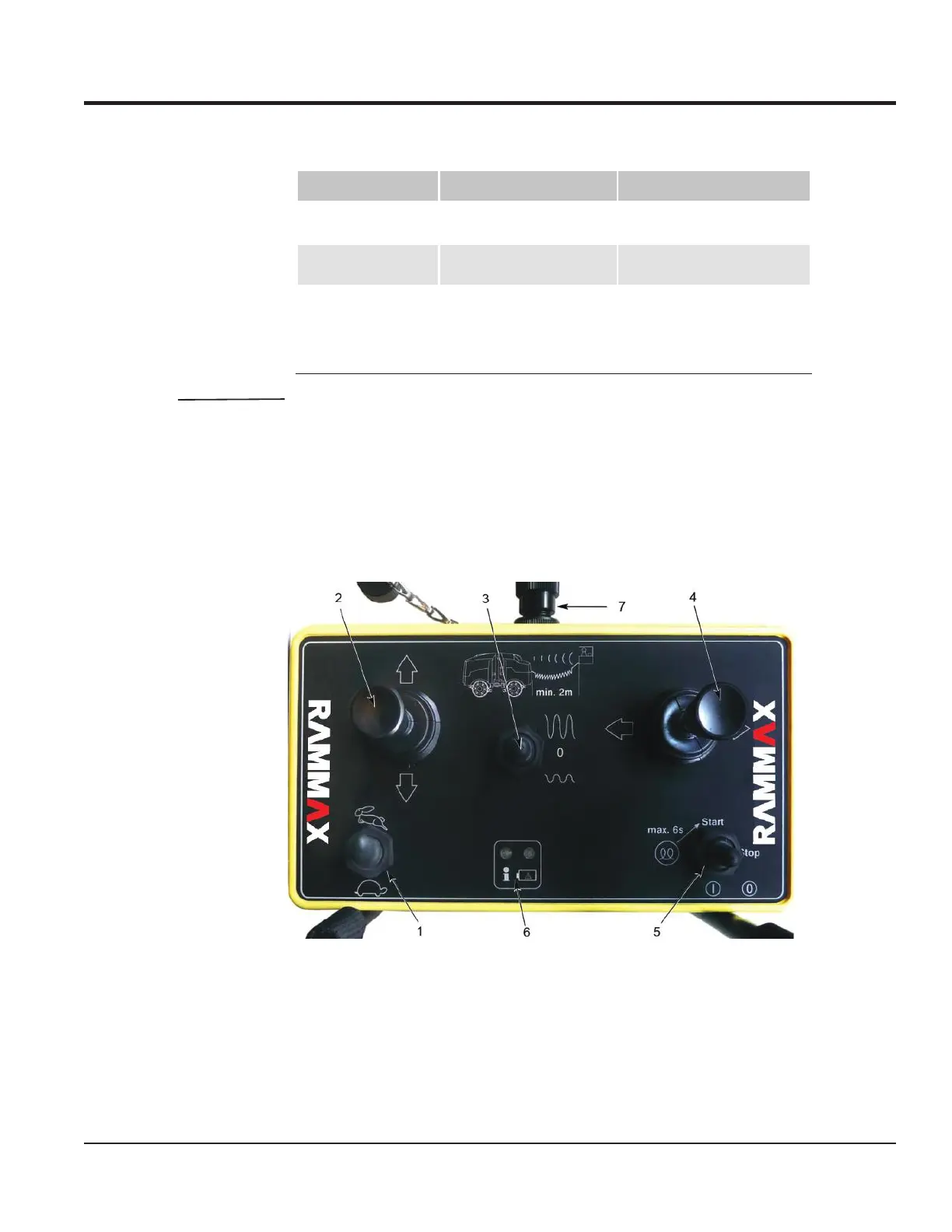
Fig. 5-1 Infrared transmitter
Display Cause Remedy
Shutdown bar lights up Switch on shutdown bar has
triggered.
Move the shutdown bar to its ori-
ginal position.
Shutdown bar is blin-
king
Close proximity shutdown
has been detected.
Move more than 2m away from
the roller.
Shutdown bar is flas-
hing
Close proximity has been
detected.
If the roller is controlled by
means of the cable, the user
must be present in the close
proximity area (between 2 and
4m)
1 Work gear/transport gear
2 Forward travel/backward travel
3 Large/small amplitude vibration
4 Steering angle left/right
OPERATING AND DISPLAY ELEMENTS



 To Next Page