4 Applications
96 Pulse Laser Station NPL-302 Series Instruction Manual
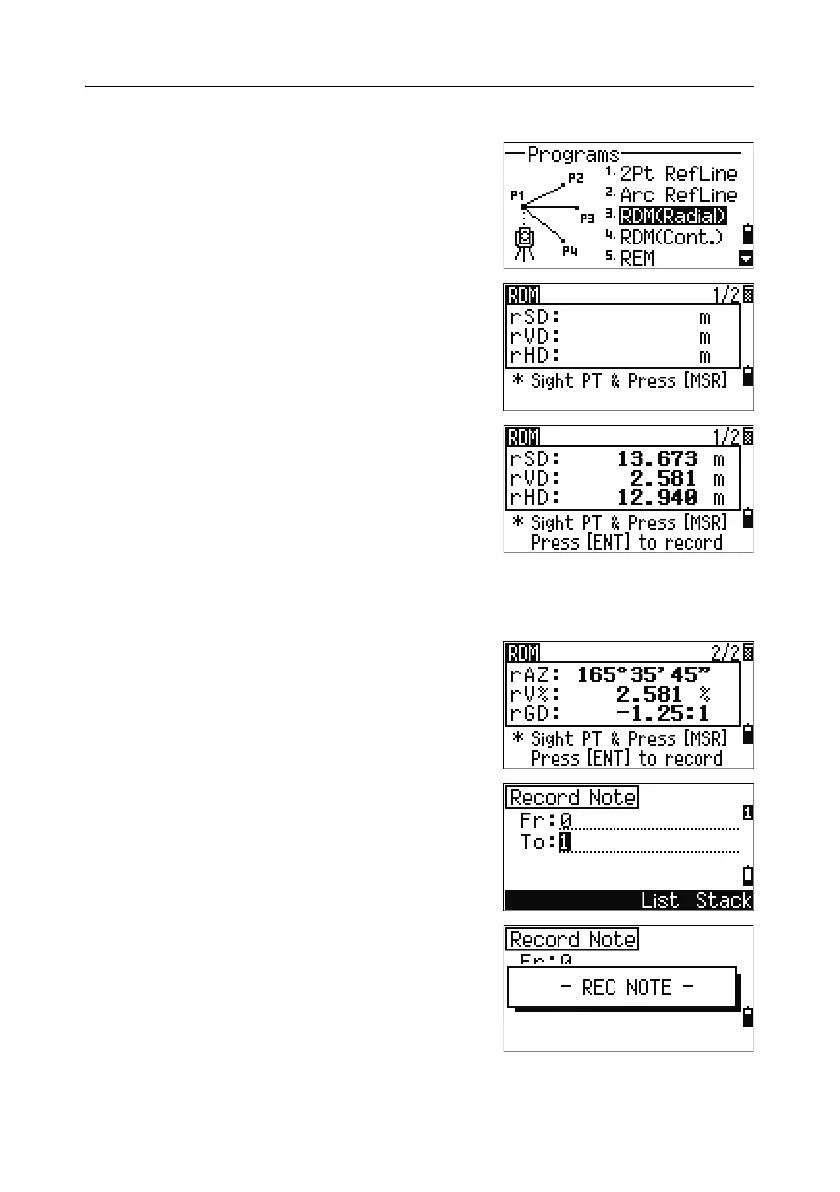
Measuring between the current and the first point measured
1.
To enter the RDM (Radial) function, press [3]
or select
RDM(Radial) in the Programs
menu.
2. Sight the first point and press [MSR1] or [MSR2].
The distance from the station point to the first
point appears.
3. Sight the second point and press [MSR1] or
[MSR2]. The distances between the first and
second point are displayed.
rSD Slope distance between two points
rVD Vertical distance between two points
rHD Horizontal distance between two points
4.
To change display screens, press [DSP].
rAZ Azimuth from first point to second point
rV% Percentage of grade (rVD/rHD) × 100%
rGD Vertical grade (rHD/rVD): 1
5. To record the distance and angle information
as a comment record, press
[ENT] in the 1/2 or
2/2 observation screen.
Default point numbers are displayed. You can
change these point numbers. To record a note,
press
[ENT] in the To field.



 To Next Page