Applications 4
Pulse Laser Station NPL-302 Series Instruction Manual 75
To continue resection observations, press the Add
softkey. The input screen for the next PT appears.
Setting up the station quickly without coordinates 40.1
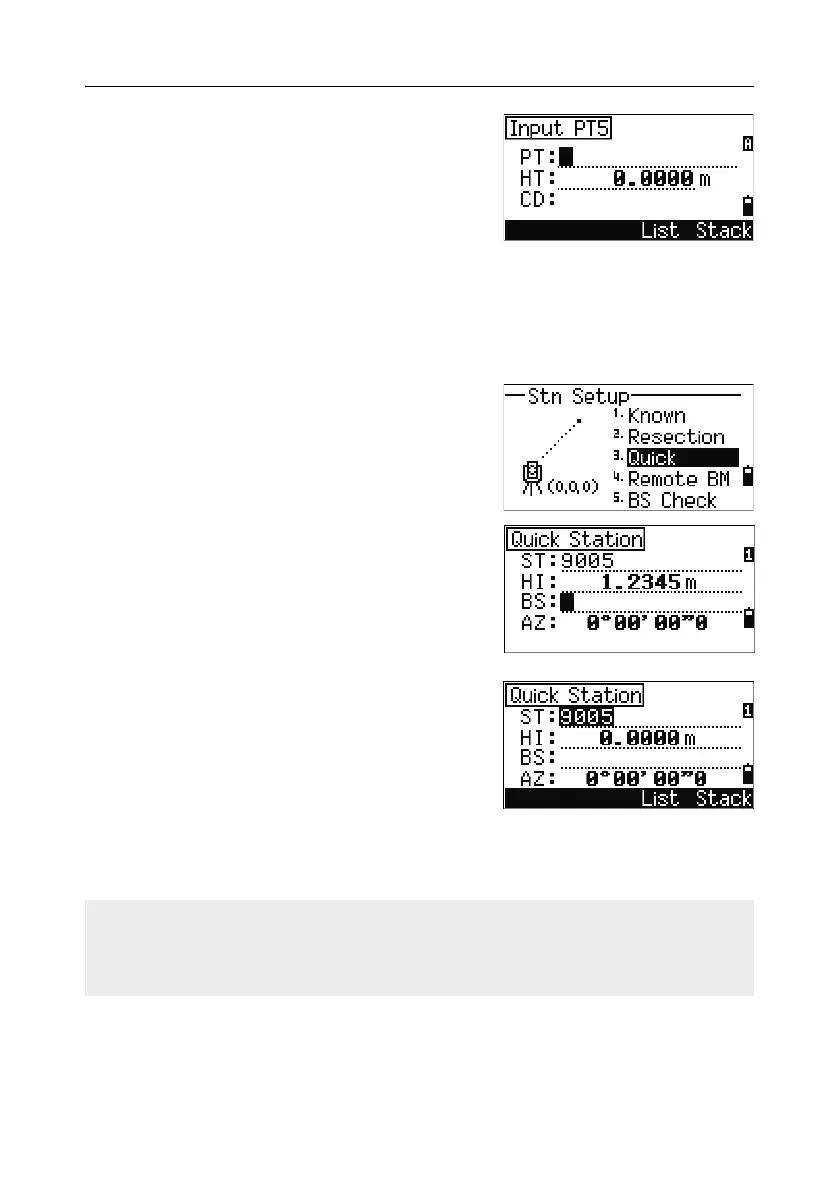
The station point (ST) in this function defaults to a new point number. For the new
point, MP (0, 0, 0) is stored as the coordinates. When the ST is manually changed to
a known point name, the station is set up on the coordinates of the known point.
1. To enter Quick Station setup, press [3] or select
Quick in the Stn Setup menu.
ST Station point (defaults to the last
recorded PT + 1, or ST + 1, depending
on the Split ST setting)
HI Height of instrument
BS Backsight point (blank)
AZ Backsight azimuth (defaults to zero)
2. No default PT is assigned to the BS. Leave this
field blank, or enter a BS point name.
3. The backsight azimuth (AZ) defaults to zero,
but you can change this.
4. To complete the station setup, sight the BS and
press
[ENT].
When you press
[ENT] in the AZ field, both HA and AZ are reset to the value you
have entered.
Even if both ST and BS are known points, this function does not calculate the
backsight angle (AZ) automatically. To calculate the AZ between two known points
(ST and BS), use Station Setup > Known. For more information, see
Setting up a station with known coordinates or azimuth, page 67.



 To Next Page