Preparation 2
Pulse Laser Station NPL-302 Series Instruction Manual 23
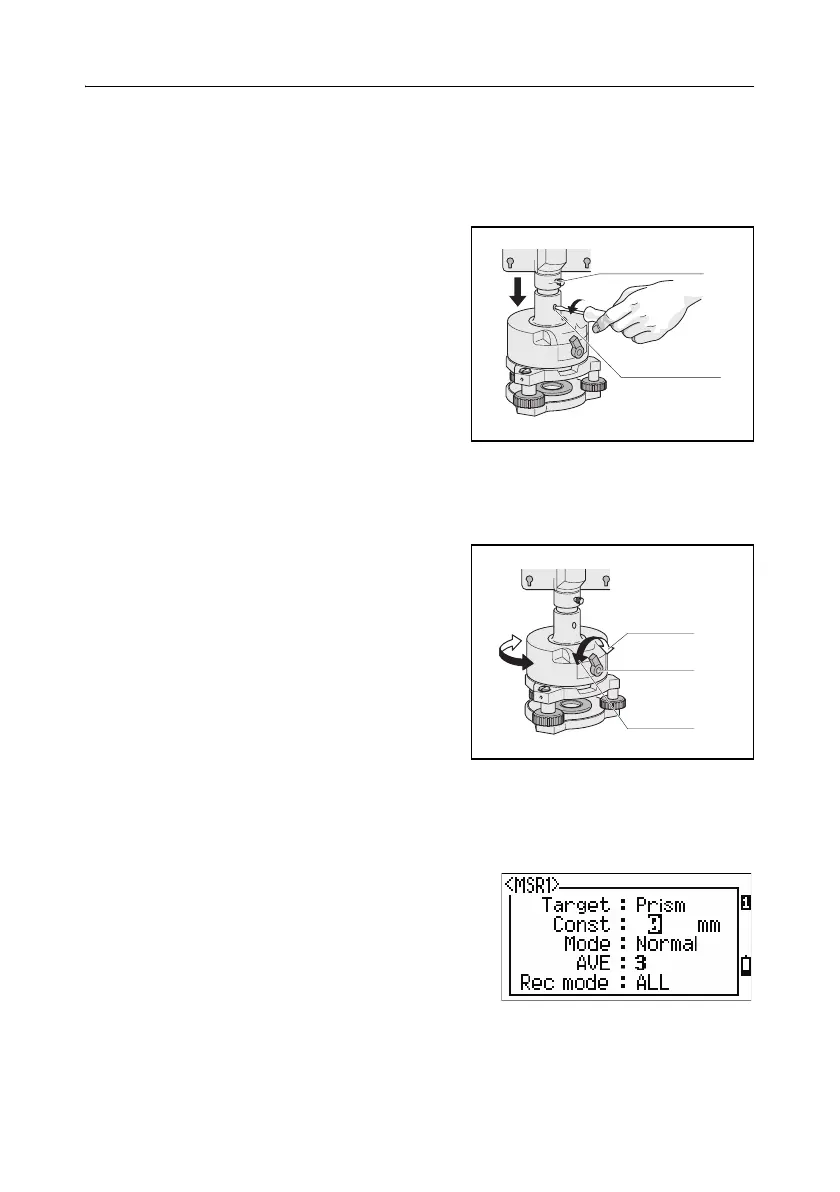
Adjusting the height of the tribrach adapter 20.1
The tribrach adapter has two height settings. To use the prism reflector with a
NPL-302 series instrument, use the lower height setting.
To adjust the height of the tribrach adapter:
1. Remove the height adjustment screw from
the tribrach adapter.
2. Slide the tribrach adapter up or down the
prism holder mount until the height
adjustment screw holes on the prism holder
mount and on the tribrach adapter are
aligned.
3. Replace and tighten the adjustment screw.
Changing the direction of the prism 20.1
The prism mounted on the tribrach adapter can be rotated to face in any direction.
To change the direction of the prism:
1. Release the rotation clamp. To do this, turn
the clamp lever counterclockwise.
2. Turn the upper plate of the tribrach adapter
until the prism is facing in the required
direction.
3. Fasten the rotation clamp. To do this, turn
the clamp lever clockwise.
Setting the prism constant 20.1
1. Attach the prism to the single prism holder.
2. Set the prism constant. To do this, hold down
[MSR1] or [MSR2] for one second. For more
information, see Measurement settings,
page 60.
Prism holder mount
Height adjustment
screw
Clamp
Clamp lever
Unclamp



 To Next Page