Menu Key 5
Pulse Laser Station NPL-302 Series Instruction Manual 117
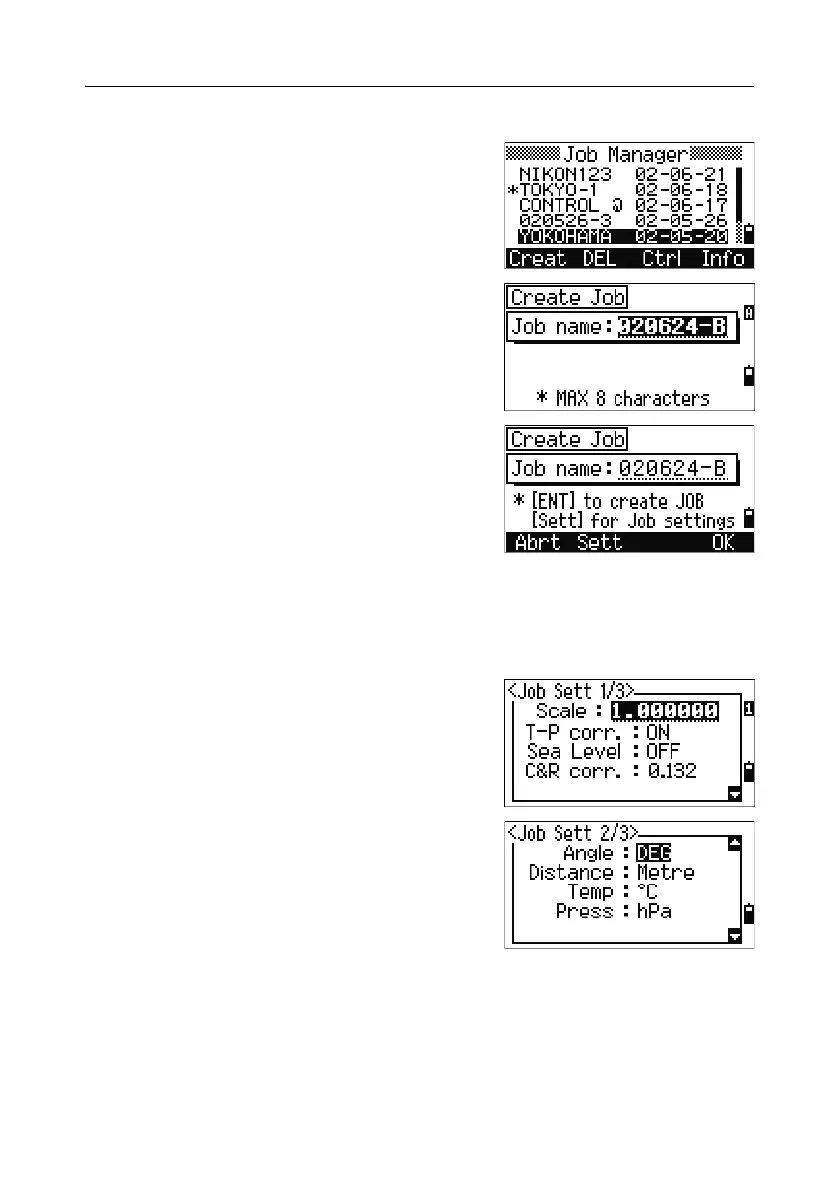
Creating a new job 52.2
1. Press the Creat softkey in the job list.
2. Enter a job name of up to eight characters.
Press
[ENT].
3. Do one of the following:
– To check the job settings, press the
Sett
softkey.
– To create a new job using the current job
settings, press
[ENT] or the OK softkey.
Job settings
The following settings are set when a job is created, and cannot be changed. This
ensures that the data in a job is correctly stored in the database, and that all
necessary corrections are applied when you store each record.
Scale Factor 0.999600 to 1.000400
T-P correction ON/OFF
Sea Level ON/OFF
C&R correction OFF/0.132/0.200
Angle unit DEG/GON/MIL
Distance unit Metre/US-Ft/I-Ft
Temp unit °C/°F
Press unit hPa/mmHg/inHg



 To Next Page