Applications 4
Pulse Laser Station NPL-302 Series Instruction Manual 111
Calculating a corner point 40.1
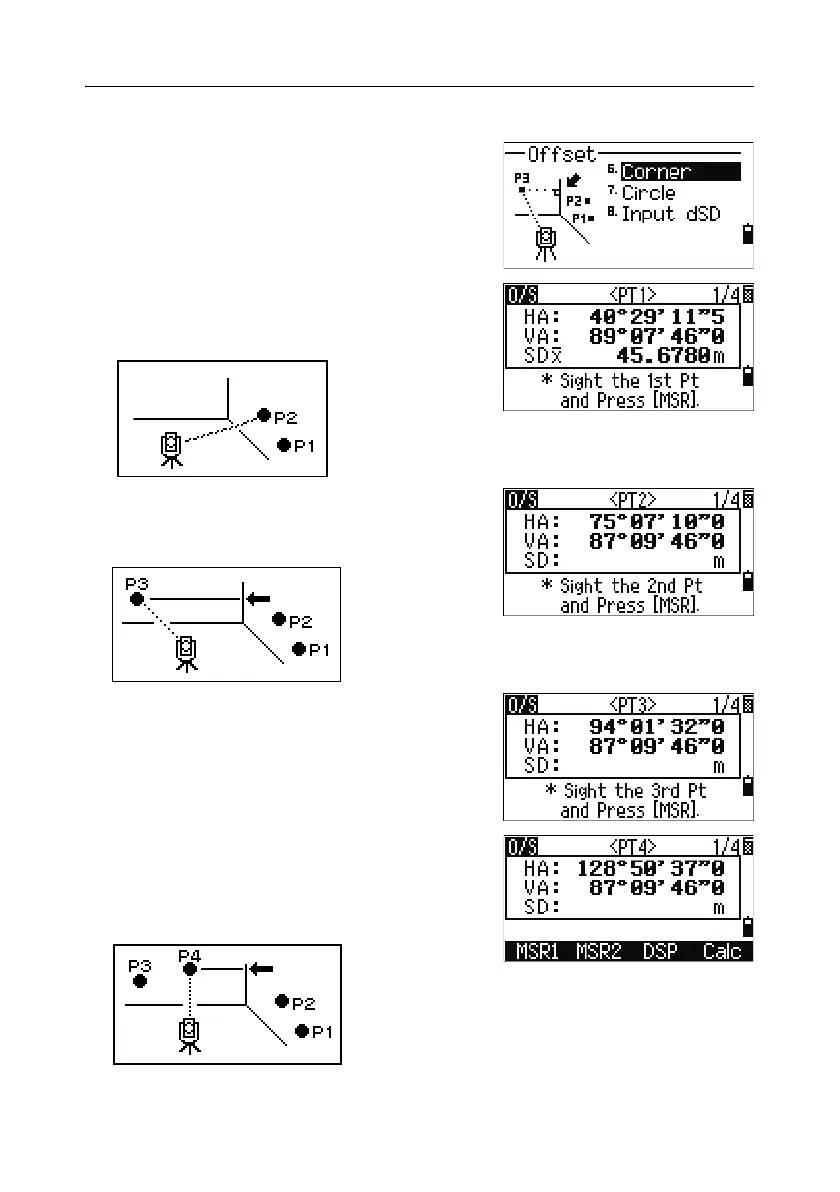
1. To enter the corner point function, press [6] or
select
Corner in the Offset menu.
2. Take a distance measurement to the first prism
(or target) on the wall. Press
[MSR1] or [MSR2].
3. Sight a second point on the same wall with the
first point measurement. Press
[MSR1] or [MSR2].
4. Sight the first point on the second wall. Press
[MSR1] or [MSR2].
5. If the two walls are at right angles, press the
Calc softkey to calculate the corner point by
three points.
6. If you take a measurement to a fourth point,
the corner point can be calculated as the
intersection of two walls (P1-P2 and P3-P4).
The default elevation is given by P4.



 To Next Page