4 Applications
64 Pulse Laser Station NPL-302 Series Instruction Manual
HA Reset and Angle Operations 4.1
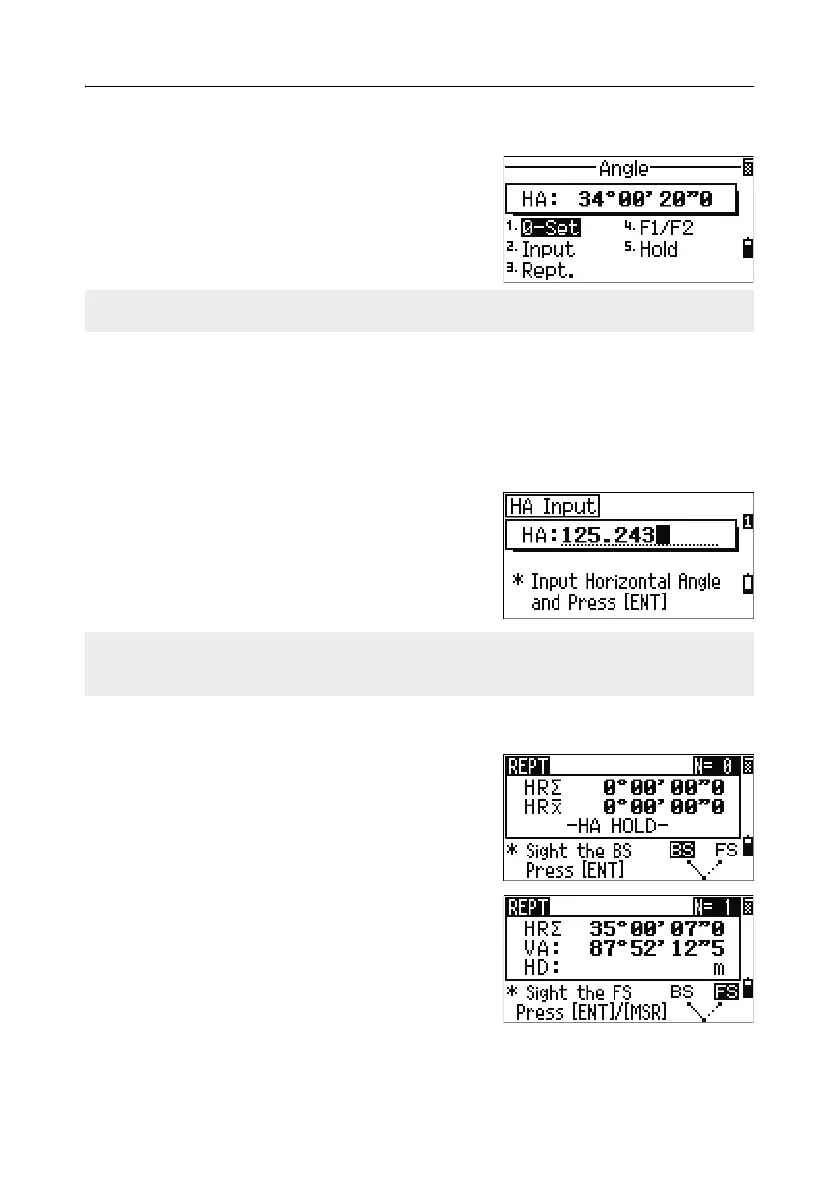
To open the Angle menu, press [ANG] in the BMS.
To select a command from this menu, either press
the corresponding number key, or press
[<] or [>] to
highlight the command and then press
[ENT]
Setting the horizontal angle to 0 41.1
To reset the horizontal angle to 0, press [1] or select 0-Set in the Angle menu. The
display returns to the Basic Measurement Screen (BMS).
Entering the horizontal angle 41.2
To display the HA Input screen, press [2] or select
Input in the Angle menu. Use the numeric keys
to enter the horizontal angle. Then press
[ENT].
Recording a foresight point after repeat angle measurement 41.3
1. To activate repeat angle measurement, press
[3] or select Rept. in the Angle menu.
HR=0 appears.
2. Sight the backsight and press [ENT].
3. Sight the foresight and press [ENT].
The horizontal angle is accumulated and the
value is held again.
4. To end repeat angle measurement, press [ESC].
F1/F2 is not supported by the NPL-332.
To enter 123°45'50", type [1] [2] [3] [.] [4] [5] [5] [0].
The displayed value is rounded to the minimum angle increment.



 To Next Page