5 Menu Key
162 Pulse Laser Station NPL-302 Series Instruction Manual
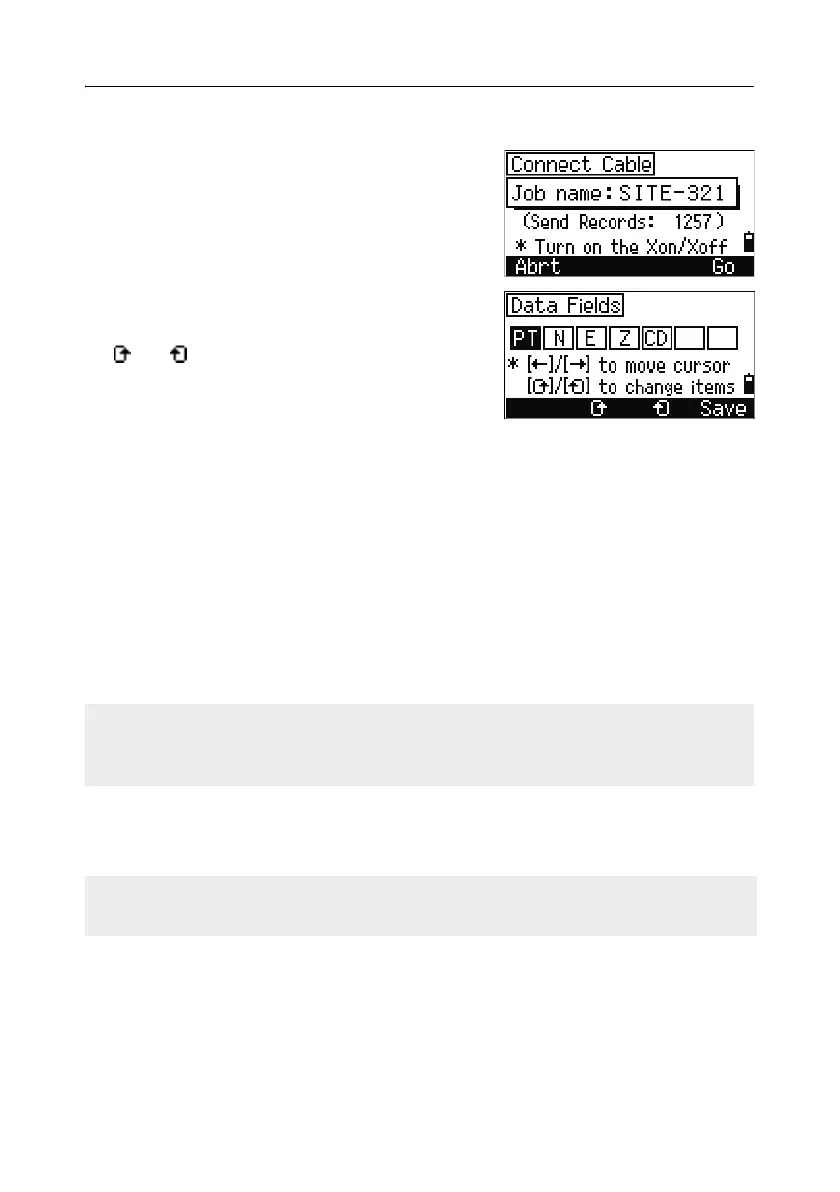
Advanced feature: Editing the data order for upload
1. To open the Data Fields screen, press the
Edit softkey.
2. To move between the fields, press [<] or [>].
3. To change the selected item in a field, use the
and softkeys. The options are PT, N, E,
Z, CD, or blank.
4. To save your changes and return to the
previous screen, press the
Save softkey.
For example, if your original data is as follows:
1, UB, 30.000, 20.000, L1
and you set the data fields to PT N E CD, then the uploaded data is:
PT=1, N=30.000, E=20.000, CD=L1
Uploading coordinates without points
You can upload data without points. If you do not include a point in the format
definition, each line of data is automatically assigned the next available point
number. To help you to select points in the field, make sure that you store an
identifier in the CD field.
Uploading a point name list or code list 50.1
To upload a point name list via cable, press [3] or select PT List in the
Communication menu.
The data format cannot include duplicate items. Use PT, N, E, Z and CD once each
in the data format.
To skip some items in your original file, set the corresponding field to blank.
When you upload a code list, it always replaces the existing code list on the
instrument.



 To Next Page