4 Applications
106 Pulse Laser Station NPL-302 Series Instruction Manual
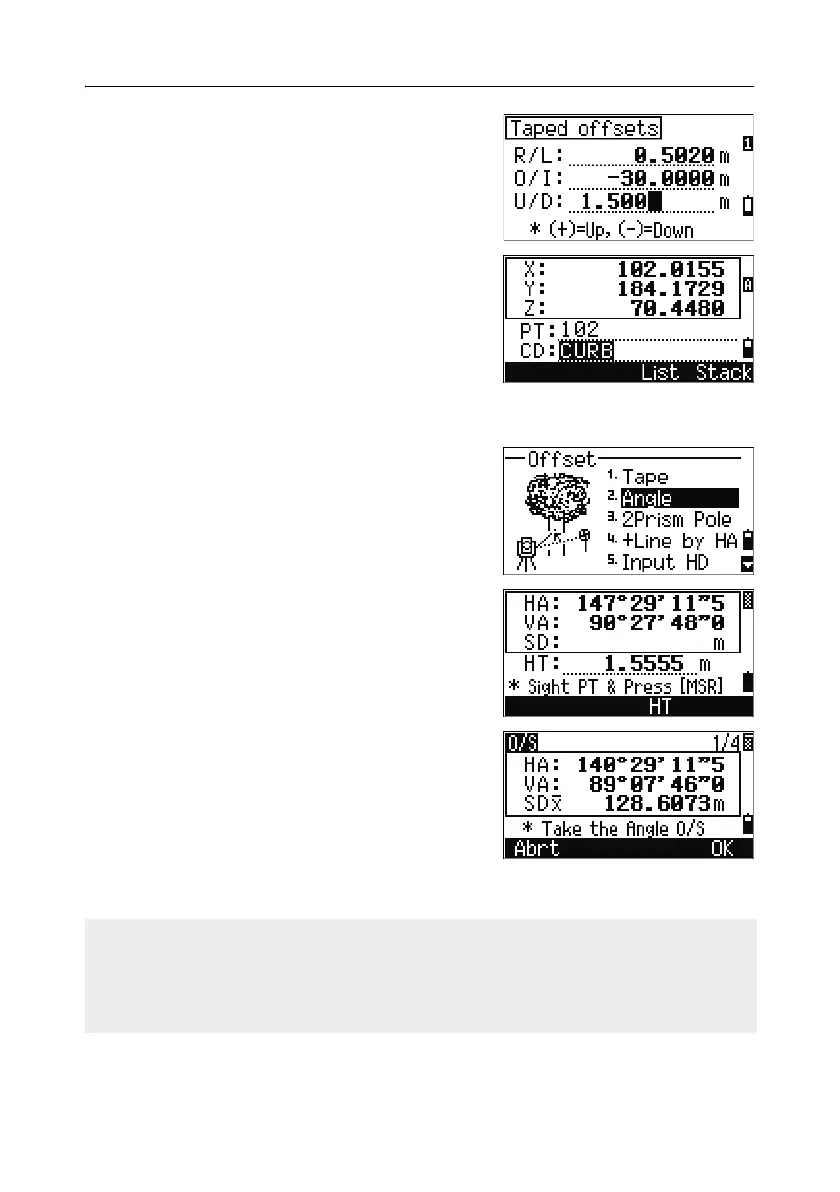
You can enter any combination of taped offset
distances to specify the point.
4. To go to the recording PT screen, press [ENT] in
the last field.
The calculated coordinates are shown.
5. Enter a PT (and CD) value.
6. Press [ENT] to record the point.
Raw data is also recalculated, based on the
taped offset value.
Measuring angle offsets 40.1
1. To enter the angle offset function, press [2] or
select
Angle in the Offset menu.
If you have not taken a distance measurement
before entering this function, a temporary
measurement screen appears.
2. Sight the target and press [MSR1] or [MSR2].
3. To take the angle offset, rotate the alidade and
telescope. The measured distance (HD)
remains unchanged.
4. To record the offset point, press [ENT] or the OK
softkey.
The XYZ data is also recalculated, based on
the new angle.
You can record an angle offset in the Basic Measurement Screen (BMS). After
taking a distance measurement, rotate the alidade and/or telescope. Then press
[ENT] to record the measured distance with the updated angle value. If you use this
method, the dimension of the angle offset is not stored as a CO record. To store the
CO record, use the O/S function.



 To Next Page