3 Getting Started
56 Pulse Laser Station NPL-302 Series Instruction Manual
The following examples show how various values are entered:
Jobs 3.3
To record data on the instrument, you must create or open a job.
C
Caution – Before you use the instrument for the first time, check the job
settings.
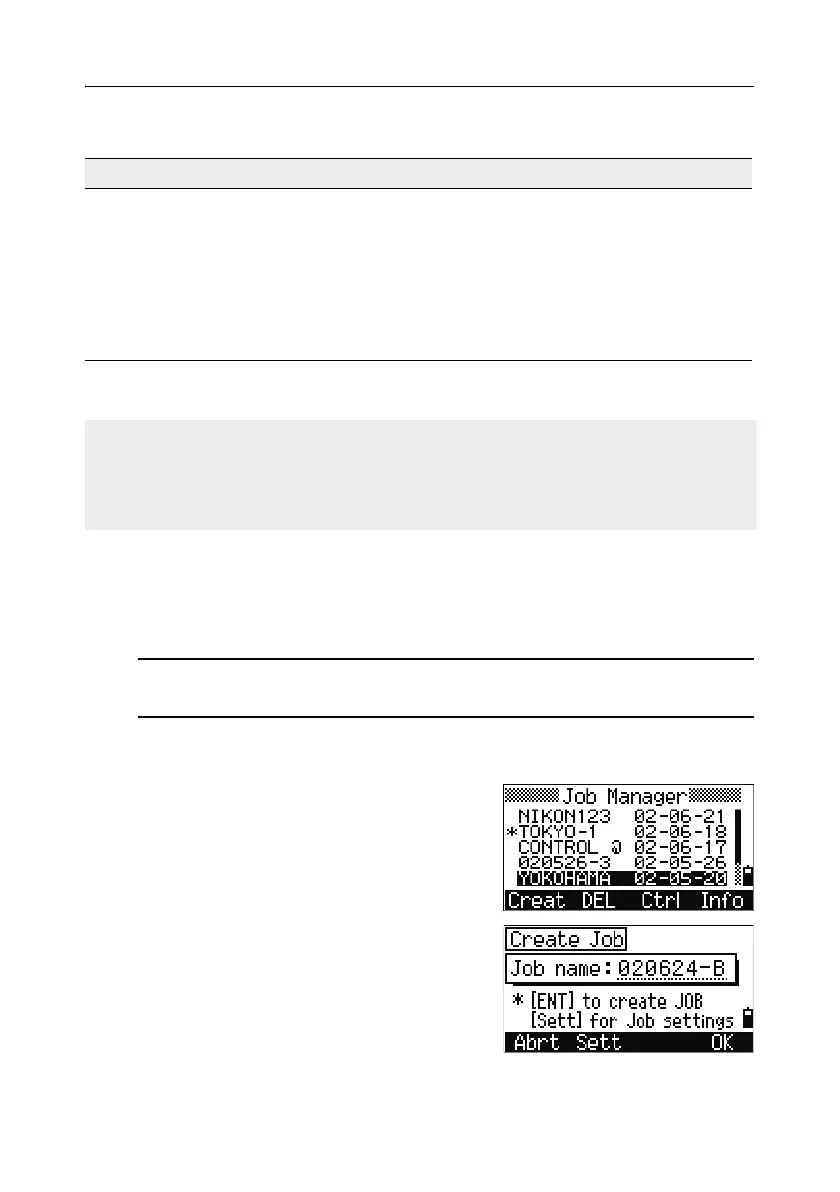
Creating a new job 33.1
1. Press [MENU] to open the MENU screen.
2. Press [1] to open the Job Manager.
3. Press the Creat softkey to open the Create
Job screen.
4. Enter the job name.
To enter ... Type ...
65' 5 3/8" [6] [5] [.] [5] [.] [3] [.] [8] [ENT]
65' [6] [5] [ENT]
65' 5" [6] [5] [.] [5] [ENT]
65' 5 3/8" [6] [5] [.] [5] [.] [6] [ENT]
5 3/8" [0] [.] [5] [.] [3] [.] [8] [ENT] or [0] [.] [5] [.] [6]
[ENT]
The numerator and denominator that you enter are automatically converted to the
closest value from the following list: 0, 1/8, 1/4, 3/8, 1/2, 5/8, 3/4, 7/8, 1/16, 3/16,
5/16, 7/16, 9/16, 11/16, 13/16, 15/16.
If the denominator is 16, it is not shown on the screen.



 To Next Page