3 Getting Started
46 Pulse Laser Station NPL-302 Series Instruction Manual
[USR] keys 30.4
If you use a function frequently in the field, you can assign it to the [USR1] or [USR2]
key. Whenever you press a
[USR] key, the function that is assigned to that key is
activated directly.
The following functions can be assigned to the
[USR] keys:
• Input HT
• BS Check
• Base XYZ
• Default PT
• Select Target
• Input Temp-Press
• Input Note
• The following menus, or a single function from one of these menus:
– Cogo
–O/S
–PRG
By default, Input HT is assigned to
[USR1], and no function is assigned to [USR2].
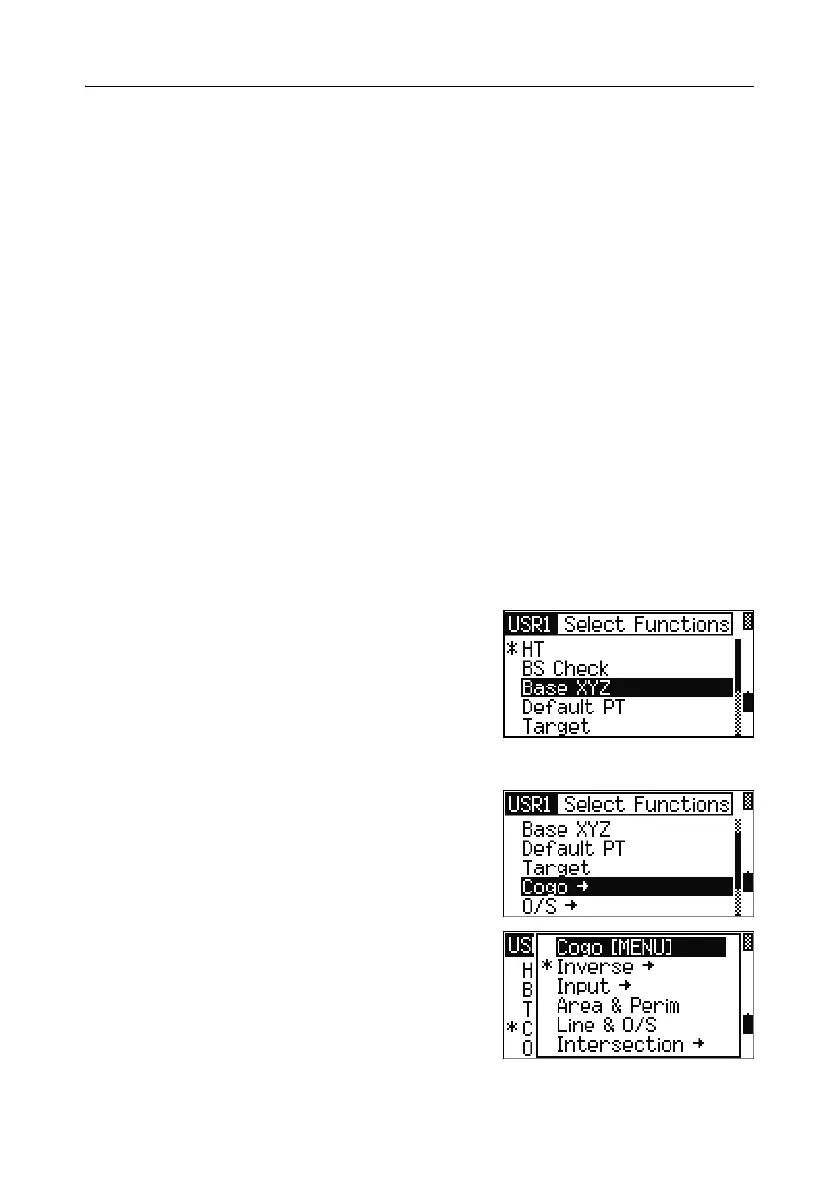
Hold down the
[USR] key for one second to display
the list of functions that can be assigned to the
key. The currently assigned function is indicated
by an asterisk (*) beside the function name.
To change the function that assigned to the key,
press
[^] or [v] to highlight the function. Then press
[ENT].
If an item on the list has an arrow (
->) beside it,
this item is a menu. If you highlight a menu item
and then press
[ENT], a sub-menu appears.
The first item on the sub-menu ends with the text
[MENU]. If you select this item, the whole menu
is assigned to the
[USR] key.



 To Next Page