4 Applications
84 Pulse Laser Station NPL-302 Series Instruction Manual
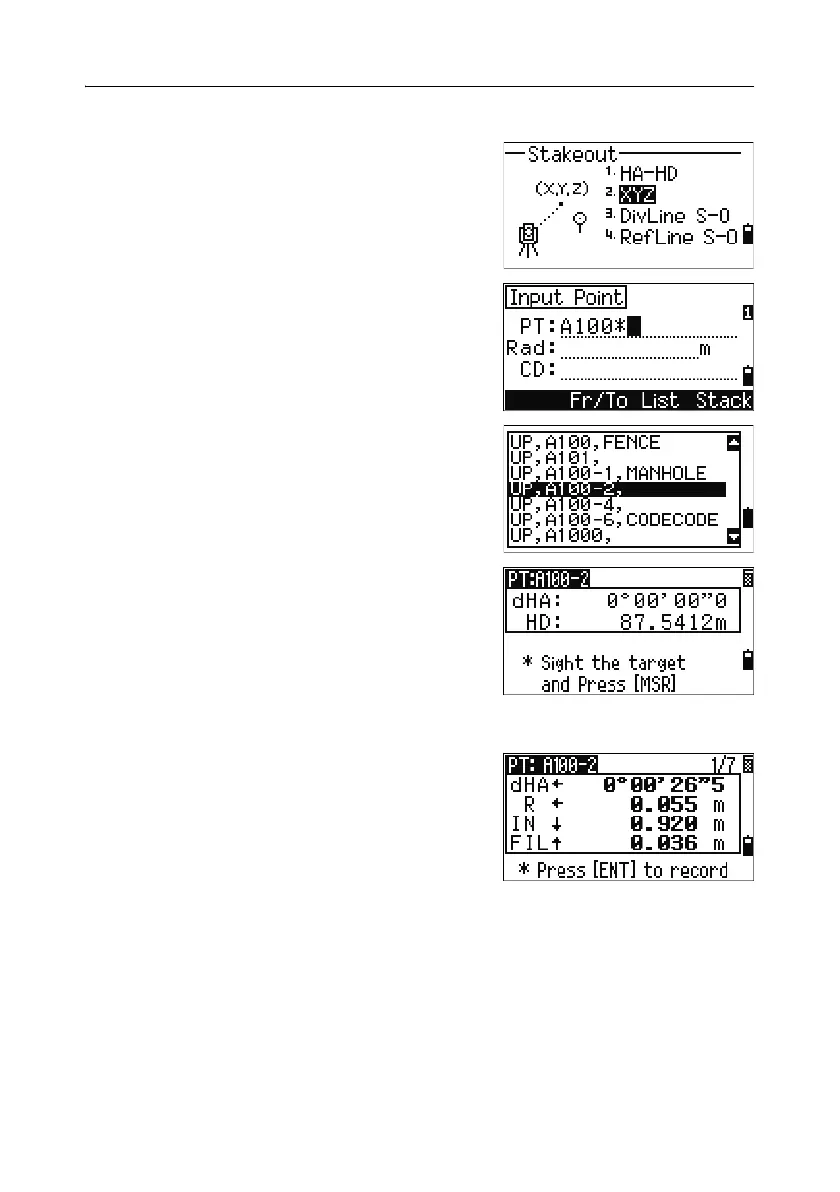
Specifying the stakeout point by coordinates 40.1
1. To start a stakeout by coordinates, press [2] or
select
XYZ in the Stakeout menu.
2. Enter the point name that you want to stake
and press
[ENT].
You can also specify the point by code or
radius from the instrument.
If several points are found, they are displayed
in a list. Use
[^] or [v] to move up and down the
list. Use
[<] or [>] to move up or down one page.
3. Highlight a point in the list and press [ENT].
The delta angle and the distance to the target
are shown.
4. Rotate the instrument until the dHA is close to
0°00'00". Press
[MSR1] or [MSR2].
dHA Difference in horizontal angle to the
target point
HD Distance to the target point
5.
Ask the rodman to adjust the target position.
When the target is on the intended position,
the displayed errors become 0.000 m (or
0.000 ft).
dHA Difference in horizontal angle to the
target point
R/L Right/Left (Lateral error)
IN/OUT In/Out (Longitudinal error)
CUT/FIL Cut/Fill



 To Next Page