Applications 4
Pulse Laser Station NPL-302 Series Instruction Manual 113
3.
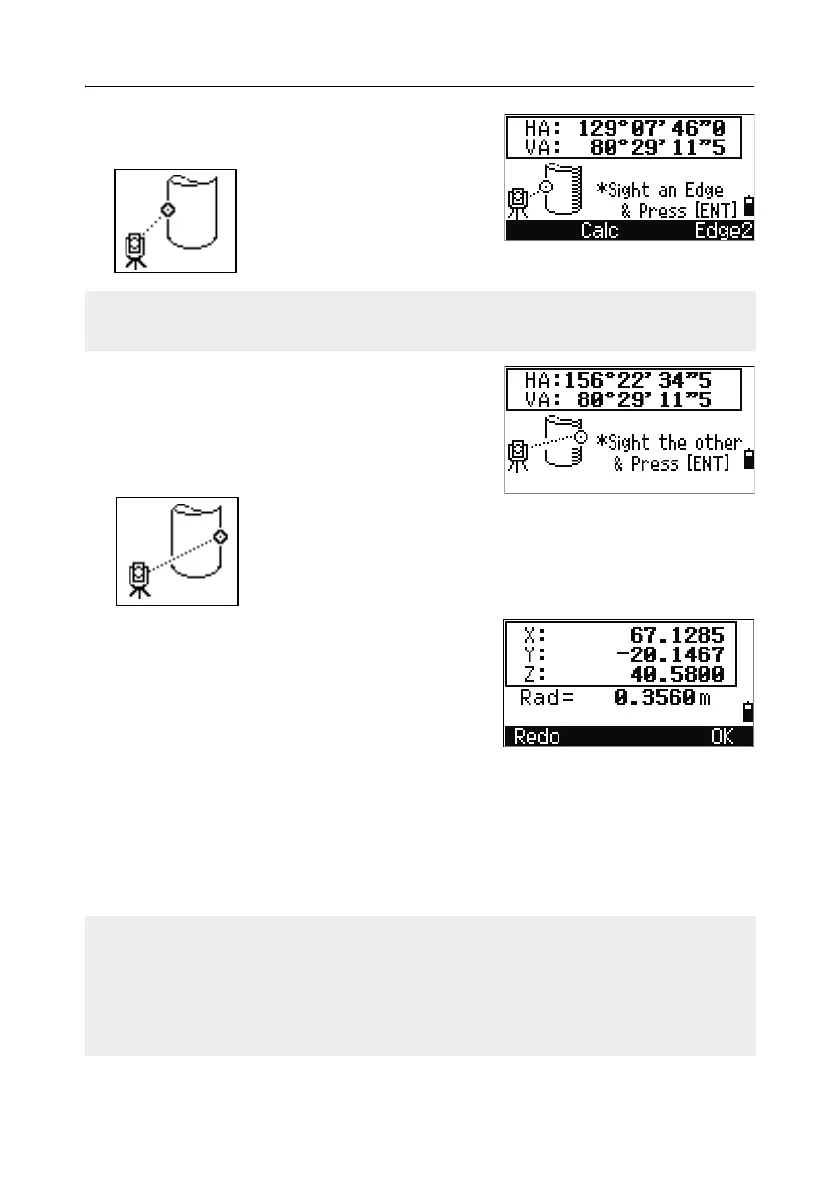
Sight one edge of the circle and press [ENT].
4. Sight the other edge of the circle and press
[ENT].
The instrument calculates and records the
center of the circle.
It also calculates the coordinates of the center
point and the radius of the circle.
5. To record the point, press [ENT] or the OK
softkey.
Sample records
SS,71,1.5000,37.0518,32.08380,81.06510,11:51:48,
CO, PT1, 0.0000, 0.0000,47.05350, 83.58560
CO, PT2, 0.0000, 0.0000, 29.53010, 83.58560
CO,O/S MSR:71 1.5555 36.5418 38.28360 81.06510
CO,Radius of circle 0.356
CO,Input +SD:0.0020
If you have taken a distance measurement to the center of the circle, press the
Calc softkey to calculate the offset using one edge angle observation.
The calculated point (center of the circle) is stored as an SS record.
The following one or two comment records are angle-measured points. For
example:
CO, Point name (fixed to PT1/ PT2), HT(0.0000), SD(0.0000), HA, VA.
If you press the
+SD softkey before you sight Edge1, the input value is recorded at
the end.



 To Next Page