Getting Started 3
Pulse Laser Station NPL-302 Series Instruction Manual 61
Target field
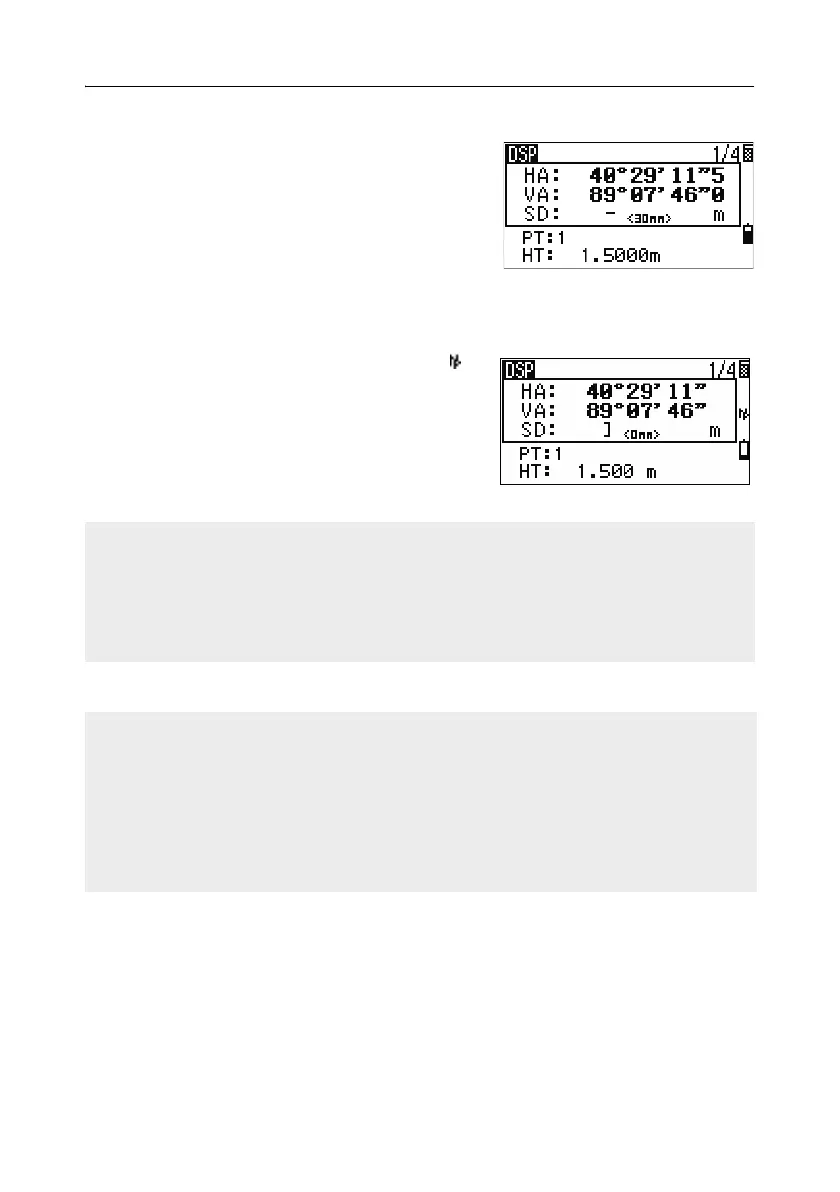
If the measurement is started with the Target field
set to Prism, there is a dash “–” in front of the
prism constant.
If the measurement is started with the Target field
set to N-prism, there is a right square bracket “]”
in front of the prism constant.
The symbol then constantly runs from left to right over the prism constant in the
display.
When an N-prism measurement is taken, the
icon appears in the status bar (above the battery
icon).
Rec mode field
Incorrect Target settings may result in measurements outside the precision and
intervals specified for the instrument.
A measurement made immediately after changing the target setting may take a
longer time than usual.
The Target setting is used to apply better cyclic-error adjustment in distance
measurement. It efficiently eliminates multipath reflection.
The Rec mode setting controls how the [MSR1] and [MSR2] keys operate in the BMS.
The MSR only setting is the default measurement mode. After a measurement, the
instrument stops in the BMS and waits for you to press [ENT] before recording the
point.
The Confirm setting displays the Record PT screen before data is recorded.
The ALL setting is a quick shooting and recording mode. The instrument
automatically records the point using the default PT/CD. The instrument then
returns to the BMS for the next measurement.



 To Next Page