4 Applications
68 Pulse Laser Station NPL-302 Series Instruction Manual
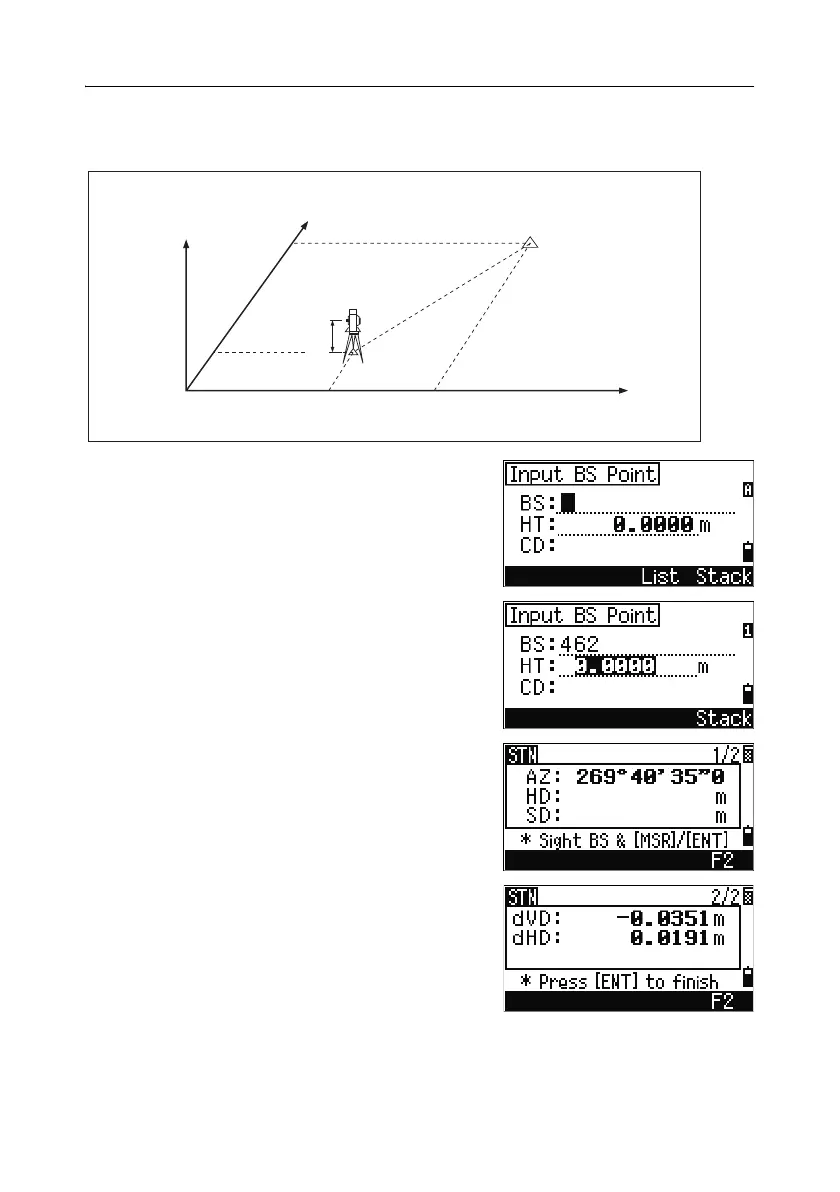
Sighting the backsight by entering coordinates
1.
To enter coordinates for the backsight point
(BS), press
[1] or select Coord in the
Backsight screen.
2. Enter the point name. If the point exists in the
job, its coordinates are shown.
3. If you intend to take a distance measurement
to the BS, enter the height of target in the HT
field.
4. Sight the BS on Face-1 (F1). Press [ENT] to
complete the setup.
– To record a full shot (with HA, VA, and SD
values) to the BS, press
[MSR1] or [MSR2].
AZ Azimuth calculated by coordinates
– If you are measuring to a known
coordinate BS, press
[DSP] to display a QA
screen. The QA screen shows the dHD and
dVD values, which indicate the difference
between the measured distance and the
distance calculated from the known
coordinates.
Z
Y
X0
X
Xb
Y0 Yb
Backsight point
(Xb, Yb, Zb)
Station point
(Xi, Yi, Zi)
Instrument height



 To Next Page