4 Applications
78 Pulse Laser Station NPL-302 Series Instruction Manual
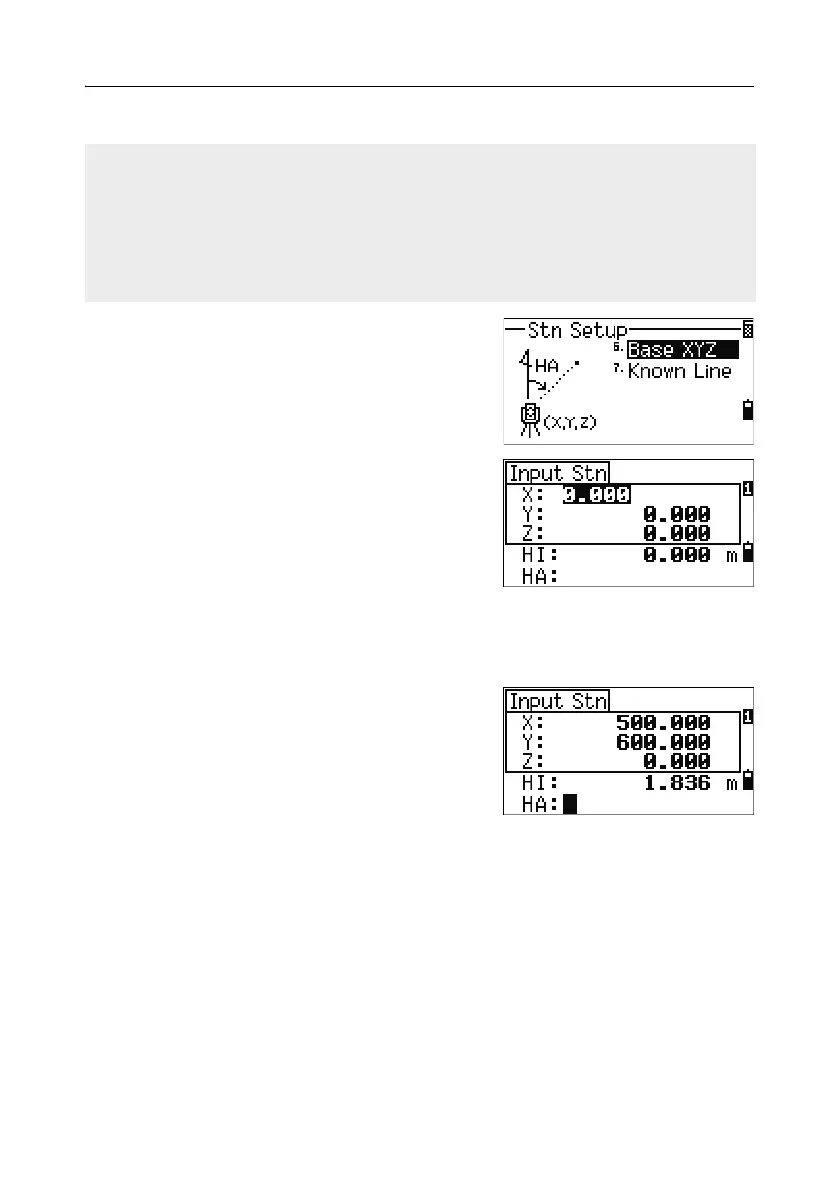
Base XYZ function:
1.
To enter the Base XYZ function, press [6] or
select
Base XYZ in the Stn Setup menu.
The current instrument XYZ values are shown
as the default.
2. Enter the new instrument XYZ values and
press
[ENT].
3. Do one of the following:
– To reset the horizontal angle, enter a value in the HA field and press
[ENT].
– If you do not need to reset the HA, leave
the HA field blank and press
[ENT].
The display returns to the BMS.
Base XYZ does not store a ST record, so the BS Check cannot check the backsight
when you enter a station using Base XYZ.
To store raw data, use one of the other functions in the Stn Setup menu. This
function does not store an ST record in the job.
You can use this function without an open job. If there is an open job when you use
this function, a CO record is stored to indicate that the instrument’s base
coordinates have changed.



 To Next Page