Full Color Card Printer
8
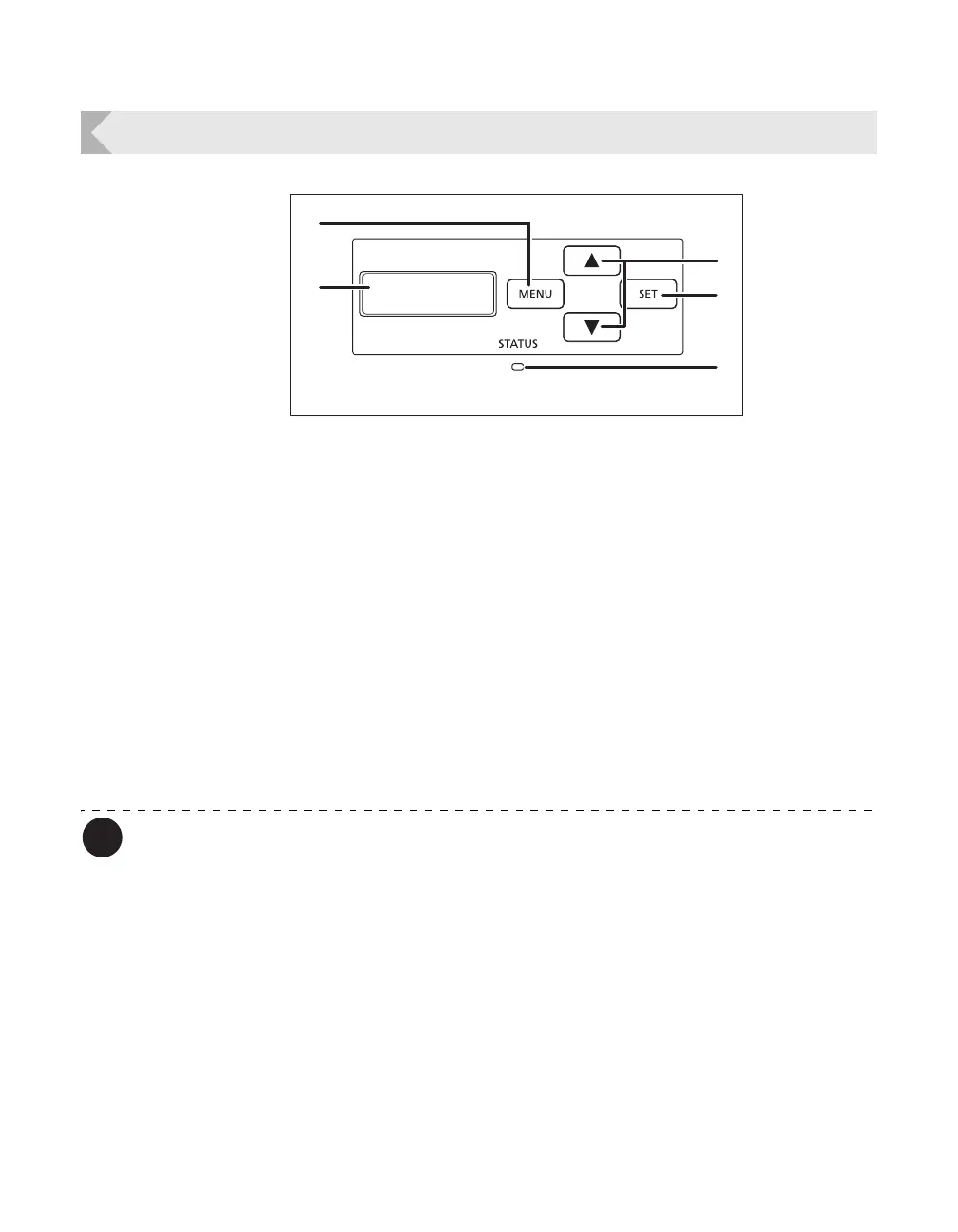
Operation Panel
You can check the status of the printer by looking at the LED Indicator.
• LED Indicator is lit (blue) ... Ready for printing.
• LED Indicator is blinking (blue, slow) ... Printer is in use.
• LED Indicator is lit (orange) ... Cards or Ink Ribbon have run out.
• LED Indicator is blinking (orange) ... Card jammed, or other error has occurred.
a MENU Key
Switches between Normal Mode and User
Mode. In User Mode, it is used to go up one
level of the menu.
→See "Normal Mode and User Mode" on page 23 for
details about Normal Mode and User Mode.
b / Keys
In User Mode, used to select menus and
settings values.
c SET Key
Used to clear errors. In User Mode, this opens
the display menu.
→See "Troubleshooting" on page 67 when an error
occurs.
→See "Basic User Mode Operations" on page 25 for
details on changing the User Mode settings.
d LED Indicator
This indicator is lit blue depending on the status
of the printer. Is lit or blinks orange when an
error occurs.
→See "Troubleshooting" on page 67 when an error
occurs.
e LCD Panel
Displays the printer status.
→See "Normal Mode Message List" on page 23 for
details of the display.



 To Next Page