Full Color Card Printer
22
Cleaning Tape Replacement
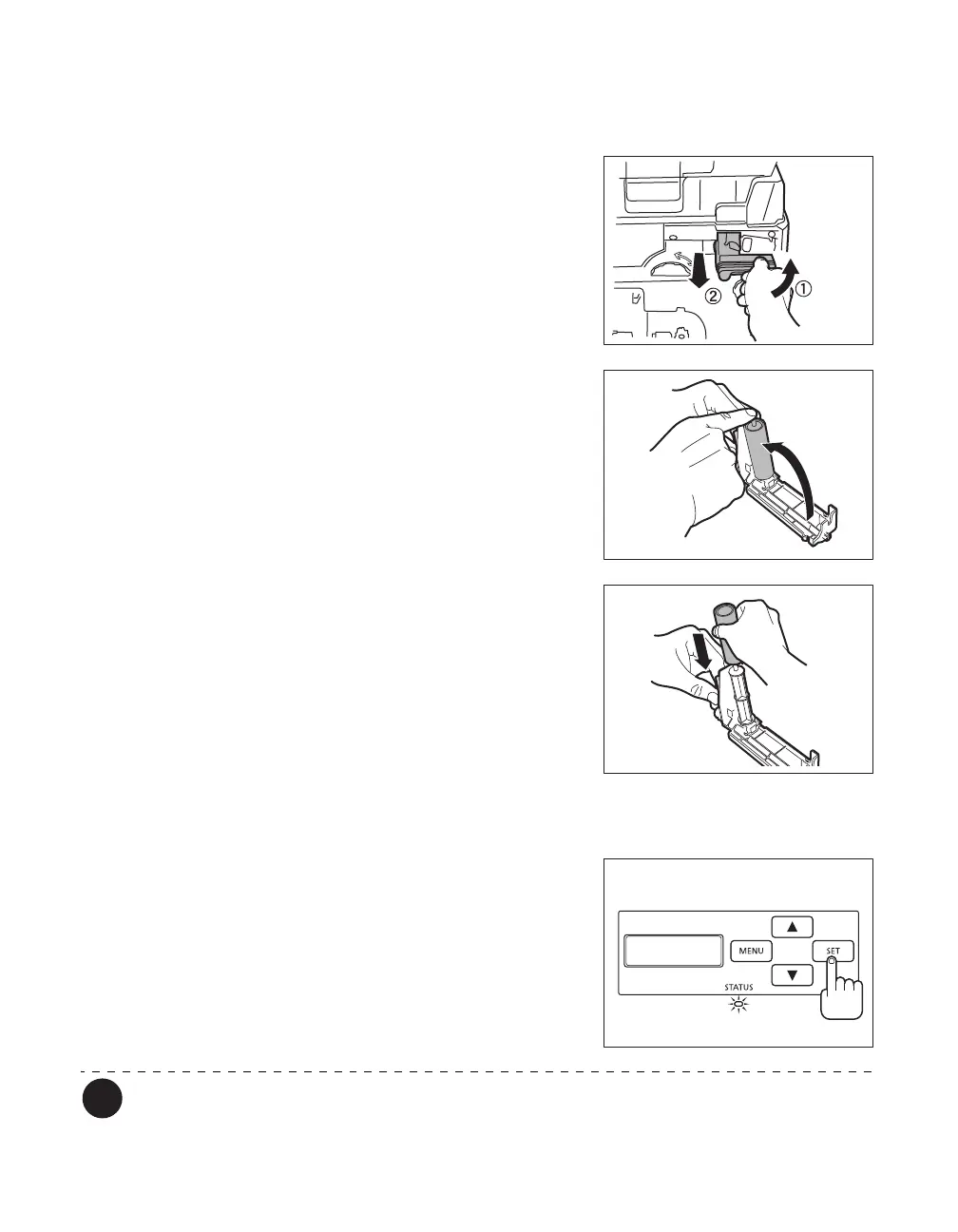
1 Remove the Cleaning Tape Cassette.
• Hold the Cleaning Tape Cassette handle, lift it, and
pull.
2 Lift up the tape spindle.
• As in the diagram at right, lift the tape spindle by hand.
3 Remove the used Cleaning Tape, insert
the new tape, and return the tape
spindle.
4 Insert the Cleaning Tape Cassette.
• Set the slide of the Cleaning Roller with the rail on the
printer and insert it all the way.
5 Close the Front Cover.
6 When [Push SET key] appears on the
screen, press the SET Key.
• Clear an error first if the error message such as [Card
Empty] appears, then press the SET Key.
→See "When an Error Message Appears" on page 67
for clearing error messages.
A protective tape is attached to the new Cleaning Tape. Use the cleaning tape after
removing the protective tape.
Push SET key



 To Next Page