The Intelligent Surveillance Solution
NUUO NVR/DVR/Hybrid NDVR System
- 78 -
Windows Users
Click on
to add/remove/synchronize Windows Users.
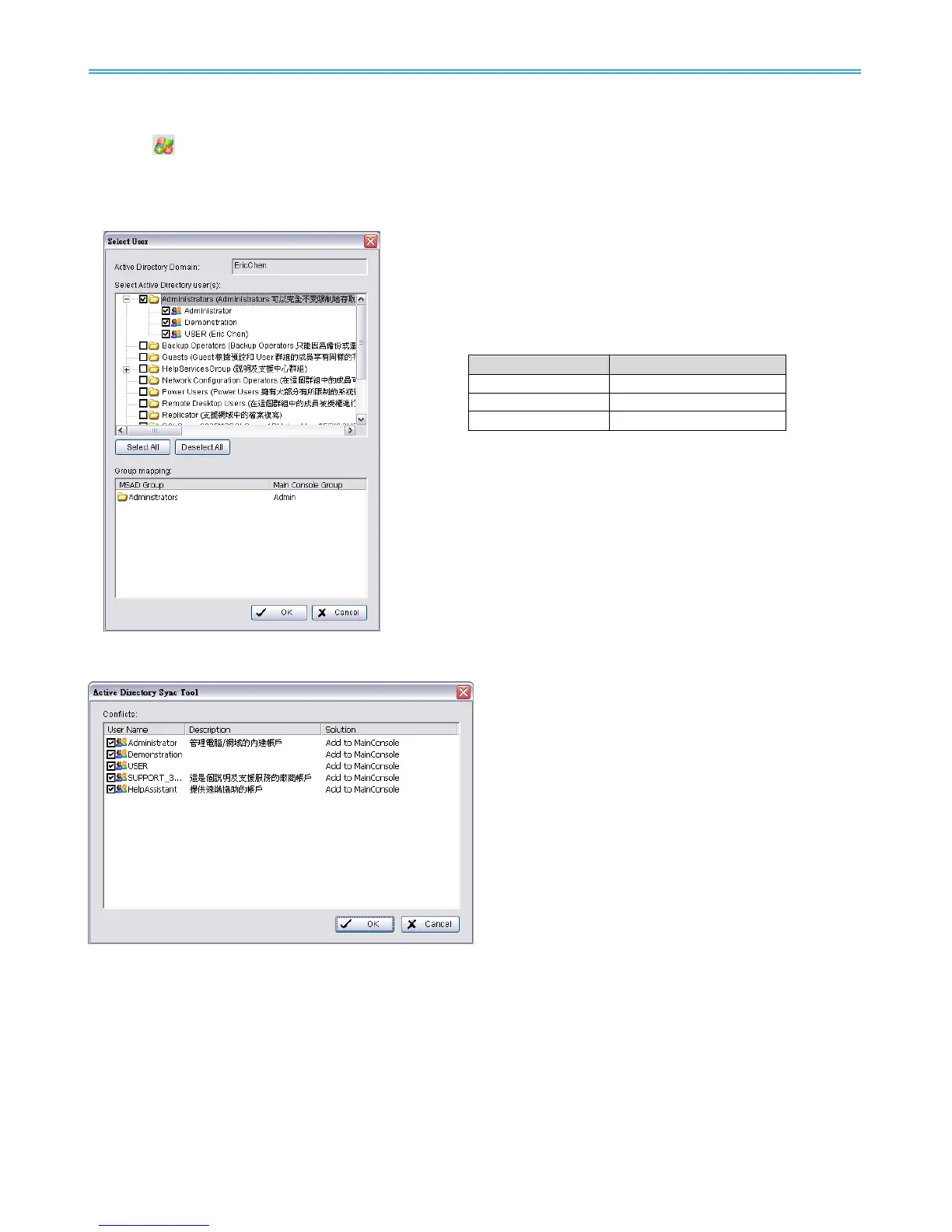
Select User
Check users or folders under Select Active Directory user(s) and click OK to add Windows Users.
Click Select All to check all available users and folders, or click
Deselect All to uncheck all users.
Group Mapping:
Selected Windows users will be grouped according to default
mapping:
You may modify group setting for each user later under the User
Account page.
Click OK when you are done adding Windows users.
Synchronization results will be displayed for confirmation.
Please refer to the default solution for all conflicts:
New accounts added from AD domain:
Add to Main Console
Accounts from AD domain removed:
Delete from Main Console
Account description modified:
Update description
Encountered admin account:
Skip admin account
Newly added account from AD domain
conflicts with existing basic user account:
Replace basic user account
Uncheck items to skip applying solution to Main Console user account settings.
For example, if you uncheck an “Add to Main Console” solution, the new account will not be added to Main
Console’s user account list.



 To Next Page