99
Pulse I/O Board Section 2-2
Preliminary PC Setup Before using high-speed counters 1 and/or 2, enter the following settings in
PROGRAM mode.
Port Mode Setting (DM 6611)
Specify High-speed Counter Mode for ports 1 and 2. This setting is read when
the PC is turned ON. If it is changed, the PC must be restarted.
Note 1. When using high-speed counter 1 and 2 interrupts, the port must be set to
High-speed Counter Mode. Although the PV of the high-speed counter can
be read in Simple Positioning Mode, high-speed counter 1 and 2 interrupts
cannot be used.
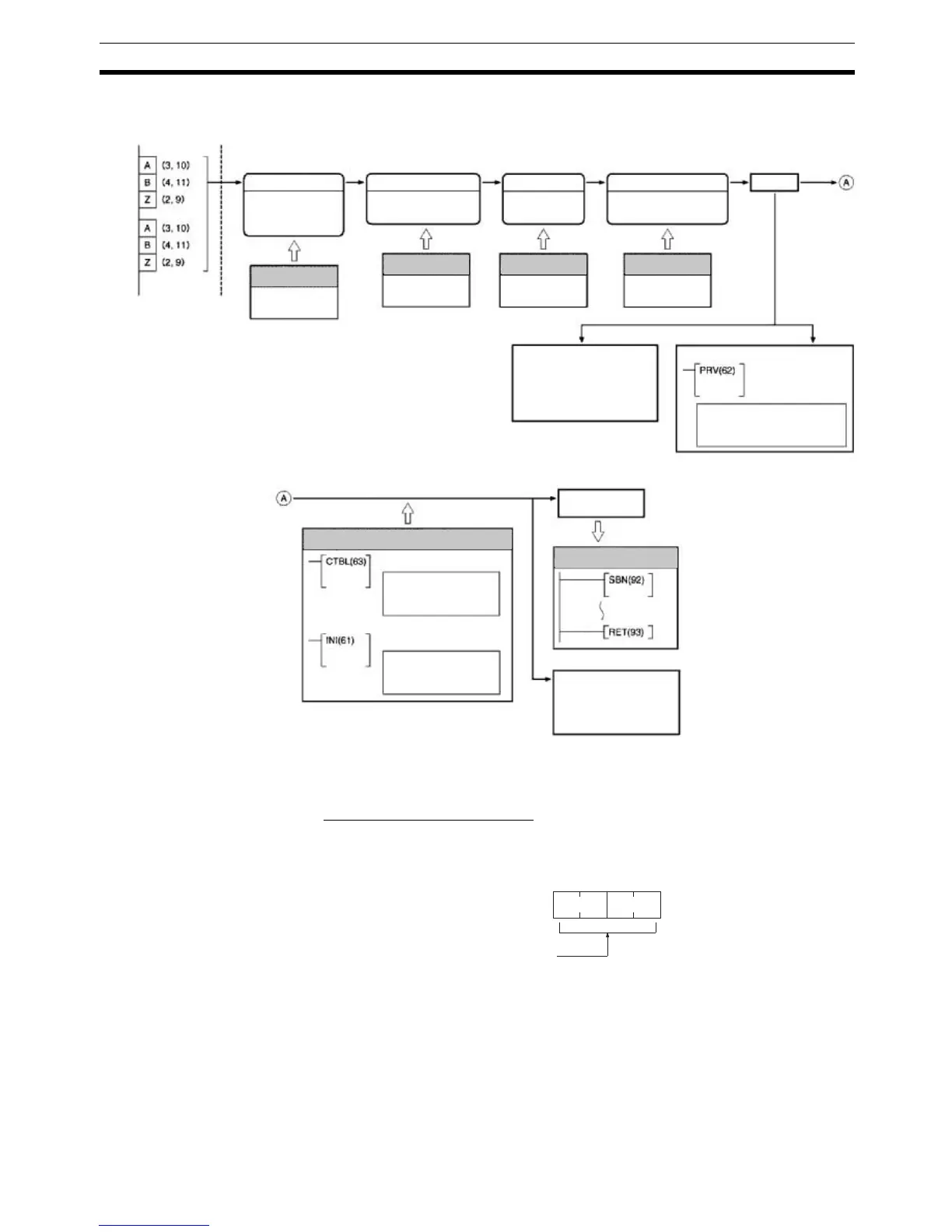
Pulse I/O Board: High-speed Counter Function
Input Mode
Differential phases
Pulse/Direction
Up/Down pulses
Port Mode Setting
High-speed Counter Mode
Simple Positioning Mode
Numeric Range
Ring Mode
Linear Mode
Port 1
(CN1)
encoder
input
Port 2
(CN2)
encoder
input
Reset Method
Phase-Z signal +
software reset
Software reset
Interrupts
Generated
Port 1:
AR 0500 to AR 0509
Port 2:
AR 0600 to AR 0609
Range Comparison Result
Each cycle
PV of Counter
Port 1: IR 233 to IR 232
Port 2: IR 235 to IR 234
Each execution
HIGH-SPEED
COUNTER PV
READ
PV read
Comparison operation status read
Range comparison result read
Note: When using
count check interrupts
REGISTER COMPARISON
TABLE
Comparison table registra-
tion and comparison start
Note: Cannot be used in
Simple Positioning Mode.
MODE CONTROL
PV change and compari-
son start/stop
Note: Cannot be used in
Simple Positioning Mode.
Count
PC Setup
Bits 00 to 03 of
DM 6643/DM 6644
PC Setup
Bits 04 to 07 of
DM 6643/DM 6644
PC Setup
Bits 08 to 11 of
DM 6643/DM 6644
PC Setup
Bit 00 to 15 of
DM 6611
Specified Subroutine
Ladder Program
15 0
DM 6611
0 0 0 0
Bit
Port Mode Setting
0000 Hex: High-speed Counter Mode
(Must be set to High-speed Counter Mode when using high-speed
counter interrupts.)
0001 Hex: Simple Positioning Mode
Default: 0000 (High-speed Counter Mode)



 To Next Page