Panasonic Eco Solutions Nordic AB
MEW01457 Rev: - Operating Instructions Fire alarm system EBL512, V2.7.x
16
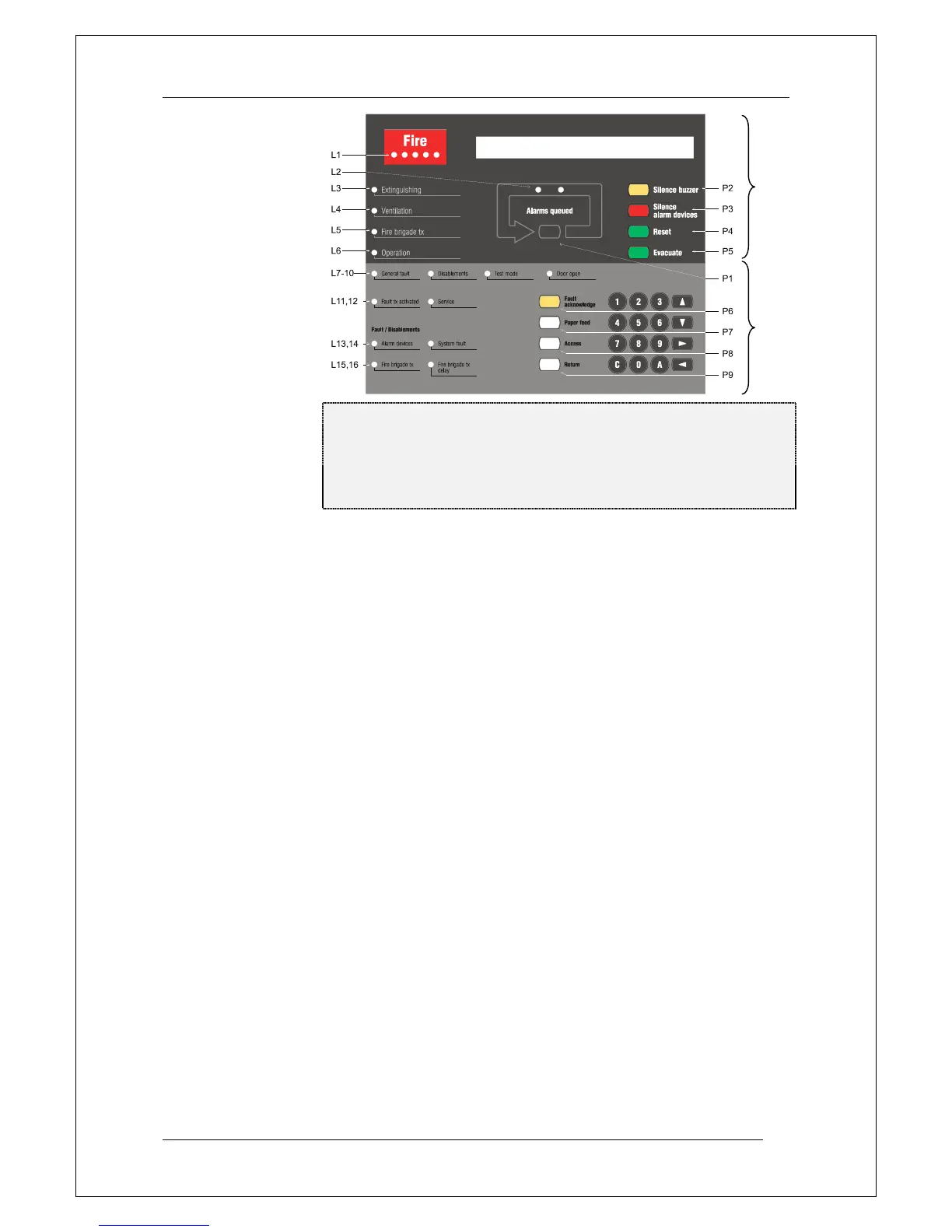
Figure 2. The EBL512 front; FBP (upper dark grey part) and CP
(lower light grey part). The look might vary according to
configuration, convention, etc. (e.g. English texts as in the
figure). See also chapter "LED indicators and push buttons",
page 17.
The fire brigade personnel use the FBP to take required operational
control of the system and to see which alarm point / zone(s) having
generated fire alarm. In the display (LCD, 2x40 alphanumeric
characters), the information displayed on the first row is depending on
how many alarm points / zones having generated fire alarm (and also
convention). On the second row is, for an alarm point or a zone, a
user definable text message (alarm text) shown, if programmed.
The CP is to "communicate" with the system, i.e. for commissioning,
monthly tests, maintenance, etc. Access codes for different access
levels are required. A keypad is used to get access to the system (a
menu tree with main and sub menus) and for different manoeuvres.
The CP has several system status LEDs.



 To Next Page