223
Polyend Tracker Manual
222
Polyend Tracker Manual
NOTESNOTES
Song Mode
9
Song Mode
9
Previewing Tracks in Song Mode
While songs and patterns can be played from within song mode, the ability
to preview only individual track clips is possible. This can only be performed
in ‘Red’ [Rec] Mode and with an individual track clip selected.
▌ PREVIEWING A SONG TRACK CLIP
1. Press [Song] to select song mode.
2. Press [Rec] to toggle to editing in ‘red’ mode. The slot and pattern
bounding box will be displayed red. Also all of the screen button options
are shown as available in ‘red’ mode - [Rec] on.
3. Navigate to the track clip location desired, Press [Left], [Right], [Up] and
[Down] to also navigate through the slots. Select a single track clip.
Multiple selections cannot be previewed.
4. With the track clip selected and highlighted red, Press [Shift] + [Play].
The clip will play once fully or press [Play] to stop playback.
5. Alternatively, with the track clip selected and highlighted red, Press
[Shift] + [Preview Track], 1
st
Screen button. The clip will play once fully
or press [Stop], 1
st
Screen button, to stop playback.
Track 1
Selected Track Clip.
Example Pattern 8, Track 2
[Shift] + [Play].
Previews the individual track clip
[Shift] + [Preview Track].
Previews the individual track clip
Clip Plays through once fully, unless
the [Play] or [Stop], 1
st
Screen button
is pressed to immediately stop.
Track 4Track 2 Track 5 Track 7Track 3 Track 6 Track 8 Step Pattern
1 3
2 4
3 8
4 8
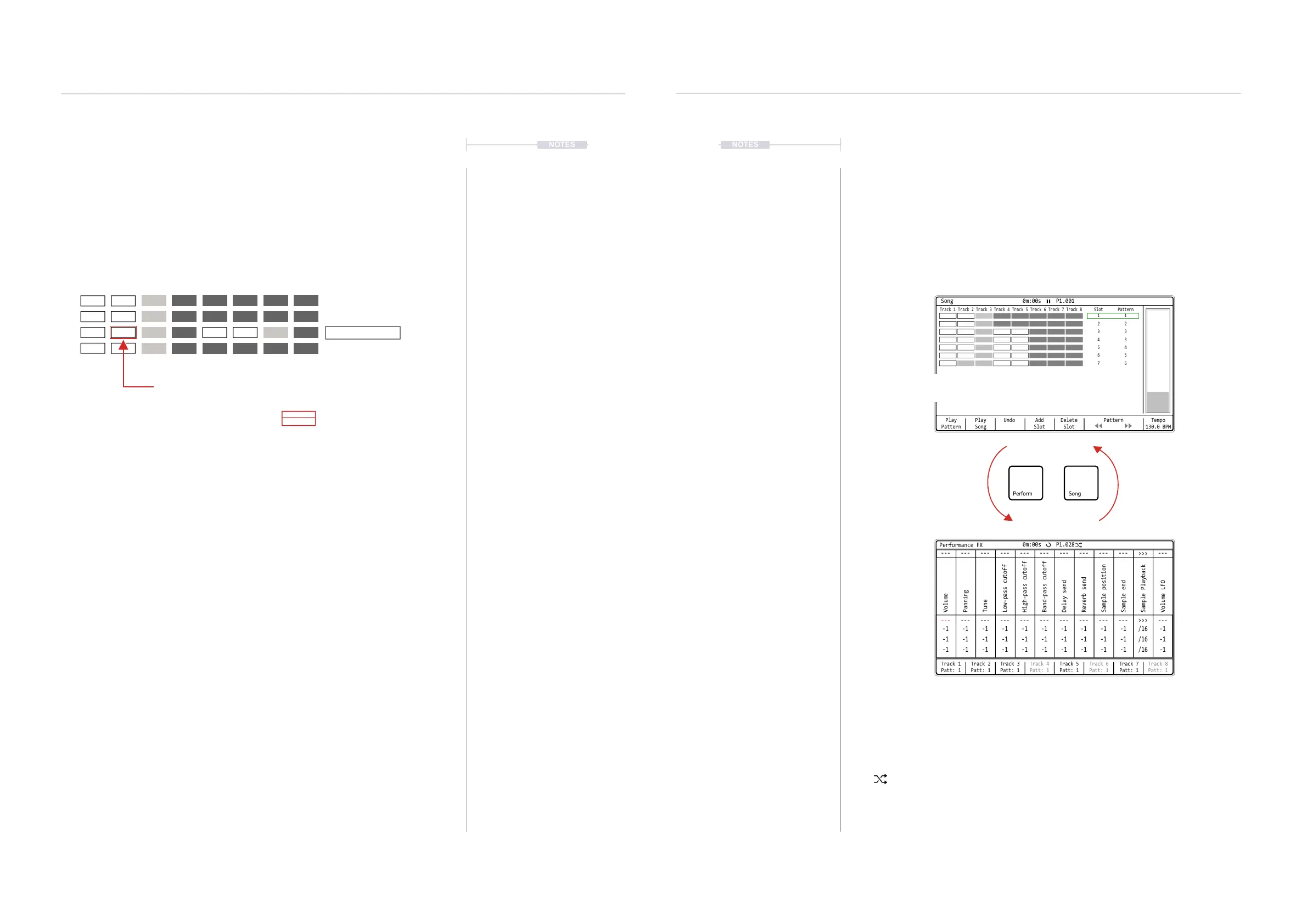
9.7 Link between Song and Performance Mode
Songs and patterns are integrated and linked to work together. In addition
songs work in conjunction with Performance Mode. Performance mode
allows live performances and improvisations. Perform is covered in detail in
a later section.
Play
Pattern
Play
Song
Undo Add
Slot
Delete
Slot
Pattern Tempo
130.0 BPM
Track 1 Track 5Track 3 Track 7Track 2 Track 6Track 4 Track 8 Slot
1
2
3
4
5
6
7
Pattern
1
2
3
3
4
5
6
Song 0m:00s P1.001
Track 1
Patt: 1
---
---
-1
-1
-1
---
---
-1
-1
-1
---
---
-1
-1
-1
---
---
-1
-1
-1
---
---
-1
-1
-1
---
---
-1
-1
-1
---
---
-1
-1
-1
---
---
-1
-1
-1
---
---
-1
-1
-1
---
---
-1
-1
-1
>>>
>>>
/16
/16
/16
---
---
-1
-1
-1
Track 2
Patt: 1
Track 3
Patt: 1
Track 4
Patt: 1
Track 6
Patt: 1
Track 5
Patt: 1
Track 7
Patt: 1
Track 8
Patt: 1
Performance FX
Volume
High-pass cutoff
Sample end
Tune
Delay send
Sample Playback
Panning
Band-pass cutoff
Low-pass cutoff
Sample position
Reverb send
Volume LFO
0m:00s P1.028
The ‘Random’ symbol in the header of a page will demonstrate that tracks from various
patterns can be selected for mixing in performance mode.
Press [Play] in Performance Mode to play the current pattern as set in the pattern page or set
in song mode, whichever is the most current pattern selected. Press [Shift] + [Play] in
Performance Mode to play the full song.
Songs can be played in Song Mode which will play through all slots and the patterns assigned.
When switching to performance mode the song will continue playing.
While pressing [Song] will select the song page,
holding [Song] button with a long press from
within another page will temporarily display it.



 To Next Page