243
Polyend Tracker Manual
242
Polyend Tracker Manual
NOTESNOTES
MIDI
11
MIDI
11
11.3 Typical MIDI Congurations
There are many congurations that can be set up with MIDI gear. Some are
complex and involve multiple devices while a simple set up can have two
devices communicating. Some typical examples are shown.
The settings in the cong menu will depend on:-
• How the devices are connected together? Are the devices
connected by USB? Which will transmit and receive MIDI with the
MIDI 5 Pin connection using the MIDI Jack adapter?
• Which device will be a primary leader (main controller e.g. main
clock) or a secondary follower (will respond to other gear as the lead
control e.g. synchronised to another clock)?
• Will MIDI note data (melodies, chords, etc) be communicated?
• Will MIDI CC control change data be communicated (to change
parameters like delay level or trigger performance effects)?
▌ ACCESSING THE MIDI CONFIG OPTIONS
1. Press [Cong] to open the conguration menu.
2. In the rst column, select ‘MIDI’. Use the 1
st
and 2
nd
Screen button to
navigate. Alternatively use [Left] or [Right] to navigate menus and Turn
(Jog) or [Up] or [Down] to select a function.
3. The ‘MIDI’ Options will be available in the central menu window. Use the
4
th
and 5
th
Screen button to navigate. Alternatively use [Left] or [Right] to
navigate menus and Turn (Jog) or [Up] or [Down] to select a function.
4. Press [Change], 6
th
Screen button to edit the option that is highlighted.
5. Use the 4
th
and 5
th
Screen button to navigate to the desired parameter
setting. Alternatively use [Left] or [Right] to navigate menus and Turn
(Jog) or [Up] or [Down] to select a function.
6. Press [Apply], 6
th
Screen button to conrm the option that is highlighted.
CC D
11
Velocity
127
CC A
40
CC B
5
CC C
7
Offset
0
CC F
117
CC E
64
Prg Chg
Chan AT
64 Sust
65 Port
12
13
12
13
12
13
51
52
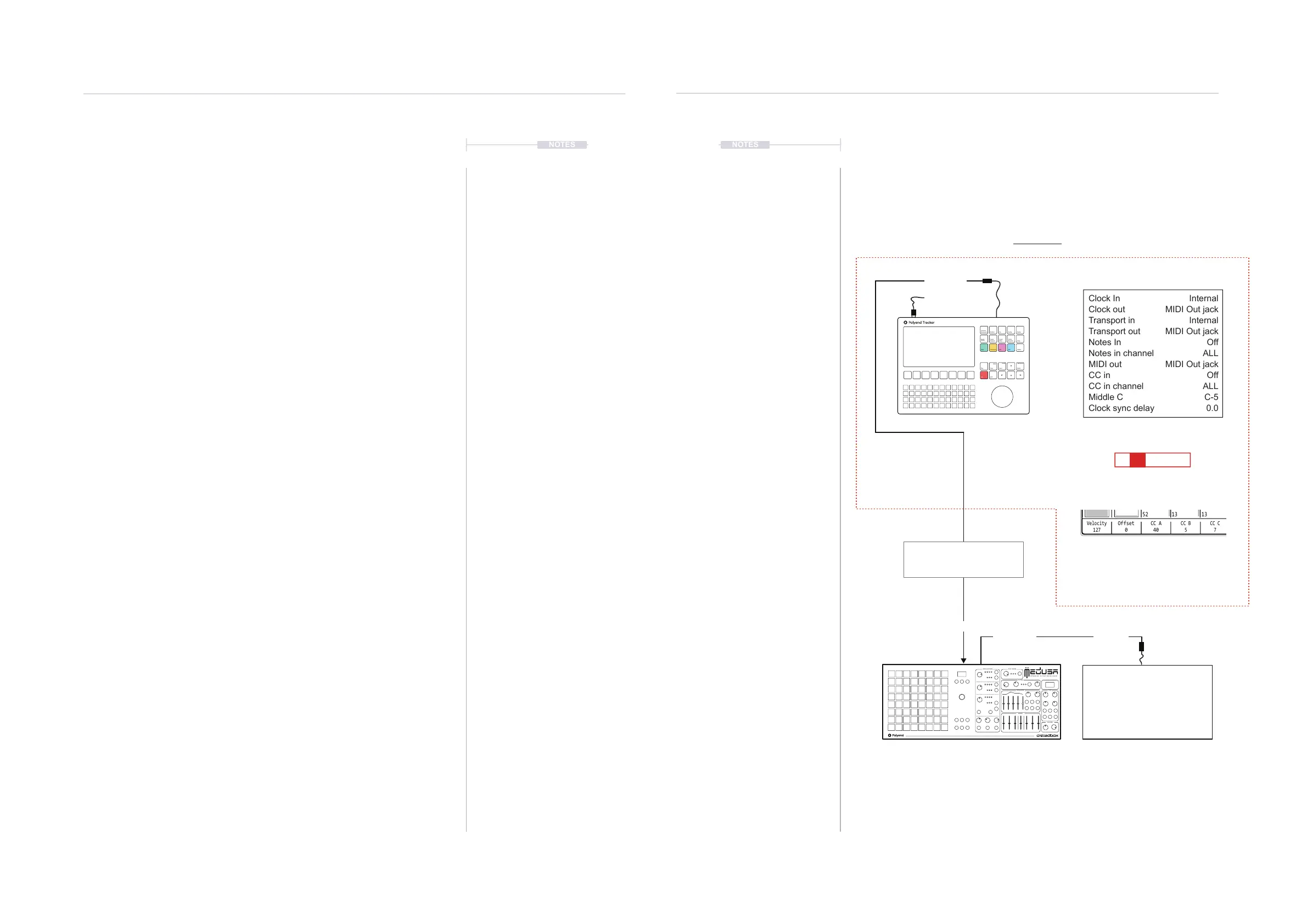
Tracker: Cong > MIDI
Tracker: Steps Set for MIDI Output
USB MIDI
Instrument; M01 = MIDI Channel 1
FX1; a 50 = MIDI CC A, Value of 50
CC A can be set in the instrument
parameter page. CC A set to 40 for
control change in this example,
transmitted with the value in the step
Clock In
Clock out
Transport in
Transport out
Notes In
Notes in channel
MIDI out
CC in
CC in channel
Middle C
Clock sync delay
Internal
MIDI Out jack
Internal
MIDI Out jack
Off
ALL
MIDI Out jack
Off
ALL
C-5
0.0
HY B R I D S Y N T H E S I Z E R
OSCILLATO RS PLAY MODE
FILTER
ENVELOPE
MIXER
VOLUME
LFO
Transport control e.g. Play, Stop
and Clock is dictated by Tracker
and its current Tempo.
Polyend Medusa will follow the lead
of Tracker as will other devices.
Devices should be congured to receive clock and transport and the MIDI Channel which Tracker
communicates, for example, Channel 1. CC 40 In Medusa represents the Filter Cutoff frequency
in this example each step in Tracker will set the lter cutoff.
A 2
nd
device as an extended part of
the MIDI Network.
Drum Machine
Example Conguration 1: Tracker as the primary lead.
MIDI IN
MIDI OUT
MIDI THRU MIDI IN
Instrument
Parameters
Sample
Loader
Note
Play
Rec
Master
Song
Pattern
Backspace
Delete
File
Sample
Editor
FX1
Insert
Home
Perform
Sample
Playback
Instrument
Copy
Paste
Shift
Config
Sample
Recorder
FX2
C5 M01 a 50 - - - -



 To Next Page