255
Polyend Tracker Manual
254
Polyend Tracker Manual
NOTESNOTES
MIDI
11
MIDI
11
While integration with Polyend Play is a build in feature for mapping Play’s
controls, other MIDI controllers can also be used in Synthesiser Mode.
Synthesizer Mode
Notes on using MIDI Synthesiser Mode:-
• The external device must be congured to match the MIDI
Synthesizer CC controls and general Tracker MIDI conguration, i.e.
Channel etc.
• Tracker’s sequencer must be stopped to use as a MIDI synthesizer.
• The Synthesizer mode page does not have to be displayed to
operate in this mode. The last selected instrument will be the one
used for the synthesizer control from an external controller.
InstrumentsCC List
Note: To use Tracker as a synthesizer, the sequence must be stopped.
Instrument Synthesizer 2. Guitar0m:00s P1.008
1. Strange Sample Number 1Tune = 5
2. GuitarFineTune = 3
4. Snare OnePanning = 10
5. Closed Hat 1Filter type = 9
6. Selection0001Cutoff = 1
7.Resonance = 11
8.Overdrive = 12
9.Bit Depth = 13
10.Reverb Send = 14
11.Delay Send = 15
12.Volume Automation Type = 20
13.Volume Attack - Shape LFO = 21
3. Transient KickVolume = 7
11.9 MIDI Synthesizer
The MIDI synthesizer mode is a feature that allows integration when
controlling Tracker from an external MIDI device and by controlling up to 8
voices across MIDI. Tracker will operate as a secondary follower to an
external controller which will be able to play and control Trackers
instruments. This also brings a tight integration between Tracker and
Polyend Play, where the MIDI CC is pre-mapped.
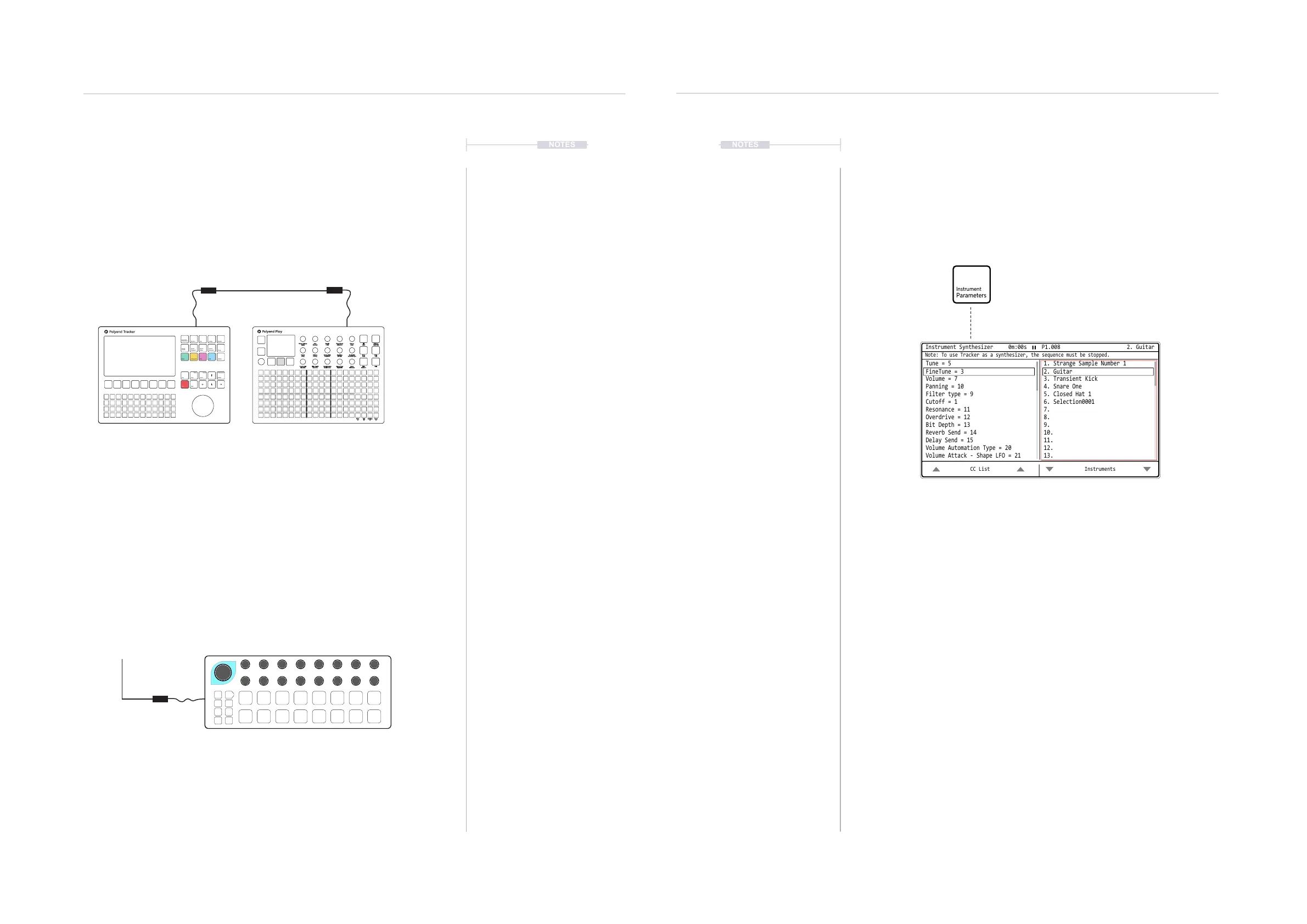
Select [Instrument Parameters] page 1/2.
Screen Button [More] then Press [Instrument Synthesizer]
The right window will allow selection of
the instrument to control. The instrument
selected will be shown in the top bar.
The left window will display, as a
reference, the Tracker parameter
MIDI CC numbers.
Other MIDI Devices can be used with Trackers
MIDI Synthesizer mode to control the instruments.
The rotary controls in play will be automatically
mapped to have full integrated over MIDI CC with
Trackers selected instruments. Play can control
Tracker with the pads.
MIDI IN
MIDI OUT
MIDI OUT
Beatstep Pro
Instrument
Parameters
Sample
Loader
Note
Play
Rec
Master
Song
Pattern
Backspace
Delete
File
Sample
Editor
FX1
Insert
Home
Perform
Sample
Playback
Instrument
Copy
Paste
Shift
Config
Sample
Recorder
FX2
Tracker:
Cong > MIDI
Play:
Menu > MIDI > CC Mapping > Jack Channel 1
Choose: Set Values for Polyend Tracker
Clock In
Clock out
Transport in
Transport out
Notes In
Notes in channel
MIDI out
CC in
CC in channel
Middle C
Clock sync delay
MIDI In jack
Off
MIDI In jack
Off
MIDI In jack
CH1
Off
MIDI In jack
CH1
C-5
0.0
Fill
Delete
Reverb Send
Delay Send
Note
Microtune
Master Volume
Limiter
Save
Reset
Overdrive
Bit Depth
Volume
Panning
Tempo
Swing
View
Master FX
Repeat Type
Repeat Grid
Filter Cutoff
Resonance
Track Length
Play Mode
Patterns
Audio/MIDI
Chance
Action
Sample
Folder
Copy
Paste
Randomize
Randomize Type
Sample Start
Sample End
ShiftMove
Micromove
Mute
16
Solo
32
Variation
48
Sample Attack
Sample Decay
Select
64



 To Next Page