105
Polyend Tracker Manual
104
Polyend Tracker Manual
NOTESNOTES
Instruments
6
Instruments
6
Access to control the general parameters is simple and quick. The process
described applies when accessing all instrument parameters and effects.
▌ ADJUSTING INSTRUMENT PARAMETERS
1. Ensure the desired instrument is selected. This will be shown top right
of the screen.
2. Press [Instrument Parameters] to select the parameters pages.
3. Pressing [Instrument Parameters] again will toggle between the general
parameter page and the automation parameters.
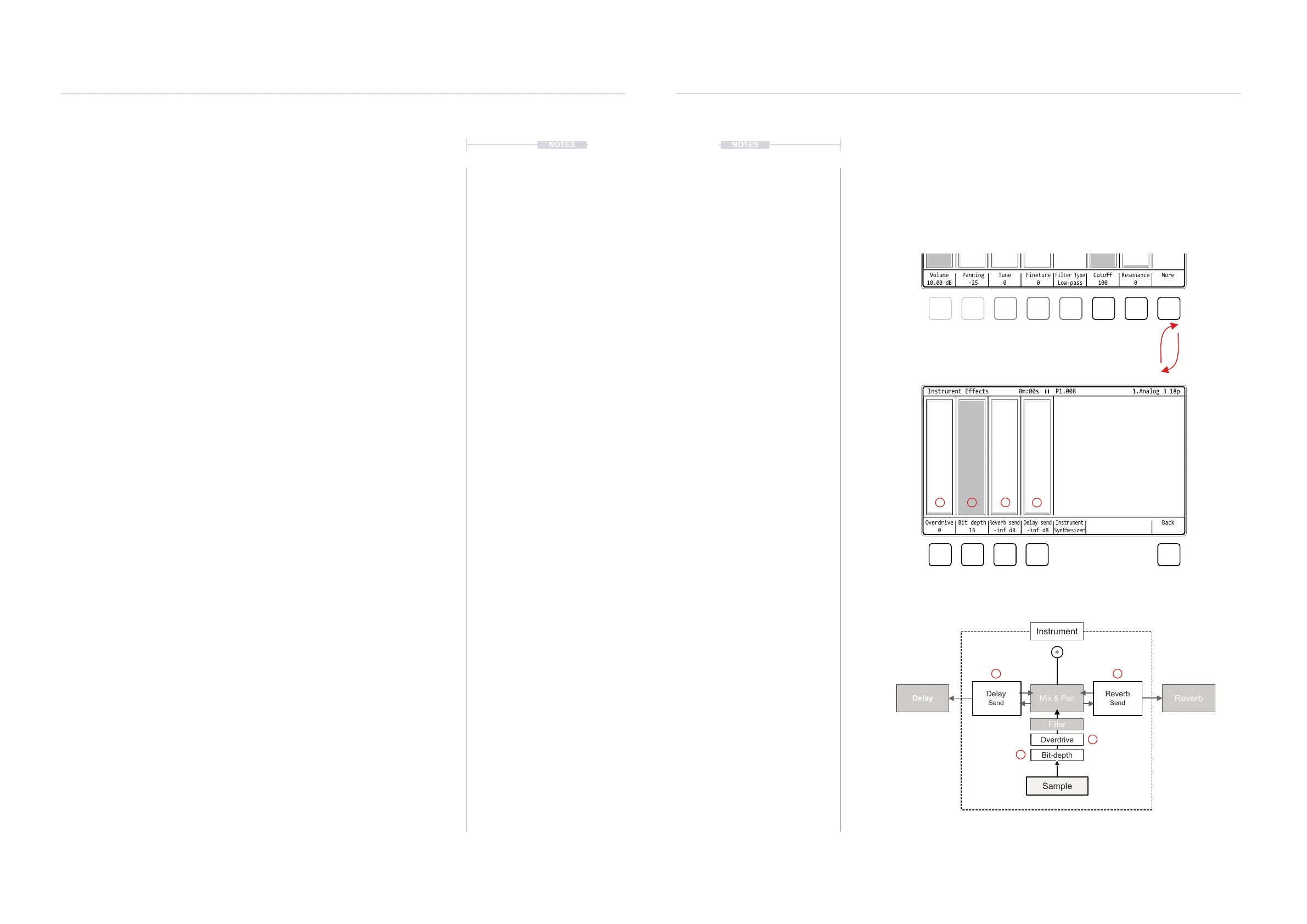
4. Within the instrument page 1/2 (displayed top left), the instrument
effects are accessible. Press [More], 8
th
Screen button to open the
effects page, and press [Back] to return to the main page.
5. Press the screen button below the desired option to select. Pressing
[Left] or [Right] will navigate the options. The selected parameter will
show a red bounding box.
6. Within a selected option, Turn (Jog) to manually adjust the parameter
value e.g. Volume.
7. Alternatively, Press [Up] or [Down] to incrementally adjust the parameter
value. Holding [Up] or [Down] will continuously adjust the value.
8. With a parameter selected, Press [Delete/Backspace] to reset it’s value
to the default setting. For example Panning will reset to 0.
9. Parameters are presented in columns. The value is shown in the
graphic of the upper main page and also the exact value is shown
below the parameter name in the screen button labels.
10. To exit the instrument parameters, select another page e.g. [Pattern].
6.4 Instrument Effect Parameters - Page 1
The general settings page 1 also gives access to a series of instrument
effect parameters. There are 2 instrument specic effects, overdrive and bit
depth and also 2 send controls which use the common delay and reverb.
Bit-depth
Overdrive
Filter
Reverb
Send
Delay
Send
Mix & Pan
Reverb
Delay
Instrument
Sample
+
Page 1 of 2: General Sample Based Parameters
Instrument Parameter Effects
Screen buttons select the parameter options or [Right] [Left] to
navigate option. Then turn (Jog) or press [Up] [Down] to adjust / select
Volume
10.00 dB
Panning
-25
Tune
0
Cutoff
100
Finetune
0
Resonance
0
Filter Type
Low-pass
More
Instrument Parameters 1/2 0m:00s P1.008
Disabled
Low-pass
High-pass
Band-pass
1.Analog 3 18p
1.Analog 3 18p
Overdrive
0
Bit depth
16
Reverb send
-inf dB
Delay send
-inf dB
Instrument
Synthesizer
Back
Instrument Effects
0m:00s P1.008
2
2
3
3
4
4
1
1



 To Next Page