177
Polyend Tracker Manual
176
Polyend Tracker Manual
NOTESNOTES
Audio
8
Audio
8
8.1 Master Pages - Audio Control
Audio is controlled in the Master pages of which 3 are available. This is
where the Tracker mixer is found to control the audio levels and also the
master effects. This section will concentrate on the audio level and routing
controls. The Master effects are covered in another section.
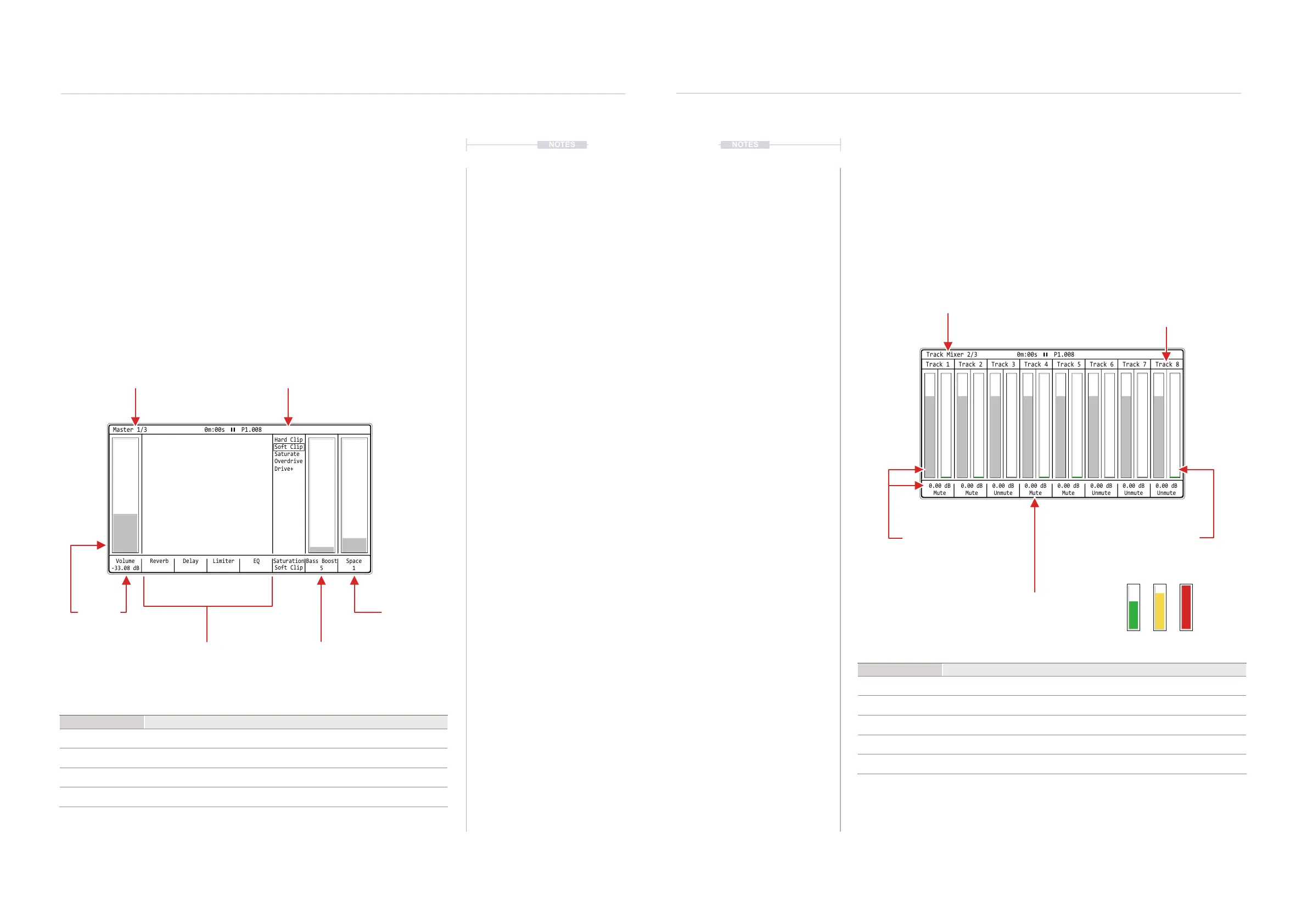
Master - Page 1
The Master mix is the rst page in the master pages and contains the main
output level as well as a series of effects and access to the master reverb
and delay effects. Rendered audio exports of the ‘master’ i.e. all tracks, uses
the volume level and functions in Master page 1.
Master Page
Page 1 of 3
Space
Adjusts the space amount
applied to the main audio
output.
Master Effects
Access to the master
delay, reverb, limiter & EQ
parameter pages.
Bass Boost
Adjusts the amount of bass
boost applied to the main
audio output.
Saturation
Distortion preset
Volume
Master output level
applied to the main
‘Out’ connection
Volume
-33.08 dB
Reverb Delay EQ Saturation
Soft Clip
Hard Clip
Soft Clip
Saturate
Overdrive
Drive+
Bass Boost
5
Limiter Space
1
Master 1/3 0m:00s P1.008
0.00 dB
Mute
0.00 dB
Mute
0.00 dB
Unmute
0.00 dB
Unmute
0.00 dB
Mute
0.00 dB
Unmute
0.00 dB
Mute
0.00 dB
Unmute
Track 2 Track 6Track 3 Track 7Track 4 Track 8Track 1 Track 5
Track Mixer 2/3 0m:00s P1.008
Track Mixer - Page 2
The Master page controls the track volume levels. Each of the 8 tracks is
displayed with the real time level bar graph and the current setting in the
bar graph and the value shown in the track label. Tracks rendered as
individual stems will use the levels set for tracks. Note that track names can
be edited in this page by pressing [Rec].
Function
Command
Adjust Track Level Hold Track Screen Button 1-8 + Turn (Jog) or Press [Up] or [Down]
Mute Track Press Track Screen Button 1-8 to toggle Mute / Unmute
Unmute Track Press Track Screen Button 1-8 to toggle Mute / Unmute
Solo Track Hold [Shift] + Press Track Screen Button 1-8 to toggle Solo on/off
Edit Track Names Press [Rec], Edit Mode. Press Track Screen Button 1-8 for track to rename.
Function
Command
Navigate Options Press [Left] or [Right]
Edit Parameter
With option selected, Turn (Jog) or Press [Up] or [Down]
Select Effect Page Press Track Screen Button 2 [Reverb], 3 [Delay], 5 [Limiter] or 6 [EQ].
Quick Level Adjust Hold [Master] + Turn (Jog)
Tracks & Track
Names
Track Mixer
Page 2 of 3
Mute State
Screen button sets mute /
unmute state. Also sets solo
/ un-soloed with shift.
Mute Button Behaviour.
In the master section mute is applied when the button is released after being pressed.This is different to muting in
the Pattern section where mutes are applied immediately that the button is pressed.
Level Adjustment
Adjustable level setting for
track. Bar graph and value
displayed. Also controllable
by MIDI CC71-CC82
Actual Level
Actual audio level for track. High
levels indicate red, medium
yellow, lower levels green.



 To Next Page