51
Polyend Tracker Manual
50
Polyend Tracker Manual
NOTESNOTES
Pattern Format
4
Pattern Format
4
4.3 Conguring a Pattern.
Pattern and step editing is performed in ‘Pattern’ Mode. The rst
requirement is to create the pattern itself where steps can later be added to
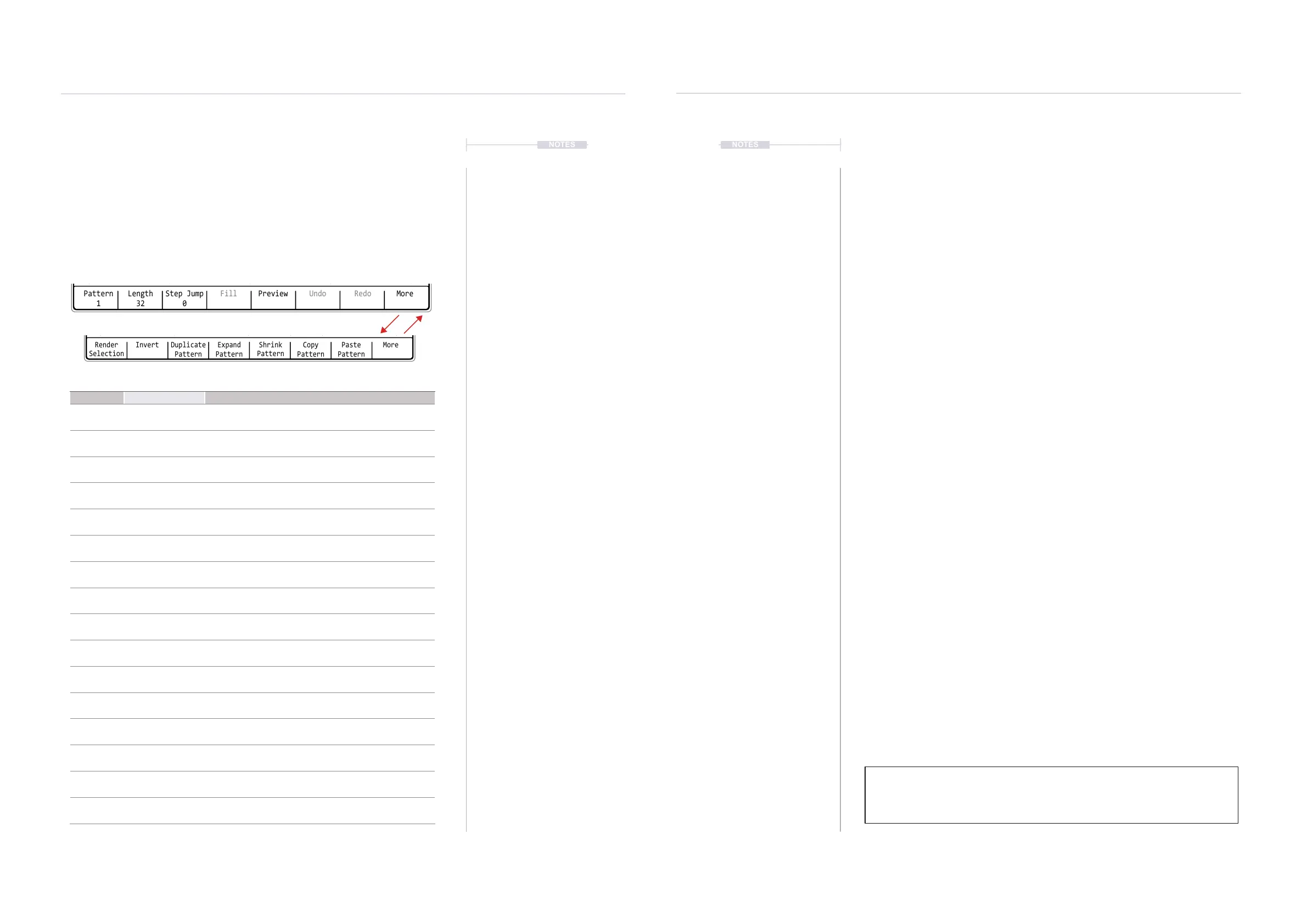
create the melody or beat. Commands for the pattern are available from the
dynamic screen buttons located at the bottom of the page. These will
change depending on the mode or selection made.
Menu Option Function Description
Pattern Pattern Selection
Selects a pattern to edit. This will select a pattern number
between 1-255 in the project.
Length Pattern Length
Adjust the number of step rows in the pattern. Default is
32 but a maximum of 128 rows are available in a pattern.
Step Jump Programming Aid
Assists in recording steps with the pads. Will
automatically jump the selection cursor in dened steps.
Fill Programming Aid
Assists in programming steps. Will automatically ll steps
based on dened selection criteria
Preview Instrument Preview
Will play the instrument for the step to allow previewing of
the sound.
Undo
Undo Last
Command
If available, will reset the previous state prior to the last
action, effectively undoing the last (up to 20) commands.
Redo
Redo Last
Command
If available, will restore the previous state after to the last
action, effectively redoing the last (up to 20) commands.
More Next Page Selects the next page of commands - see below
Render
Selection
Bounce Audio
Renders the selection to a new audio sample. Useful to
use elsewhere or to reduce track consumption.
Invert Invert Steps Inverts all steps in the selection vertically
Duplicate
Pattern
Extends Pattern
Extends the entire pattern and its associated steps,
extending the pattern to double the length.
Expand
Pattern
Extends Pattern
Extends the pattern by adding blank steps in between
existing steps, extending the pattern to double the length.
Shrink
Pattern
Contracts Pattern
Contracts the pattern length by deleting every 2nd step,
reducing the pattern to half the length.
Copy
Pattern
Copy Copies the entire pattern to the virtual clipboard.
Paste
Pattern
Paste
Pastes the copied pattern from the virtual clipboard into
the location starting at the current position.
More Prior Page Selects the previous page of commands - see above
▌ SELECTING THE PATTERN MODE PAGE
1. Press [Pattern] to select the pattern mode page.
2. The options for the pattern page will show at the bottom of the page and
are represented by the 8 screen buttons.
3. To change the options page, Press [More], 8
th
Screen button. This
toggles between the two pages of pattern options.
▌ SELECTING A PATTERN
1. Press [Pattern] to select the pattern mode page.
2. Ensure options page 1 is displayed. Press [More] to toggle between the
two pages of pattern options.
3. Hold [Pattern] - 1
st
Screen button + Turn (Jog). A pattern number
between 1-255 can be selected. Blank patterns selected have 32 steps
as default. Arrow buttons can be used instead of Jog.
4. The currently active pattern number is displayed top left in the info bar.
▌ ADJUSTING THE PATTERN LENGTH
1. Press [Pattern] to select the pattern mode page.
2. Ensure options page 1 is displayed. Press [More] to toggle between the
two pages of pattern options.
3. Hold [Length] - 2
nd
from left screen button + Turn (Jog). A pattern length
between 1-128 steps can be selected. Default is 32. The arrow buttons
can be used instead of Jog where [Left] or [Right] will set length in
predened denominations i.e. 1, 2, 4, 8, 16 etc
Tip: It is good practice to build patterns starting with a small length. For example
start with 8 or 16 steps and create the beat or melody. This can then be duplicated
/ extended along with its steps and then edited to create longer passages.
The dynamic screen buttons labelled at the bottom of the page will control options for creating patterns
Pattern
1
-- --- ---- ---- -- --- ---- ---- -- --- ---- ---- -- --- ---- ----
15 15
Length
32
Step Jump
0
Fill Preview Undo Redo More
Render
Selection
-- --- ---- ---- -- --- ---- ---- -- --- ---- ---- -- --- ---- ----
15 15
Paste
Pattern
Expand
Pattern
Copy
Pattern
Duplicate
Pattern
Invert MoreShrink
Pattern
14.



 To Next Page