263
Polyend Tracker Manual
262
Polyend Tracker Manual
Performance Mode
12
Performance Mode
12
12.3 Selecting Tracks
Effects triggered in performance mode will only affect selected tracks.
These are selected using the screen buttons and will be indicated in red.
Tracks can also be muted from within the perform page.
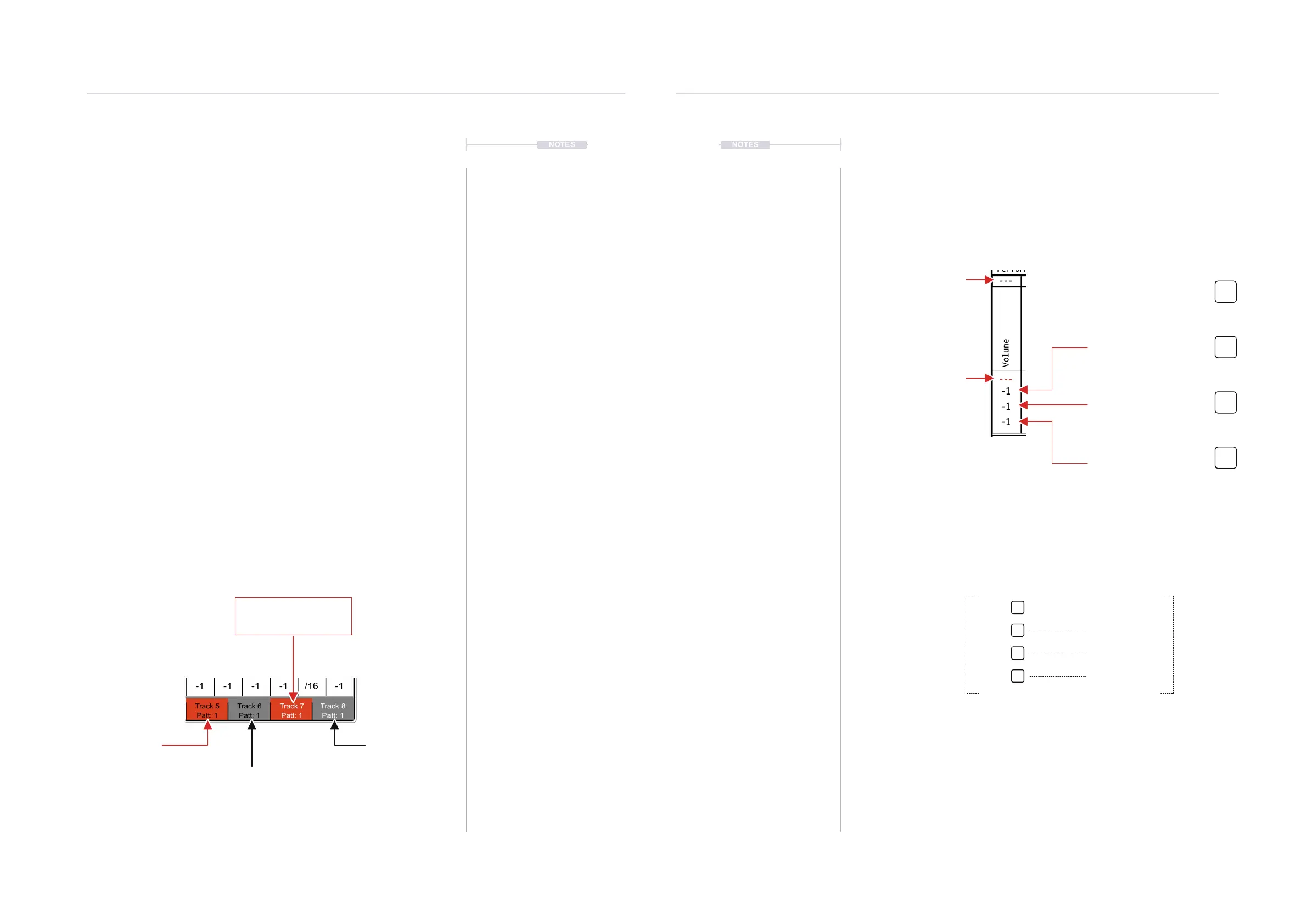
▌ SELECTING TRACKS TO APPLY PERFORMANCE EFFECTS
1. Press [Perform] to select the Performance Mode page.
2. Press [Track 1] to [Track 8], these are buttons that are represented by
the 8 screen buttons. This will toggle selection on or off.
3. A selected track will be lit red in the screen button label, which means
any performance effect triggered will apply to only the selected tracks.
Tracks showing unlit will be audible but the effect will not be applied.
▌ MUTING TRACKS IN THE PERFORM PAGE
1. Press [Perform] to select the Performance Mode page.
2. Press [Shift] + [Track 1] to [Track 8], these are buttoned represented by
the 8 screen buttons. This will toggle mute on or off.
3. A muted track will be labelled to reect the state when pressing [Shift].
In the normal display a muted track screen button text label is shown in
black, while text for an unmuted, audible track is displayed in white.
NOTESNOTES
Track 7
Red = Effect will be applied
White Text = Unmuted
Track 5
Red = Effect will be applied
Black Text = Muted
Track 8
Unlit = Effect not applied
White Text = Unmuted
Track 6
Unlit = Effect not applied
Black Text = Muted
12.4 Perform Effect Values
Each of the congured effects has four slots which hold the value for the
effect. These are triggered by the respective pad. The top row is reserved
as a default ‘off’ and the other three values are set relative to the current
effect parameter value. In addition a ‘top row’ of values are available to be
controlled by MIDI CC inputs from external gear if desired.
---
---
-1
-1
-1
Performance FX
Volume
Value 2 - Pad Row 2
Triggers the chosen effect
value for the selected tracks
---
-5
+5
-40
Value
Value is referenced as an offset applied to the current setting for the effect. The rst row,
value offset is off by default to allow a quick revert to the default state.
For example, with volume set at -10dB, the values are offset by each value, when triggered.
Current Volume = -10dB
-15dB
-5dB
-50dB
Value 1 - Pad Row 1
Sets the chosen effect to ‘off’.
MIDI CC Option
Controlled by external gear.
Triggered Effect Value. Actual Value.
Value 3 - Pad Row 3
Triggers the chosen effect
value for the selected tracks
Value 4 - Pad Row 4
Triggers the chosen effect
value for the selected tracks
Pads are used to trigger the effect value



 To Next Page