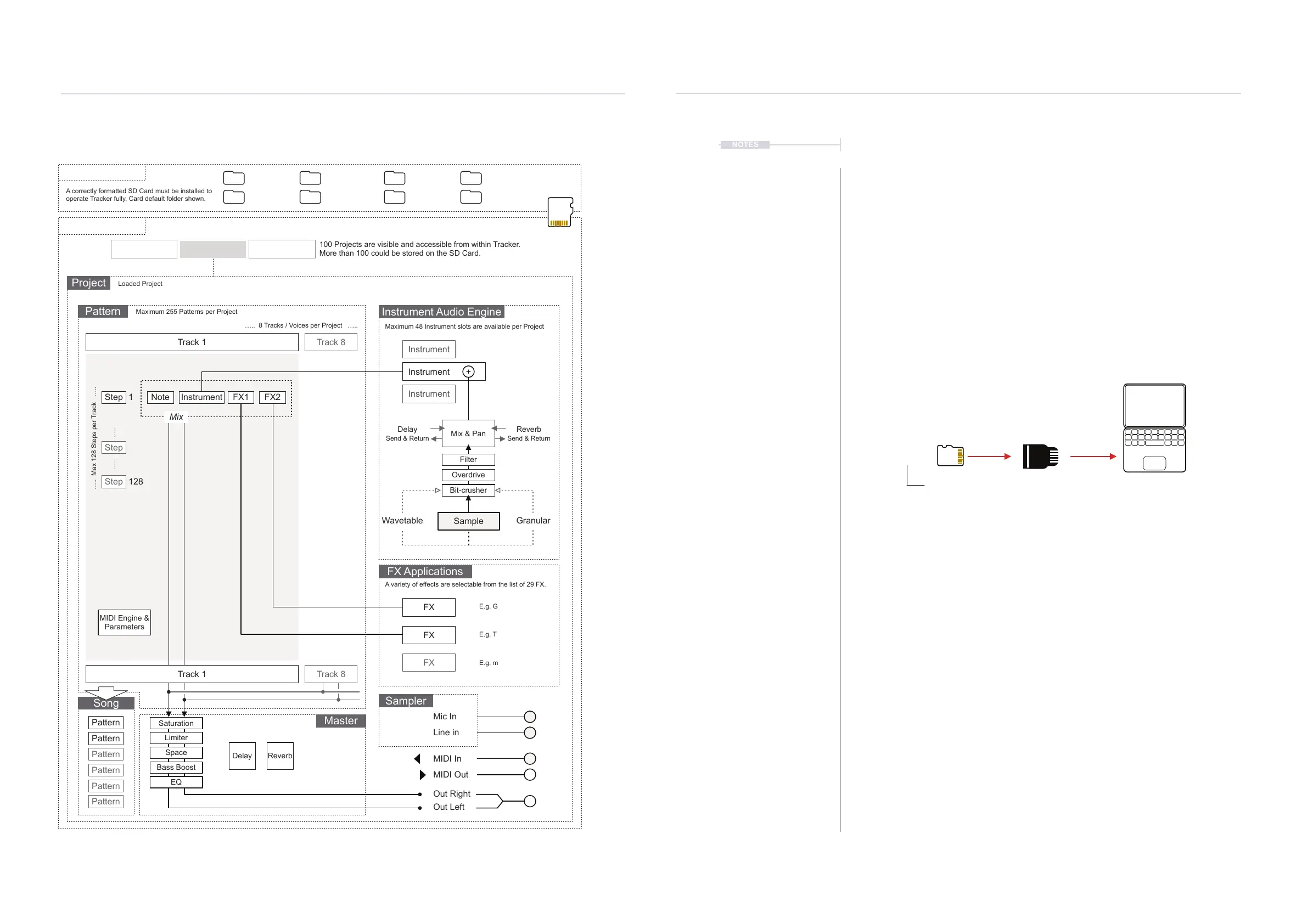
2.2 Tracker Audio Structure
Architecture
2
23
Polyend Tracker Manual
22
Polyend Tracker Manual
Architecture
2
Track 1
Bit-crusher
Overdrive
Filter
Delay Reverb
Reverb
Send & Return
Delay
Send & Return
Mix & Pan
MIDI Engine &
Parameters
Instrument
Instrument
Instrument
FX
FX
FX
Sample
+
Wavetable Granular
Out Right
MIDI Out
Line in
MIDI In
Mic In
Out Left
Step
Mix
Note Instrument FX1 FX2
Step
Step
Track 8
Track 8
1
128
Project
Firmware Instruments Mod trackerLog
Micro SD Card
Tracker
Games Manual Projects
Samples
Project
Project
Pattern
Song
Master
Instrument Audio Engine
FX Applications
Sampler
A correctly formatted SD Card must be installed to
operate Tracker fully. Card default folder shown.
Loaded Project
Maximum 255 Patterns per Project
Maximum 48 Instrument slots are available per Project
A variety of effects are selectable from the list of 29 FX.
E.g. G
E.g. T
E.g. m
….. 8 Tracks / Voices per Project …..
….. Max 128 Steps per Track …..
.…. .….
100 Projects are visible and accessible from within Tracker.
More than 100 could be stored on the SD Card.
Track 1
Pattern
Pattern
Pattern
Pattern
Pattern
Pattern
2.3 SD Card Structure.
The Micro SD Card is an integral part of Tracker and must be inserted to
operate correctly. An alert message is displayed if Tracker is powered up
without an SD Card installed. It is important that the correct format is
applied to the Micro SD Card. This should be FAT32 with Master Boot
Record (MBR) Partitioning.
The default le structure will expand as different functions are used. For
example a snapshots folder is created when capturing screen images, also
export and recording folders crated once these les are rstly generated.
Files and folders can be accessed with a PC or Mac. A USB adapter is
supplied with Tracker.
Micro SD Can be connected to a
PC / Mac with the USB adapter.
NOTES
Root
Limiter
Space
Bass Boost
EQ
Saturation



 To Next Page