229
Polyend Tracker Manual
228
Polyend Tracker Manual
NOTESNOTES
10.3 Master Delay
Delay is one of the two send effects. A send effect basically routes an
adjustable amount of audio in parallel to its main signal path and is sent to
a common audio effect. In this case delay. This delay affected audio is then
returned back to the main audio path. The effect itself is a common
function, managing several send / return signals. Any delay parameter
adjustments will therefore also affect other send signals. The ‘Send /
Return’ conguration is a common application for delay effects.
What is a delay effect?
A delay is a common production effect used to delay an incoming signal to
the output. While this is a simple principle there are many effects that use
delay as a foundation. Some examples are echo (creating dened repeats)
and chorus (short delay taps to give a thicker rather than echo style feel) as
well as delay types such as ping-pong delay spreading the delay points
across the stereo eld left to right and slap-back delay emulating old tape
delays which are used successfully to thicken vocals.
Delay is a time based effect and synchronisation (or not) with the track
tempo should also be considered depending on the output required.
▌ ACCESSING MASTER DELAY PARAMETERS
1. Press [Master] to select master section. Press again if needed, until the
‘Master’ Page 1/3 is displayed.
2. Press [Delay], 3
rd
Screen button.
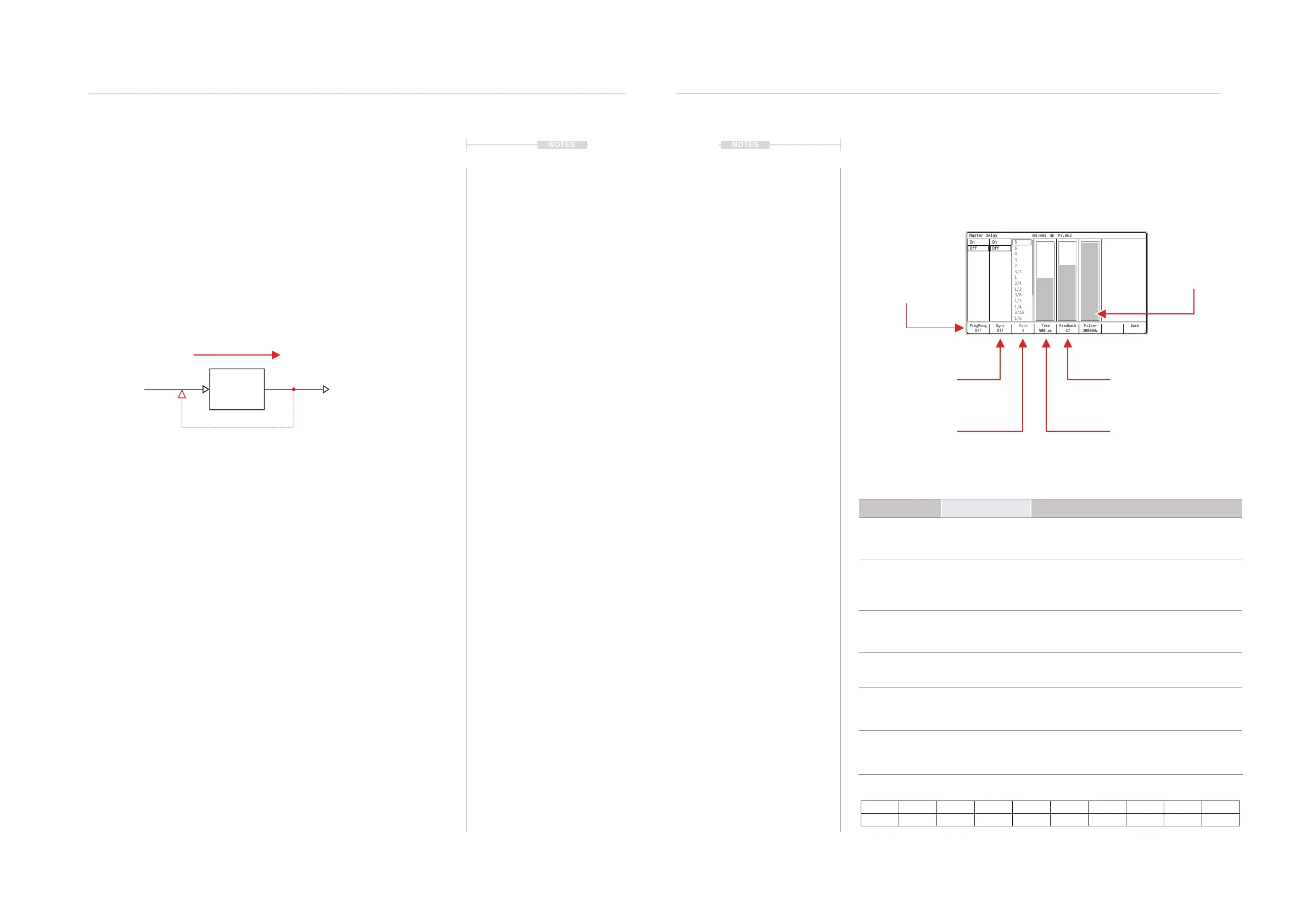
3. The six delay parameters are presented on the master delay page.
4. Press [Back], 8
th
Screen button to return to the master page.
Master Delay Page
Accessed via the Master page 1/3 and selected from the screen buttons.
Rate Options
8 6 4 3 2 3/2 1 3/4 1/2 3/8
1/3 1/4 3/16 1/6 1/8 1/12 1/16 1/24 1/32
Option Range Description
Pingpong On, Off
Toggles the pingpong mode on or off. This will
set the delays to be generated across the
stereo eld left to right
Sync On, Off
Toggles synchronisation to the project tempo
on or off. When on, the rate with respect to
tempo is used for the delay. When off, the time
parameter is used.
Rate See Rate Table
The rate divider / multiplier, synchronised to
project tempo, used for the delay time.
Available when sync is set to on.
Time 1 - 3500ms
The time used for the delay. Only available
when sync is set to off.
Feedback 0-99
Amount of delay output signal that is fed back
into the delay input. This parameter is what
increases the number of delays in the audio.
Filter 100Hz - 20000Hz
Applies a lter to the delay and helps shape
the sound more appropriately.
Master Delay Settings.
PingPong
Off
Rate
8
Time
500 ms
Feedback
47
Filter
20000Hz
Sync
Off
Back
Master Delay 0m:00s P3.002
On On 8
3
3/4
1/4
Off Off
6
2
1/2
3/16
4
1
1/3
3/2
3/8
1/6
Pingpong
Selects a pingpong (left / right
stereo effect) or standard
when off, delay.
Filter
Filter applied to the
delay effect
Sync
Synchronisation to project tempo.
If on rate is used to sync to
tempo. Specic time is used if off.
Feedback
Amount of delay output fed
back into the delay line input
Rate
Synchronisation to tempo,
used when sync is on.
Time
Stand alone delay time, used
when sync is off.
Input Output
Delay Time
Time delay between input and output.
Connecting the output to the input creates feedback
and increases the delay ‘events’.
Delay Line
Master Effects
10
Master Effects
10



 To Next Page