101
Polyend Tracker Manual
100
Polyend Tracker Manual
NOTESNOTES
Instruments
6
Instruments
6
6.1 Instrument Overview
An audio instrument is the primary sound source in Tracker and is based on
an audio sample. The instrument can be a raw sample of congured into a
more elaborate instrument such as wavetable. The Instrument parameters
will congure settings. The sound can be affected by effects and modulation
but essentially an instrument has a sample at its core and is triggered by
the step on which it is applied. MIDI Instruments are also available which
are covered in the MIDI section.
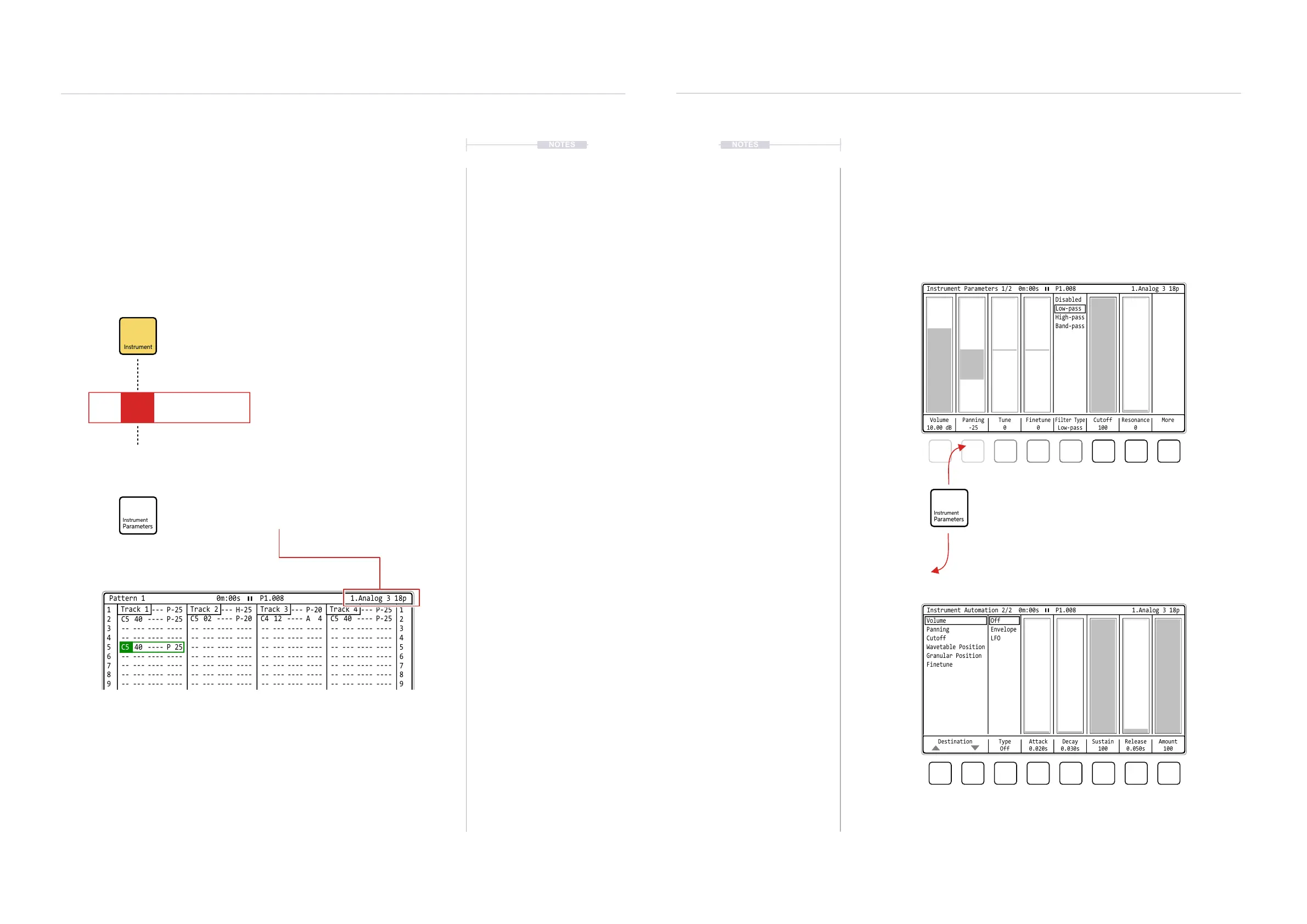
6.2 Instrument Parameter Pages
A series of instrument parameters are accessible for controlling, shaping
and modulating the sound. The two pages are accessible directly from
toggling the [Instrument Parameter] button. Page 1 is general parameters
while Page 2 focusses on parameter automation. Remember, pressing
[Delete/Backspace] on a selected parameter will reset it to it’s default state.
Page 1 of 2: General Sample Based Parameters
Page 2 of 2: Automation Parameters
Press to select and cycle the instrument parameter pages
Screen buttons select the parameter options or [Right] [Left] to
navigate option. Then turn (Jog) or press [Up] [Down] to adjust / select
Volume
10.00 dB
Panning
-25
Tune
0
Cutoff
100
Finetune
0
Resonance
0
Filter Type
Low-pass
More
Instrument Parameters 1/2 0m:00s P1.008
Disabled
Low-pass
High-pass
Band-pass
1.Analog 3 18p
Destination Type
Off
Sustain
100
Attack
0.020s
Release
0.050s
Decay
0.030s
Amount
100
Instrument Automation 2/2 0m:00s P1.008
OffVolume
EnvelopePanning
LFOCutoff
Wavetable Position
Granular Position
Finetune
1.Analog 3 18p
The instrument selection has a dedicated
button when working in the pattern.
Instruments can be created from samples, edited, sliced and saved as ‘.pti’ les
which can then be used in other projects or shared with others.
.pti
Up to 48 audio instrument slots are available in the instrument
list to populate and to choose from. Instruments or samples
can be loaded to the instrument list.
The instrument parameters (2 pages) are accessible directly
and are specic to the currently selected instrument.
Pattern
1
1 1
2
C5 40 ---- P-25
C5 40 ----
C5 40 ---- P-25
-- --- ---- ---- -- --- ---- ---- -- --- ---- ---- -- --- ---- ----
-- --- ---- ---- -- --- ---- ---- -- --- ---- ---- -- --- ---- ----
P 25
-- --- ---- ---- -- --- ---- ---- -- --- ---- ----
-- --- ---- ---- -- --- ---- ---- -- --- ---- ---- -- --- ---- ----
-- --- ---- ---- -- --- ---- ---- -- --- ---- ---- -- --- ---- ----
-- --- ---- ---- -- --- ---- ---- -- --- ---- ---- -- --- ---- ----
-- --- ---- ---- -- --- ---- ---- -- --- ---- ---- -- --- ---- ----
-- --- ---- ---- -- --- ---- ---- -- --- ---- ---- -- --- ---- ----
-- --- ---- ---- -- --- ---- ---- -- --- ---- ---- -- --- ---- ----
-- --- ---- ---- -- --- ---- ---- -- --- ---- ---- -- --- ---- ----
-- --- ---- ---- -- --- ---- ---- -- --- ---- ---- -- --- ---- ----
-- --- ---- ---- -- --- ---- ---- -- --- ---- ---- -- --- ---- ----
-- --- ---- ---- -- --- ---- ---- -- --- ---- ---- -- --- ---- ----
C5 02 ---- P-20
C5 40 ---- H-25
C4 12 ---- A 4
C5 40 ---- P-20
C5 40 ---- P-25
C5 40 ---- P-25
2
3 3
4 4
5 5
6 6
7 7
9 9
11 11
13 13
15 15
8 8
10 10
12 12
14 14
Length
32
Step Jump
0
Fill Preview Undo Redo More
Track 2 Track 3 Track 4Track 1
Pattern 1 0m:00s P1.008 1.Analog 3 18p
Note PatternFX1
Instrument
FX2
C5 01 V 10
01
P 25



 To Next Page