113
Polyend Tracker Manual
112
Polyend Tracker Manual
NOTESNOTES
Instruments
6
Instruments
6
The envelope page covers sample based parameters that affect the shape
of the instrument sound over time. The selection of each parameter may
not be linear to allow for a better resolution to choose the value in the more
relevant range areas. The amount will set how much of the envelope is
applied 0-100%.
Attack Time
Attack is the initial time period of the envelope. This
affects the transient of the sample. Shorter times for more
percussive ‘hits’ and longer for more evolving ramps.
Range 0-10 Seconds.
0-1 Sec has a better resolution of control.
Sustain Level
This is the nominal level at which the note / sound will
sustain after the initial ‘note on’ request. This will be the
level continuously played while holding a note.
Range 0-100%.
Decay Time
A decay time period which is applied after the attack
phase and applying a note. The period before settling the
sound level to a steady state.
Range 0-10 Seconds.
0-1 Sec has a better resolution of control.
Release Time
This is the nal envelope stage and is activated after the
note is released - Tracker ‘OFF’ special note command.
This is the time period where the sound dissipates from
the sustain level to silence.
Range 0-10 Seconds.
0-1 Sec has a better resolution of control.
Attack
Sustain
Decay
Release
Destination Type
Envelope
Sustain
100
Attack
1.000s
Release
1.000s
Decay
0.500s
Amount
100
Instrument Automation 2/2 0m:00s P1.008
OffVolume
EnvelopePanning
LFOCutoff
Wavetable Position
Granular Position
Finetune
1.Analog 3 18p
Destination Type
Envelope
Sustain
100
Attack
1.000s
Release
1.000s
Decay
0.500s
Amount
100
Instrument Automation 2/2 0m:00s P1.008
Off
EnvelopePanning
LFO
Wavetable Position
Granular Position
Finetune
1.Analog 3 18p
Type
Envelope
Sustain
100
Attack
1.000s
Release
1.000s
Decay
0.500s
Amount
100
Instrument Automation 2/2 0m:00s P1.008
Off
Envelope
LFO
Wavetable Position
Granular Position
1.Analog 3 18p
Envelope
Sustain
100
Attack
1.000s
Release
1.000s
Decay
0.500s
Amount
100
0m:00s P1.008
Envelope
1.Analog 3 18p
6.6 Sample Playback Overview
An instrument can be a sample, edited or raw. A raw ‘.wav’ sample can be
added to the instrument list. When a sample is edited and developed further
as an instrument it can be saved as a ‘.pti’ instrument, for example
‘drumkit1.pti’. This can be used across all projects or distributed to other
producers.
This section covers the basics of using .pti instruments, and not the end-to-
end capturing, editing and use of audio sampling which is covered
elsewhere.
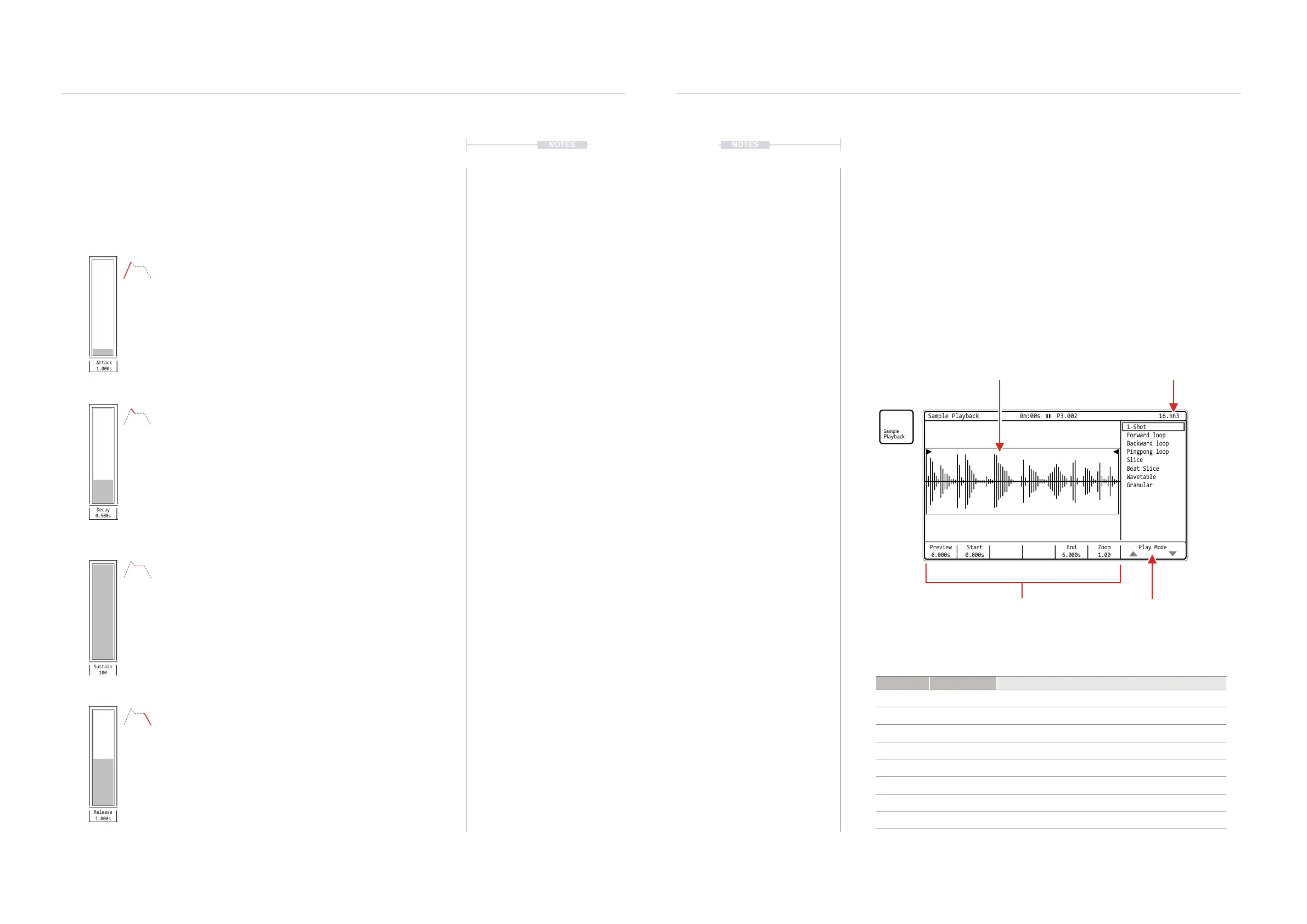
How a sample is applied as an instrument is handled in the ‘Sample
Playback’ page, accessed by the dedicated [Sample Playback] button.
Type Play Mode Description
Play 1-Shot Basic sample playback. Plays start to end once.
Loop Forward Loop Sample playback. Plays start to end and cycles on loop.
Loop Backward Loop Sample playback. Plays end to start and cycles on loop.
Loop Pingpong Loop Sample playback. Plays start to end to start on loop.
Slice Slice Sample is sliced
Slice Beat Slice Sample is sliced
Synthesizer Wavetable Sample is used as the wavetable, like a synth.
Synthesizer Granular Sample grains are used and played, like a granular synth
Preview
0.000s
Start
0.000s
Zoom
1.00
End
6.000s
Play Mode
Sample Playback 0m:00s P3.002
1-Shot
Slice
Forward loop
Beat Slice
Backward loop
Wavetable
Pingpong loop
Granular
16.hh3
Current Instrument
Selected
Sample Waveform
Display matches play mode.
Play Mode List.
How the sample will be
played in the instrument
Playback Parameters
settings, based on play
mode, for sample playback
Note: Playback is not visually animated in the waveform display when playing.



 To Next Page